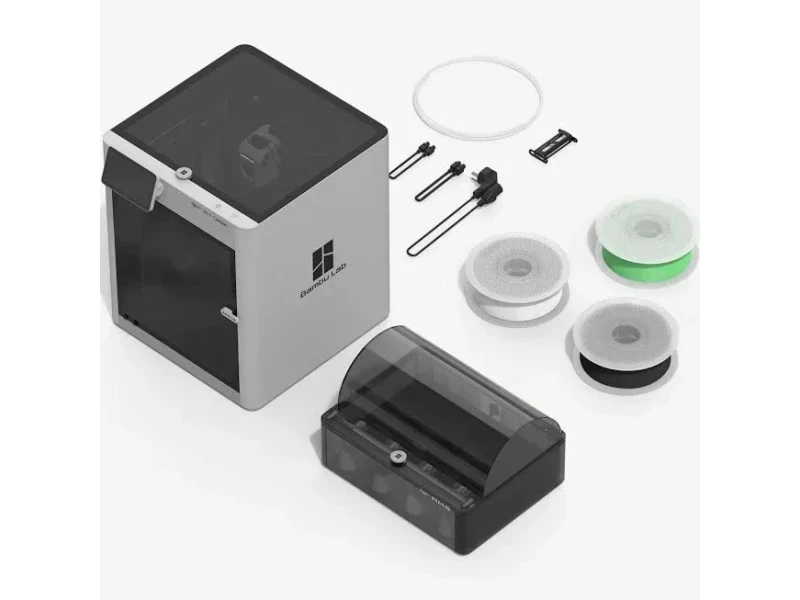
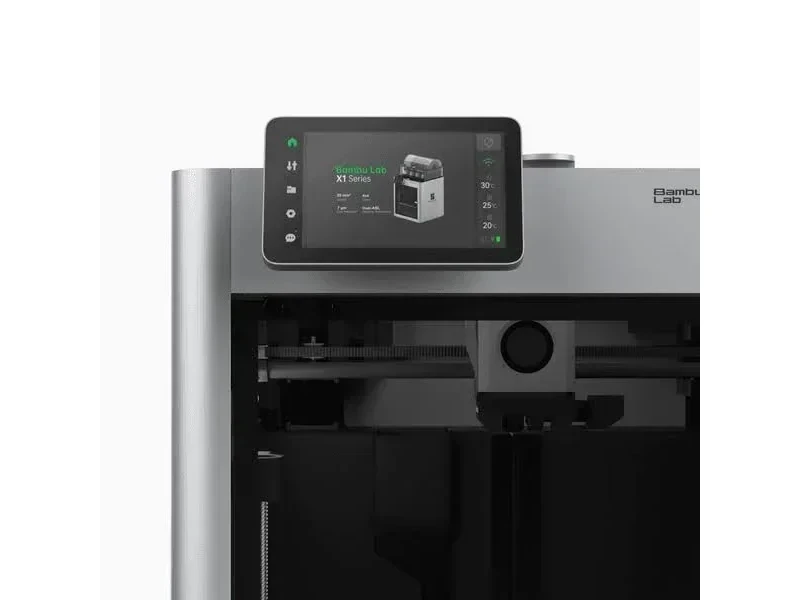
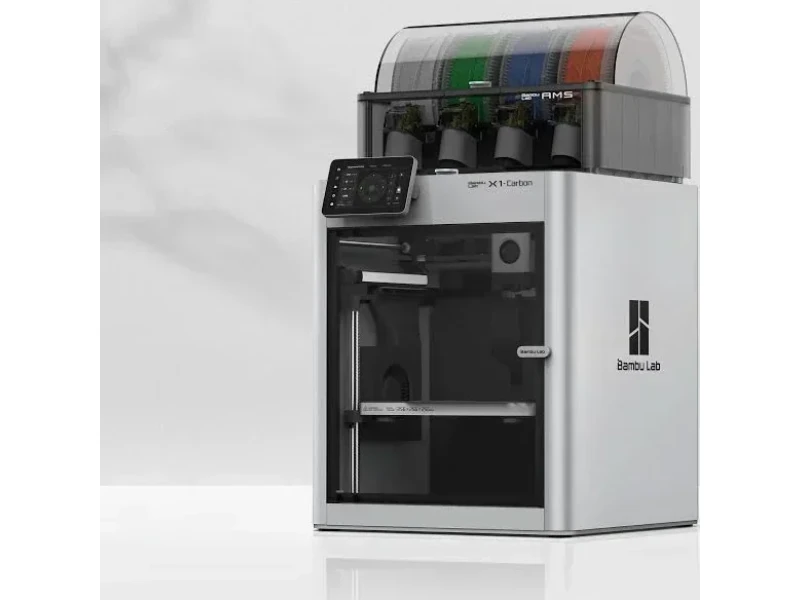
Bambu Lab X1 Carbon 3D Printer (AMS Compatible w/ X1 Carbon Combo)
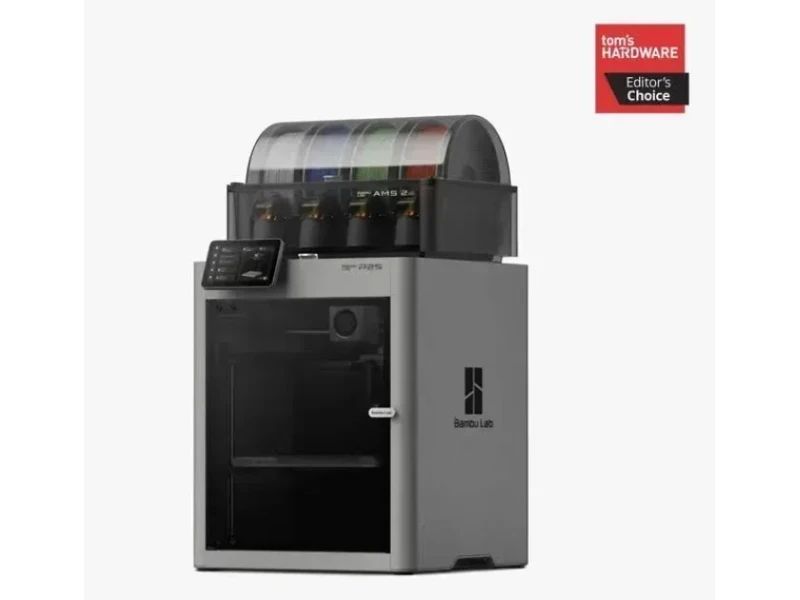
Discontinued
Extremely fast desktop FDM machine capable of carbon printing
  • Print speed up to 500 mm/s
  • Exceptional print quality
  • Optional multi-material capabilities
  • Lidar-assisted auto bed leveling
When purchasing with us you get:
  • Favorable PO Terms
  • 1 Year Warranty
  • Local U.S. Support
  • FREE training
We Accept Purchase Orders From All Educational Institutions and Eligible Business Customers
This 3D printer comes with:
  • Spool of Bambu filament
  • Build plate
  • Accessory box
  • All the necessary cables
Price $1,410.00
Lead time is 2-3 weeks.

The Bambu Lab X1-Carbon is a prosumer 3D printer combining industrial-grade performance with user-friendly features. It uses a CoreXY system for speeds up to 500mm/s, LIDAR-assisted calibration, and an enclosed frame for consistent results. Its all-in-one hotend reaches 300°C, supports multi-material printing via an AMS, and includes a webcam with AI failure detection. With a 256mm³ build volume, swappable plates, VOC filtration, and integration with Bambu Studio and Handy app, it suits both professionals and hobbyists. As part of Bambu’s X1 series, it sits between the discontinued X1 and the X1E, which adds advanced networking, a heated chamber, and higher-temp printing.


What is the print quality and performance of the Bambu Lab X1 Carbon 3D printer?

The Bambu Lab X1 Carbon delivers exceptional print quality and performance with speeds up to 500mm/s, acceleration of 20,000mm/s², precise CoreXY mechanics, and high-temperature capability up to 300°C


The Bambu Lab X1-Carbon’s enclosed chamber supports consistent printing of materials up to 300°C. Its hotend, part cooling, and auxiliary “air curtain” fans ensure effective cooling for overhangs and bridging.


Print tests show the Bambu Lab X1-Carbon handles varied materials with speed and quality. It printed a 3DBenchy in 12 minutes 38 seconds, compared to the 50–70 minutes typical for most 3D printers.


In the “OVERHANG TEST” with eSun green PLA (0.2mm layers, 220°C nozzle, 50°C bed), the X1-Carbon showed no issues with extrusion, cooling, artifacts, or defects.

Bambu Lab X1 3D printer overhang test parts shown, featuring angled degree measurements and printed structures on a green cutting mat.The 22-minute calibration cube with eSun black ABS (0.2mm layers, 270°C nozzle, 110°C print bed) produced solid results at high speed, useful for checking mechanics, belt tension, and filament flow.

3D-printed black cube displaying "X" and "Y" letters, created by Bambu Lab X1, demonstrating precise detail and smooth surface texture.

The Bambu Lab X1-Carbon maintains stable performance with intelligent calibration, detecting resonance frequencies and compensating for vibrations that could cause print artifacts.


The Z-axis uses three lead screws driven by one motor for synchronized platform movement. Along with dual auto bed leveling, this ensures consistent quality across the 256mm³ build volume.

Bambu Lab X1 3D printer with build plate showing yellow print in progress, 256x256x256 mm build volume, safety warning visible.

Multicolor printing with the X1-Carbon and AMS is shown in a Neuschwanstein Castle model, featuring blue and red roofs, white and grey walls, a green base, brown path, and dark green trees.

3D-printed model of a castle with blue roofs created by Bambu Lab X1, displayed on a wooden shelf with soft window light on a white wall.

An ABS multi-color Nike shoe print in black, white, and purple showed strong layer adhesion, clean details, and excellent overall quality.

3D-printed sneaker model on green grid by Bambu Lab X1, showcasing detailed patterns and textures.

The print generated excessive waste—0.232 kg for a 0.062 kg item — due to nozzle purges during filament changes, extending print time to over 22 hours.

Bambu Lab X1 creations: tangled filament ball, gray model tower, and a mini shoe model on a cutting mat.

Bambu Lab’s Automatic Material System includes a backup feature that switches to another spool of the same filament when one runs out.

How quickly does the AI Spaghetti Detection respond to print issues?

In this example, it took 21 seconds for AI detection to identify an issue with the print, and stop the printing process. 


Which filaments can you use with the Bambu Lab X1C FDM 3D printer?

The Bambu Lab X1 Carbon supports over eight filament types including TPU, PLA, PETG, ABS, ASA, PC, Nylon, and specialty materials like ABS-CF, with printing temperatures up to 300°C and bed temperatures up to 120°C, while accommodating both Bambu and third-party filaments and using two build surfaces optimized for different materials.

Bambu Lab X1 3D printer with transparent yellow casing, showcasing interior components. Branding visible on the side, indicating advanced design capabilities.

PLA Print Sample: The Articulated Dragon was printed in 2 hours 32 minutes using Bambu PLA at 0.25mm layers, high-speed settings (300mm/s walls, 200–300mm/s infill), and a 0.4mm hardened steel nozzle.


PLA Print Sample: A 7-hour desktop tool basket print in red PLA (0.2mm layers, 220°C nozzle, 50°C bed) was completed successfully.

Red 3D-printed crate with lattice design created by Bambu Lab X1, inside the printer.

PLA+ Print Sample: An 11-hour full-bed fruit stand print in eSun green PLA+ (0.2mm layers, 220°C nozzle, 50°C bed) was successful. PLA+ provides greater toughness and adhesion than standard PLA.

3D-printed basket with apples on a table, created by Bambu Lab X1.

ABS Print Sample: A 3-hour car cup holder trash can print in black ABS (0.2mm layers, 270°C nozzle, 100°C bed) was successfully completed.

3D-printed black cup and lid on green grid mat, crafted by Bambu Lab X1.

ABS-CF Print Sample: A 2-hour print in carbon-fiber ABS (0.2mm layers, 280°C nozzle, 100°C bed) was successfully completed.

Black 3D-printed part with angular features on a green grid mat, showcasing precision output by Bambu Lab X1.

Nylon Print Sample: 

Bambu Lab X1 3D printer showcasing a white spiral object on its print bed, highlighting precision and capabilities.

TPU Print Sample: The Airless Tennis Ball was successfully printed in TPU 98A, giving about 50% of a real tennis ball’s bounce.


The Bambu Lab X1-Carbon includes two build surfaces: the Cool Plate for PLA and the Engineering Plate for PETG, ABS, TPU, PA, and PC.

Bambu Lab X1 print bed held by hand, labeled for PETG, ABS, TPU, PA, PC materials, with branding icons and gray surface texture visible.

The Bambu Lab X1-Carbon controls conditions with a chamber exhaust fan for temperature regulation and three cooling fans — hotend, part cooling, and auxiliary—for material-specific cooling.

Bambu Lab X1 3D printer with transparent view, showcasing internal components and a sample part being printed, brand logo visible on the side.

The Bambu Lab X1-Carbon supports both Bambu and third-party filaments. With Bambu spools, RFID chips auto-detect material and color via the AMS. Third-party filaments like Prusament, JAYO, and Sunlu work well but need manual selection.

Bambu Lab X1 3D printer with a user holding a geometric patterned gray sample it created; touchscreen interface visible in the background.

The AMS has limits: soft filaments like TPU and damp PVA can clog, while abrasive types (PA+CF/PA+GF) wear parts like the cutter, often needing replacement after 1–2 rolls. Spool size is restricted to 50–68mm width, with plastic spools performing better than cardboard.

Bambu Lab X1 AMS with yellow, gray, and green filament spools, showcasing efficient multi-material 3D printing capability.

What is the build volume of the Bambu Lab X1C?

The Bambu Lab X1-Carbon has a cubic 256 × 256 × 256 mm build volume, enabling balanced printing in all directions. Its chamber sits in a rigid steel and aluminum frame, with the platform lowered by three synchronized lead screws for consistent layer alignment.

Bambu Lab X1 3D printer with open door, filament spools on top, digital display, gray object inside, placed on a tabletop.

What is the difference between the Bambu Lab X1C, Prusa Core One, Creality K1 Max and Flashforge Adventurer 5M Pro?

  • Prusa Core One vs. Bambu Lab X1C
    At $1200+, the Prusa Core matches X1C in speed but offers better thermal control (50°C chamber vs. 40°C), sturdier 10mm rods, and side-mounted spools. It also guarantees open firmware and third-party compatibility without voiding warranties, unlike Bambu’s firmware restrictions. However, Prusa’s UX is less streamlined than Bambu’s “plug-and-play” experience.
  • Creality K1 Max vs. Bambu Lab X1C
    The K1 Max is $300 cheaper and has a much larger build volume (27L vs. 16.8L). It features AI LIDAR, camera monitoring, input shaping, auto bed leveling, and up to 600mm/s speeds. Yet, it struggles with poor bed leveling, weak slicer software, hardware flaws (bowden tube compression, drag chain wear, fragile glass enclosure), and requires more tinkering to match Bambu’s reliability.
  • Flashforge Adventurer 5M Pro vs. Bambu Lab X1C
    At $400+, the 5M Pro delivers comparable speed and quality to the X1C. It has a solid steel frame, superior dual-stage filtration, and isolates electronics from chamber heat. Its downside is a proprietary hotend/extruder limited to 280°C, requiring full unit replacements instead of part swaps. Best suited for single-filament printing.
3D Printer Model Build Volume (mm) Build Volume (L) Price (USD)
Bambu Lab X1C 256 × 256 × 256 16.78 $1000+
Original Prusa Core One 250 × 210 × 220 11.55 $1,200+
Creality K1 Max 300 x 300 x 300 27.0 $700+
FlashForge Adventurer 5M Pro 220 × 220 × 220 13.07 $400+

3D printer build volume comparison chart with Bambu Lab X1C at 16.78L, showing different printer models and their volumes in liters.

What printer controls are available on the Bambu Lab X1C?

The Bambu Lab X1C features a 5-inch color touchscreen offering 27 printer controls across four sections, including precise fan and speed adjustments (with modes up to 166% speed), motion and extruder controls, filament management with RFID and auto-refill, comprehensive settings such as Micro LIDAR calibration, vibration compensation, auto bed leveling, and real-time error messaging for diagnostics.

Controls Section (7)

  • Fan Control: Adjusts part cooling, auxiliary, and chamber fans.
  • Speed Control: Four modes—Ludicrous (166%), Sport (124%), Standard (100%), Silent (50%).
  • Motion Control: Moves toolhead (X/Y in +1/+10) and raises/lowers heatbed.
  • Extruder Control: Extrudes/ejects filament in 1cm steps with sensor status.
  • Nozzle Temp: Sets nozzle temp, type, material, and diameter.
  • Chamber Temp: Displays chamber temp (X1E can set it).
  • LED Light: On/off lighting control.

Bambu Lab X1 3D printer interface displays fan status, speed, XYZ motion, and temperatures for nozzle, chamber, and heatbed with branded panel.

Filament Section (4)

  • Spool Management: Edit, load/unload, and re-read RFID for each AMS slot.
  • Humidity Monitoring: Shows AMS humidity; AMS 2 Pro adds drying page.
  • External Spool: Set filament color and type for holder use.
  • Auto Refill: Switches automatically between spools of the same filament.

Diagram of Bambu Lab X1 filament spools: four PLA, one PETG. A1 to A4 labels, 28% humidity indicator, plus unidentified spool, guide tool highlighted.

Settings Section (15)

Bambu Lab X1 interface showing account login, Wi-Fi, SD card storage, firmware, print calibration, toolbox, and settings options.

Includes account management, Wi-Fi, SD card formatting, firmware updates, and calibrations:

  • Micro LIDAR: Adjusts laser/camera position
  • Motor Noise Cancellation: Lowers noise, improves surface quality
  • Vibration Compensation: Corrects toolhead movement during vibrations
  • Auto Bed Leveling: Optimizes nozzle-to-plate distance

Other options: device self-test, filament drying, carbon rod monitoring, lead screw lubrication alerts, print monitoring (AI detection, plate/first-layer checks), AMS setup, video resolution, auto-sleep, language, and factory reset.

HMS Section (1)

  • Error Message Display: Provides problem alerts and diagnostic details.

Bambu Lab X1 3D printer showing its build chamber with parts inside, illuminated interior, sleek design, visible branding on the front panel.

The touchscreen connects via FPC and requires pressing “Home” to zero all axes before manual movement, ensuring safe maintenance operation.

Bambu Lab X1 3D Printer touchscreen displaying a print progress interface with a 3D model preview, status updates, and settings.Bambu Lab X1 3D printer display showing digital models of parts like a dinosaur puzzle and vase, ready for printing.

What connectivity options are available on the Bambu Lab X1?

The Bambu Lab X1-Carbon offers Wi-Fi and microSD connectivity, integrating with Bambu Studio slicer and the Bambu Handy iOS app. Initial setup requires account binding by scanning a QR code on the printer, linking it to Bambu Lab’s cloud services.

Bambu Lab X1 login screen with QR code and instructions displayed, "Scan QR to log into printer" shown, printer named X1C, interface elements visible.

The Bambu Lab X1-Carbon has a built-in 1080p webcam for real-time monitoring, timelapse recording, and AI spaghetti detection that pauses failed prints. Through Wi-Fi, users can send jobs, adjust settings, track progress, and get completion alerts via Bambu Studio or the Handy app.

Bambu Lab X1 3D printer interface showing active printing progress of a model. The screen displays status, temperature, and material settings.

What 3D printing software is offered with the Bambu Lab X1C?

The Bambu Lab X1-Carbon desktop 3D printer runs on Bambu Studio, a PrusaSlicer-based app combining slicing, printer control, and monitoring. Supports STL, 3MF. It offers material profiles, quality/strength presets, multicolor painting tools for AMS, and live webcam feed. The Bambu Handy iOS app adds remote monitoring, settings control, and print notifications.

Bambu Studio adds reliability with auto build-plate detection, AI spaghetti detection, and timelapse recording to microSD. Firmware updates expand features—e.g., AMS retries, third-party filament saving, and better first-layer scanning. The ecosystem tightly controls hardware for optimized performance but blocks third-party apps like Octoprint or Mainsail.


What is the design and build quality of the Bambu Lab X1 Carbon Combo 3D Printer?

The Bambu Lab X1-Carbon has a steel frame, aluminum shell, and glass panels. It measures 389 × 389 × 457 mm and weighs 14.13 kg.

What is the motion system of the Bambu Lab X1 Carbon?

The X1C uses a CoreXY system with dual stepper motors for XY motion, while the heated bed moves only on the Z-axis, reducing moving mass.

Bambu Lab X1 internal parts labeled: A and B motors, waste chute. Plastic pieces and wiring visible inside 3D printer housing.

The X-axis uses carbon fiber rods for strength and low weight, supported by self-lubricating bushings requiring no maintenance. A CoreXY GT2 belt system links the stepper motors to the print head for precise high-speed control.

Bambu Lab X1 3D printer detail view showing belt mechanism and components, highlighting precision engineering and advanced design elements.

The Z-axis uses three 8mm lead screws driven by a single stepper motor through a 6mm timing belt loop, keeping all screws synchronized for stable platform movement.

The heated bed rides on three steel guide rods with synchronized lead screws, ensuring precise 256mm Z-axis movement. This design prevents tilting and removes the need for manual bed tramming.

Bambu Lab X1 3D printer interior showing printing bed with two black sample parts, enclosed in a sleek metallic case, highlighting precision engineering.

The Z-axis maintains consistent leveling with dual auto bed leveling and a 7μm Micro LiDAR sensor for precise first-layer calibration.

Bambu Lab X1 printing yellow 3D part, close-up of extruder head with branding visible, focused on precision and technology.

Lidar Calibration Board:Bambu Lab X1 calibration board with pattern and markings inside printer, essential for precision in 3D printing.

What are the build platform specifications of the Bambu Lab X1 Carbon?

The X1C’s magnetic heated bed reaches 110°C (220V) or 120°C (110V) and supports interchangeable build plates:

  • Bambu Cool Plate – dual-sided, PLA side and heated-material side
  • Bambu Textured PEI Plate – gold-colored, included standard
  • Bambu Smooth PEI Plate
  • Bambu High Temperature Plate
  • Bambu Dual-Texture PEI Plate

The build volume measures 256 × 256 × 256 mm.

Hands holding a 3D-printed yellow boat model on a build plate from the Bambu Lab X1, with the printer and display visible in the background.

What is the hotend and extruder system of the Bamby Lab X1-Carbon?

The X1C’s all-metal hotend reaches 300°C and includes:

  • Carburized drive gears for stronger, wear-resistant extrusion
  • Hardened steel nozzles: 0.4mm standard, with 0.2mm, 0.6mm, and 0.8mm options
  • Max flow rate: 32 mm³/s
  • Integrated filament cutter for clean swaps
  • Filament break sensor to prevent failures

Bambu Lab X1 3D printer with a hand interacting with its internal components, showing intricate mechanical details and branding.

How does the Bambu Lab X1C handle filament storage and feeding?

The X1C has a built-in rear filament compartment for a single 1kg spool.


The optional AMS holds up to 4 materials, and up to 4 AMS units can be linked for a total of 16 materials.

Bambu Lab X1 3D printer AMS unit with black, green, purple, and white filament spools, top view, inside branded enclosure, four extruders visible.

    What is the mainboard of the Bambu Lab X1C?

    The X1C uses a dual-processor system:

    • Motion Controller: Dual-Core Cortex M4 for real-time movement
    • Application Processor: Quad ARM A7 at 1.2 GHz for high-level functions
    • Neural Processing Unit: 2 TOPS for AI tasks

    This processing power supports AI features like print failure detection, spaghetti detection, and first-layer analysis using the 1920 × 1080 camera.

    The system has 4GB eMMC storage with microSD expansion.

    3D printer electronics layout for Bambu Lab X1 with numbered wiring connections, circuit board, and components, showcasing internal structure and setup.

    NO.  Connect object  NO.  Connect object  NO.  Connect object 
    1  Motor Z  5 Auxiliary part cooling fan  9 AP main board (Power cable) 
    2  Motor B 6 MC board fan  10  AP main board (Communication cable)
    3  Motor A 7  MC board to AC board connecting cable  11  Heat bed (Communication cable)
    4 The chamber temperature regulator fan  8 AMS interface board   

    What are the power supply specifications of the Bambu Lab X1C?

    The X1C uses an internal switching power supply with universal input:

    • Input: 100–240 VAC, 50/60 Hz
    • Output: 24V DC (all components except heated bed)
    • Max Power: 1000W at 220V, 350W at 110V

    The power supply has Power Factor Correction to reduce interference and supports power loss recovery, resuming prints after interruptions.

    The modular design separates heated bed power from the 24V rail, improving thermal efficiency and reducing PSU load.

    The system uses closed-loop control for all cooling: part cooling, hotend, control board, chamber regulation, and auxiliary fans.

    Bambu Lab X1 Carbon power switch and certification labels, hand toggling the switch, emphasizing the 3D printer's technical details and branding.

    What comes included in the box with Bambu Lab X1C and Bambu Lab X1-Carbon Combo 3D printer?

    The Bambu Lab X1-Carbon includes:

    • Bambu Lab X1-Carbon 3D printer (fully assembled)
    • Cool Plate build surface
    • Spool holder
    • Glue stick
    • Motion system lubricant
    • 250g filament spool
    • H2 Allen key
    • Assembly tools & accessories
    • Documentation & quick start guide

    The Bambu Lab X1-Carbon Combo also includes:

    • Bambu Lab AMS
    • 2 Spare filament cutters
    • Bambu Bus Cable-6Pin (510mm)
    • Bambu Bus Cable-4Pin (260mm)
    • 2 Bambu 250g filament samples (random color/type)

    Note: Package contents may change without notice. Confirm current items with a Top3DShop sales representative before ordering.


    What upgrades and accessories are available for the Bambu Lab X1C?

    The Bambu Lab X1C supports upgrades and accessories such as textured PEI plates, replacement hotends or full assemblies, an AMS Hub for up to 16 spools, hardened steel extruders for fiber-filled filaments, nozzles from 0.2–0.8 mm, PTFE tubes and filament cutters, activated carbon filters, and the high-flow E3D ObXidian hotend, which boosts extrusion speed by 60%.

    Accessory Description Functionality Target User Price Compatibility
    Bambu Textured PEI Plate Textured build plate Easy removal, textured bottom All users $40+ Bambu Lab X1-Carbon
    Replacement Hotend Hardened nozzle unit Replaces worn hotend Maintenance  $15+ Bambu Lab X1-Carbon
    Complete Hotend Assembly Hotend + fan + sensor Full replacement Maintenance  $35+ Bambu Lab X1-Carbon
    AMS Hub AMS connection hub Link up to 4 AMS (16 spools) Advanced  users $50+ Bambu Lab X1-Carbon with multiple AMS
    Activated Carbon Air Filter VOC filter Reduce ABS/ASA fumes Maintenance  $5+ Bambu Lab X1-Carbon

    Learn more about add-ons for the Bambu Lab X1C below.

    Build Surfaces

    Bambu Lab offers extra build surfaces and nozzle options for the X1-Carbon. The Textured PEI Plate ($37.99) improves adhesion, release, and adds a textured finish. Nozzle alternatives include 0.2mm, 0.6mm, and 0.8mm sizes for finer detail or faster printing, in place of the standard 0.4mm.

    Bambu Lab X1 Carbon 3D printer with touchscreen, multi-color filament spools on top, and Bambu Lab branding on sleek, white machine.

    Bambu Lab AMS (Automatic Material System)

    Bambu Lab AMS with four filament spools in gray, green, blue, and red, set inside a sleek, transparent casing, branded with Bambu Lab X1.

    The Bambu Lab AMS is an airtight 4-slot filament box with humidity sensors to keep filaments dry. It supports multi-material printing but is not recommended for flexibles or fiber composites, except Bambu PA-CF and PAHT-CF. Each AMS includes four reusable spools.

    Hardened steel extruder unit — X1 series

    Bambu Lab X1 extruder component with black casing, visible yellow gear, and circuitry detailing.

    The hardened steel extruder uses double gears for stronger extrusion, less slippage, and better wear resistance. It supports fiber-reinforced materials and includes a filament break sensor to prevent failures.

    Hotend with nozzle

    Bambu Lab X1 extruder and thermal grease pack, showcasing 3D printer components.

    The Bambu Lab hotend uses an all-in-one design combining heatsink, throat, heater block, and nozzle. A nozzle guide helps match nozzle size to printing tasks and materials.

    Nozzle diameter Incompatible filaments Applicable printing requirements
    0.2 mm Not allowed:
    TPU
    PLA Sparkle
    PLA Marble
    PLA-CF/GF
    PA-CF/GF
    PET-CF/GF
    Ultra-fine detail but long print time
    0.4 mm Not recommended:
    filaments containing carbon fiber or glass fiber
    Fine detail with reasonable print time
    0.6 / 0.8 mm None Less detail for shorter print time


    Nozzle material Hardness Incompatible filaments
    Hardened steel 55 – 60 HRC None
    Stainless steel 25 – 30 HRC Filaments containing fiber, particles, metal powder

    Thermistor — X1 series (3 pcs)

    Bambu Lab X1 thermal grease packs with three heatpipes and fittings for efficient 3D printing. Branding visible, arranged on a white background.

    The thermistor in the Bambu Lab complete hotend assembly measures temperatures accurately from –10 to 300 °C.

    Ceramic heater — X1 series (3 pcs)

    Bambu Lab X1 components: 3 heat sensors, 3 thermal pads, and 3 packs of branded thermal grease displayed on a white background.

    The ceramic heater in Bambu Lab’s hotend assembly heats the nozzle up to 300 °C.

    PTFE tube (3 pcs)

    Three white curved tubes created by Bambu Lab X1 3D printer on a plain background.

    The pack includes three PTFE tubes (2.5 mm ID, 4 mm OD): one 370 mm and two 550 mm.

    PTFE tube (8 pcs) — for AMS inside

    Curved white filament guide tubes for the Bambu Lab X1 3D Printer arranged in parallel, showcasing flexibility and design.

    The pack includes eight PTFE tubes (2.5 mm ID, 4 mm OD) for AMS: four 195 mm and four 230 mm.

    Replacement filament cutter (3 pcs)

    Three gray 3D-printed parts with holes and protruding tabs, created by Bambu Lab X1, displayed against a plain white background.

    Filament cutters prevent clogging and aid material switching in AMS.

    Nozzle wiper (3 pcs)

    Three black plastic hook-shaped parts with blue rollers printed by Bambu Lab X1, displayed in a row on a white background.

    Nozzle wipers clean excess material from the nozzle and must be replaced when worn out.

    Silicone sock for hotend (3 pcs)

    Three black 3D-printed rectangular parts in a row, created by Bambu Lab X1, on a white background.

    The silicone hotend sock provides thermal insulation, tear resistance, and protects the nozzle from cooling air and plastic buildup.

    Activated carbon air filter

    Black 3D printed vented box, likely an accessory or part created by the Bambu Lab X1 printer, featuring hexagonal holes and a white pull tab.

    The replaceable carbon air filter absorbs VOCs during printing and lasts 1440 hours (60 days) of use.

    High Flow ObXidian™ HotEnd for Bambu Lab X1/P1 Series 

    The E3D & Bambu Lab ObXidian High Flow HotEnds are a compact, lightweight, high-performance collaboration design.

    The E3D High Flow HotEnd boosts Bambu X1 and P1 series printers by increasing volumetric flow rate 60% through internal nozzle modifications, enabling more reliable extrusion or higher flow limits. Its E3DLCâ„¢ coating adds abrasion resistance and prevents plastic buildup. The HotEnd matches the stock form factor, reuses existing sensors and heaters, and requires no mounting or cooling changes. Compatible with X1, X1 Carbon, P1S, and P1P.

    Hotend comes separately from the 3D printer, but . To install, the heater just needs to be rotated 90 degrees to accommodate the new thermistor placement.

    Bambu Lab X1 nozzle, thermal grease, and component displayed with branding, showcasing parts created by the Bambu Lab X1 3D printer.

    How reliable is the Bambu Lab X1C?

    Bambu Lab’s motion system has proven reliable with over 100,000 print hours, maintaining consistent quality even after 4,000 hours. The carbon rod system shows zero failures, easing durability concerns.

    Main issues:

    • Bed adhesion problems, usually user error.
    • Collision detection failures where the printer doesn’t stop on crashes.
    • Startup Z-offset errors from filament residue.

    Hardware failures are rare, with only two extruder issues reported, both fixable for $35.

    Software issues are more common: mid-print freezes, connectivity failures, and microSD card corruption (about 12 cases), likely from frequent data writes during continuous use.

      What maintenance is required for the Bambu Lab X1C?

      Monthly: Clean X-axis carbon rods with isopropyl alcohol; check Y/Z rods for debris. For ABS/ASA, clean rods every 5 rolls.

      Quarterly: Grease Z-axis lead screws with approved grease and apply anti-rust treatment to rods.

      Usage-based:

      • Inspect filament cutter: every 3–5 rolls (PLA/PETG/ABS/PC) or 1–2 rolls (abrasive materials).
      • Clean extruder gear with compressed air when dusty.
      • Replace PTFE tube after ~10 rolls (standard) or 5 rolls (abrasives).

      Operational:

      • Weekly: clean 3 cooling fans with compressed air.
      • Before each print: check nozzle wiper alignment and cleanliness.
      • For ABS: clean chamber camera lens weekly with alcohol.

      As needed:

      • Oil idler pulleys with Super Lube 52004 if squeaking.
      • Clean nozzle at 200°C for buildup or under-extrusion.
      • Replace hotend silicone sock if worn or loose.


      What support and warranty come with the Bambu Lab X1C?

      The Bambu Lab X1C comes with a 2-year warranty for private customers in the EU (1 year elsewhere), support including ticket systems with 24-hour response times, and optional services such as Top3DShop’s 1-year extension and Bambu Lab’s Advanced Replacement program with paused warranty during repairs.

      The warranty covers non-customer damages and failures from manufacturing defects. Some parts have a 3-month warranty: Extruder Unit (excluding gear assembly and sensor), Air Assist Tube Coupler, AMS/AMS lite Feeder Unit, AMS lite Rotary Spool Holder, and the 32GB MicroSD card. Consumables like hotends, build plates, and PTFE tubes are excluded.

      Bambu Lab provides support via three channels:

      • Technical tickets: 24-hour response for printer issues.
      • General tickets: 24-hour response for accessories, shipping, or accounts.
      • Live chat: 24/7 for specs, policies, and general questions; human agents available weekdays 9:00–21:00 UTC+8, weekends 9:00–18:00 UTC+8.

      The Bambu Lab Wiki offers detailed guides and tutorials, while Top3DShop specialists add personalized support.

      Extended protection for the Bambu Lab X1-Carbon includes:

      • Top3DShop extended warranty: adds 1 year with the same coverage as the standard warranty.
      • Bambu Lab Advanced Replacement: ships a replacement before the original is returned, with a refundable deposit equal to the printer’s price if returned within 30 days.
      • Warranty pause: coverage is extended by the time the printer spends in repair or replacement.

      Full up-to-date warranty terms are available on the manufacturer's website: https://bambulab.com/en/policies/warranty

      Bambu Lab X1 3D printer on a workshop bench with colorful filament spools and intricate 3D-printed models in various designs.

      How much does the Bambu Lab X1 Carbon 3D printer cost?

      The Bambu Lab X1-Carbon is available at $1,410.00, delivering a high-performance desktop 3D printing experience. The base model includes LIDAR-assisted calibration, an enclosed chamber with carbon filter, and a 1080p AI webcam. The X1-Carbon Combo, priced about 20% higher, adds the AMS for multi-material printing with up to four filaments. Accessories such as the textured PEI plate are sold separately. With automatic bed leveling, resonance compensation, and spaghetti detection, the X1-Carbon combines industrial-grade features with user-friendly operation. Top3DShop offers custom configurations, extended warranty, and personalized recommendations.

      Bambu Lab X1 Carbon 3D printer with touchscreen, sleek white design, and branding; capable of creating precise printed parts enclosed within.

      Our mission
      Founded in 2013, we have integrated digital manufacturing in over 10,000 businesses. Today we are a team of 80+ 3D printing enthusiasts, geeks and entrepreneurs on a mission to make these technologies accessible to all.
      Trusted integrator
      In 2018, 3D Print Awards named us the best digital manufacturing integrator. We offer technology and operational consulting to capture growth and achieve excellence in strategy, manufacturing and distribution.
      Expert customer service
      Deep expertise in 3D printing, 3D scanning, 3D modelling, plastic casting, laser cutting and CNC milling. It comes from delivering 5,000+ projects at our digital manufacturing bureau. We know what we talk about.
      Fast response time
      93% of surveyed customers are satisfied with our customer service. Have a question, concern or feedback for us? Our support team is a quick chat or email away — 5 days a week, Monday to Friday from 8 am to 4 pm PST.
      Your browser is out-of-date!

      Update your browser to view this website correctly. Update my browser now

      ×

      Please, wait ...