Flashforge AD5X: Multi-Color FDM 3D Printer with High-Speed Printing and Auto Leveling
In Stock
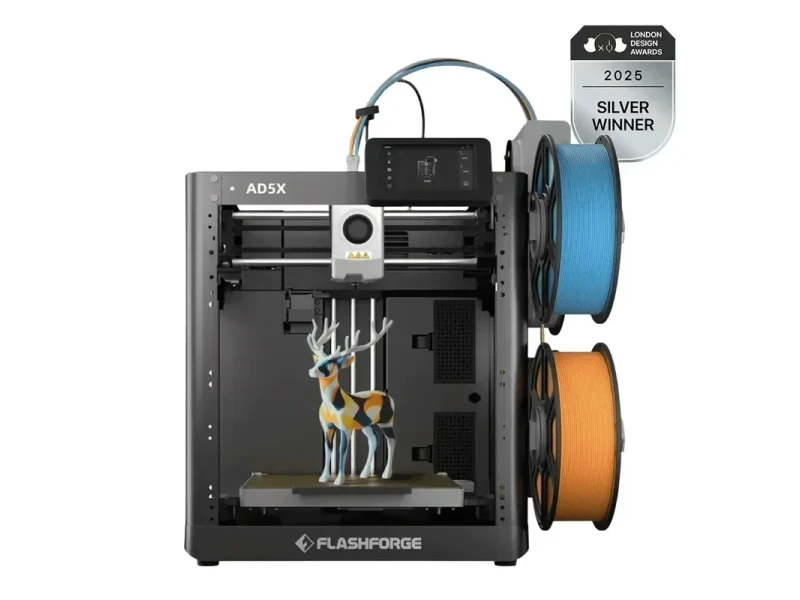
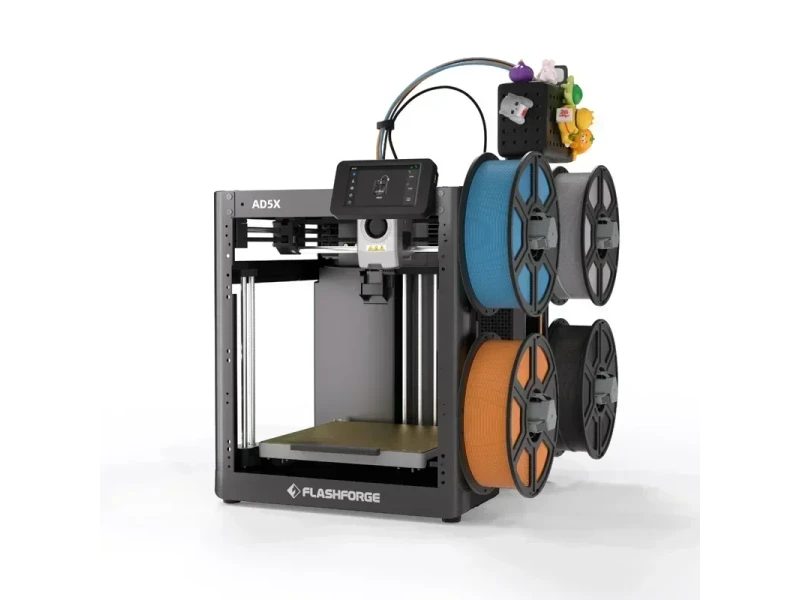
Compact multi-material FDM 3D printer
  • Smart multi-color filament module
  • Fast printing capabilities
  • Stable CoreXY structure
  • User-friendly operation
When purchasing with us you get:
  • FREE Delivery
  • 1 Year Warranty
  • Local U.S. Support
  • Up to 20% Filament Discount
We Accept Purchase Orders From All Educational Institutions and Eligible Business Customers
This 3D printer comes with:
  • All the necessary tools
  • 4-color module (IFS)
  • PLA filament
  • Quick start guide
Price $399.00 $349.00
Lead time is 2-3 weeks

The Flashforge AD5X is a high-speed CoreXY 3D printer offering precise, multi-color prints at up to 600mm/s, with support for flexible TPU 95A—a first for Flashforge. It features automatic filament switching, a cutter-equipped extruder for smooth transitions, and 99% power-loss recovery. Easy to set up in 10 minutes, it includes a 4.3-inch touchscreen, supports multiple materials (PLA, PETG, ASA, TPU), and works with Orca-Flashforge and Flash Maker software, making it ideal for designers, hobbyists, educators, and professionals.

    What is the print quality and performance of the Flashforge AD5X Multi-Color 3D Printer?

    The Flashforge AD5X’s CoreXY motion system reduces print vibration deviations for consistent, high-detail prints. It delivers smooth surfaces, sharp peaks, clean overhangs up to 45°, and precise bridging, showing strong cooling and motion control.
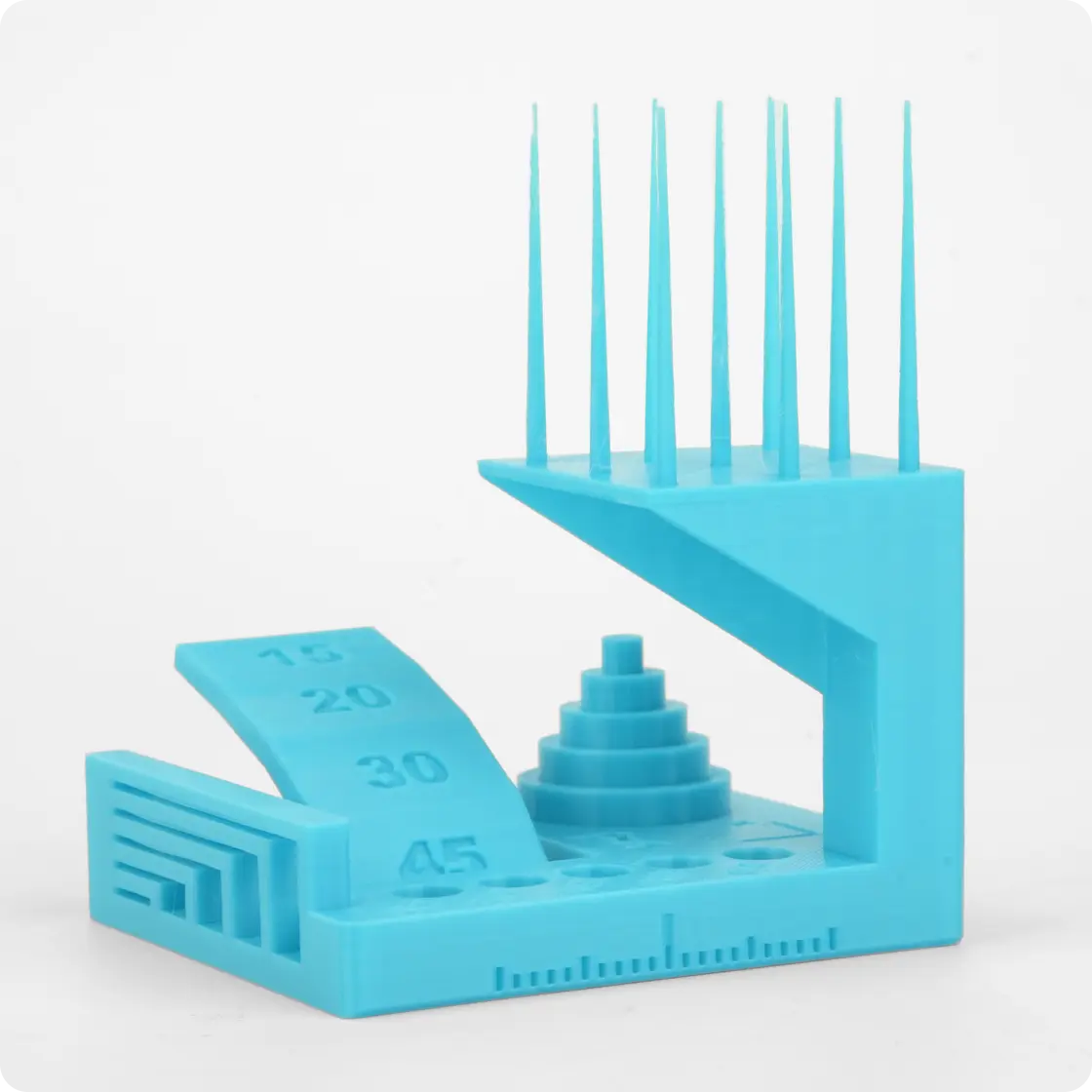
    The Flashforge AD5X 3D printer is prominently showcased, featuring a sleek black design with the brand name

    The AD5X reaches speeds of 600mm/s with 20,000mm/s² acceleration for rapid printing while maintaining precision. In a VFA test with PLA at 320mm/s (23–24mm³/s flow rate), minor rippling appeared at 50–60mm/s but smoothed out at higher speeds — typical for CoreXY systems.
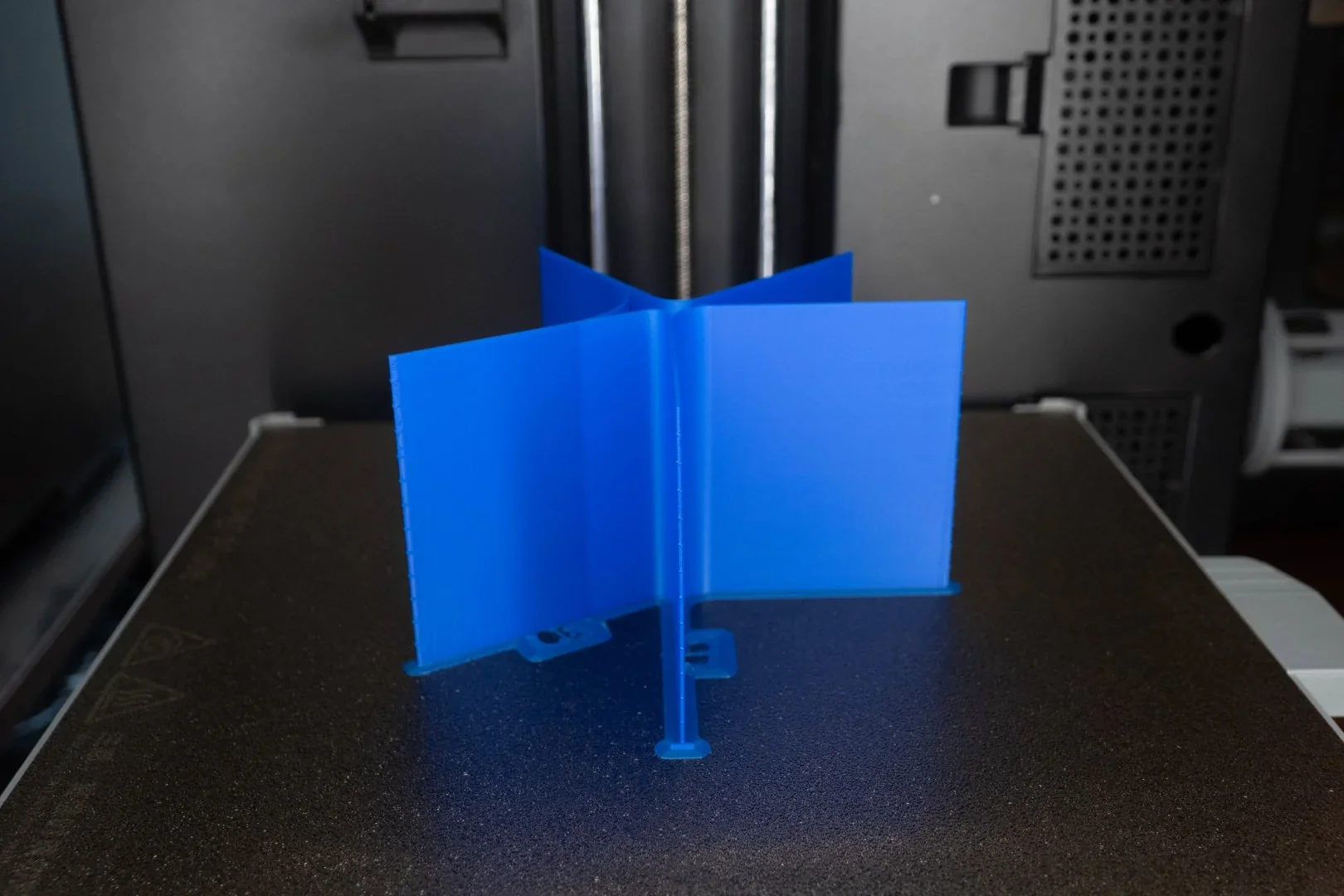
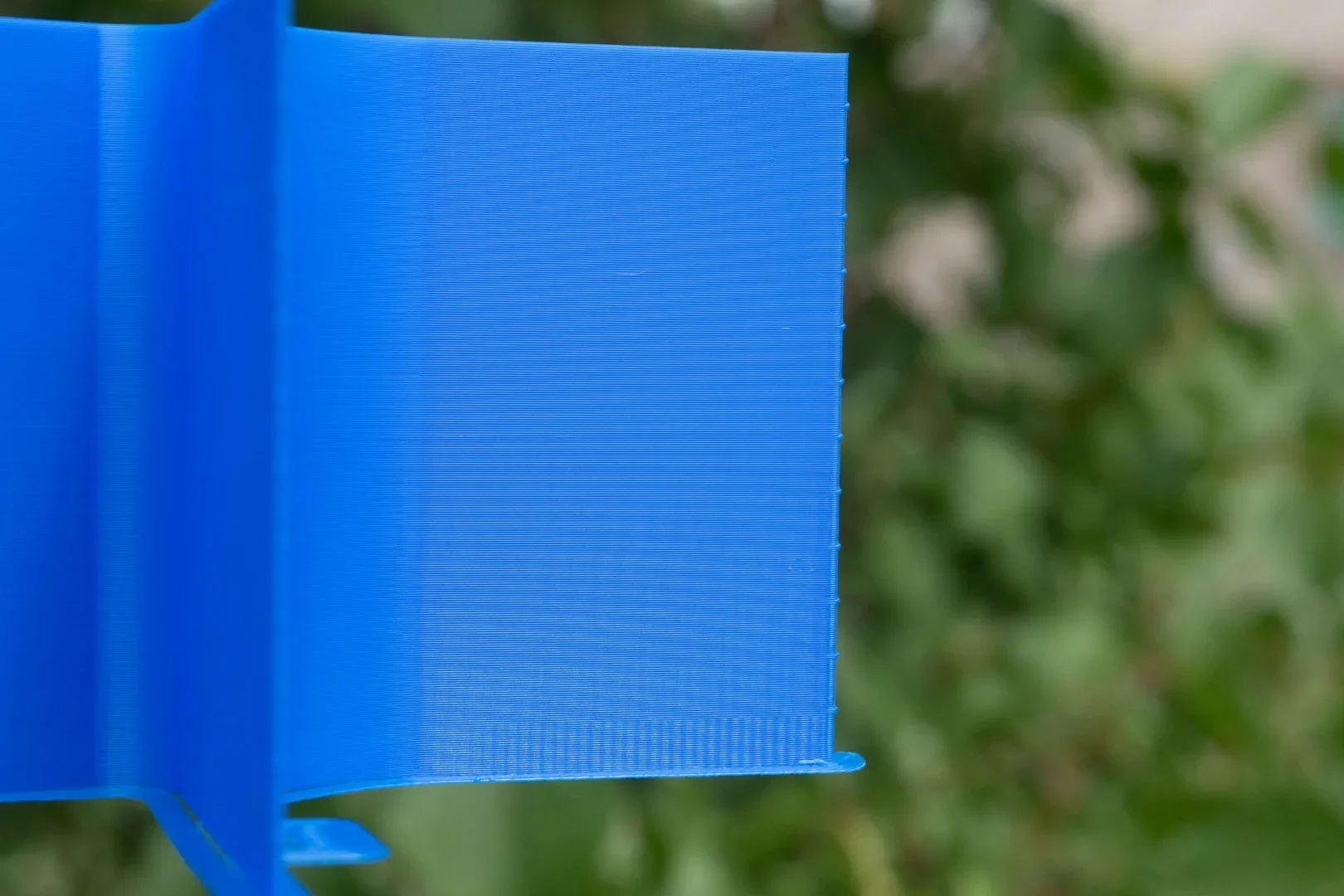
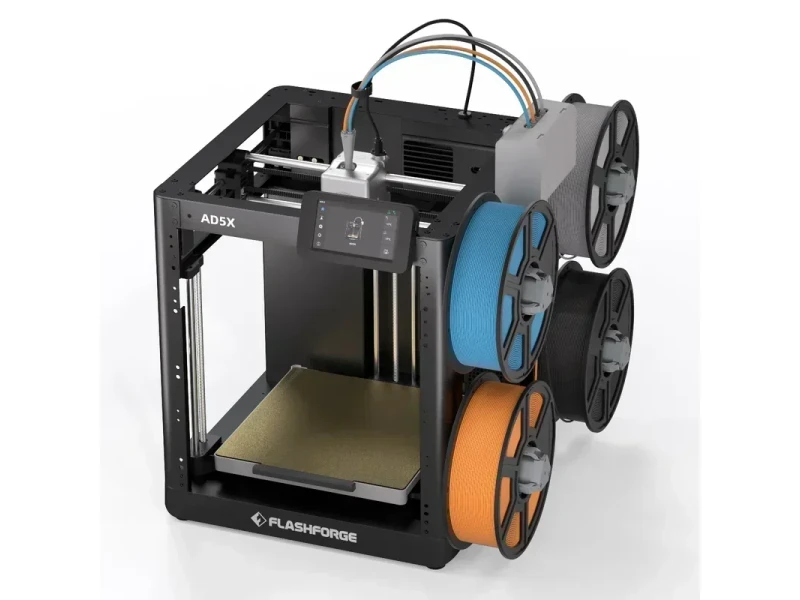
    The image displays a Flashforge AD5X 3D printer with a robust, open-frame design. Prominently featuring a high-definition touchscreen interface mounted centrally on the top frame, the printer allows for intuitive operation. The print head is positioned within the spacious build area, highlighting its capability for large-scale projects. To the right, a vertically mounted spool holder accommodates four filament spools in assorted colors, including blue, gray, orange, and black, indicating versatility in material use. The brand name "Flashforge" appears at the base of the machine, reinforcing brand identity. Above the spools, colorful figurines adorn the top, adding a playful touch to the industrial aesthetic. The machine’s sleek metal frame, combined with its advanced technical features, showcases its sophisticated engineering designed for precision and reliability in 3D printing tasks.A close-up view of a blue 3D printed object, likely created by the FlashForge AD5X 3D printer. The object features smooth vertical layers, highlighting the precision and quality of the printer's output. The background is blurred with greenery, offering a contrast to the vibrant blue of the printed piece. The object appears to have a uniform surface texture and sharp edges, indicating precise calibration and material handling.

    The CoreXY design uses dual stepper motors for balanced X/Y motion, enhancing stability and positioning accuracy while reducing wear. In a batch of 70 parts, including flanged and geared components, all prints showed uniform quality with no visible errors.
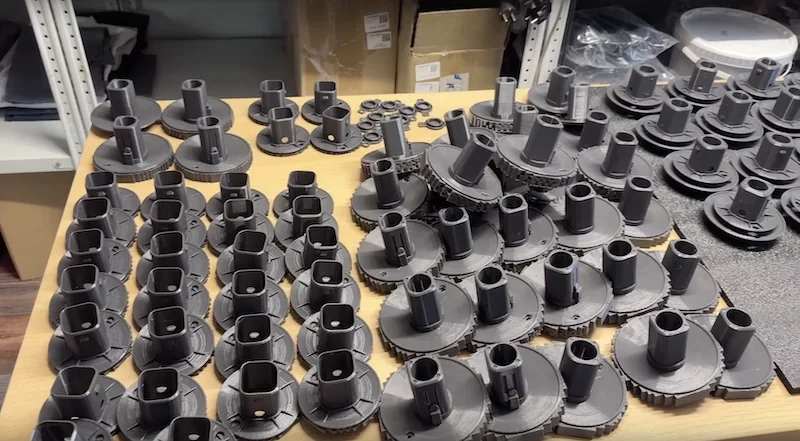
    The image features the Flashforge AD5X 3D printer, showcasing its robust and open-frame design. The printer is equipped with multiple filament spools in various colors (blue, orange, black, and grey) mounted on the side, indicating its capability for multi-material or color printing. The AD5X model name is prominently displayed on the printer's frame, along with the Flashforge branding at the bottom front. A digital interface screen is mounted at the top of the unit, angled for user interaction, suggesting ease of use and control over printing functions. Technical features visible include dual rods for stability and precision, a spacious heated print bed for large-scale projects, and an organized filament feeding system. The printer’s wiring and structure are neatly integrated, signifying a focus on efficiency and reliability in professional or industrial settings.

    The AD5X features automatic bed leveling with pressure sensing, removing the need for manual Z-axis calibration and ensuring strong first-layer adhesion. Internal tests showed a smooth, uniform first layer across the build plate.
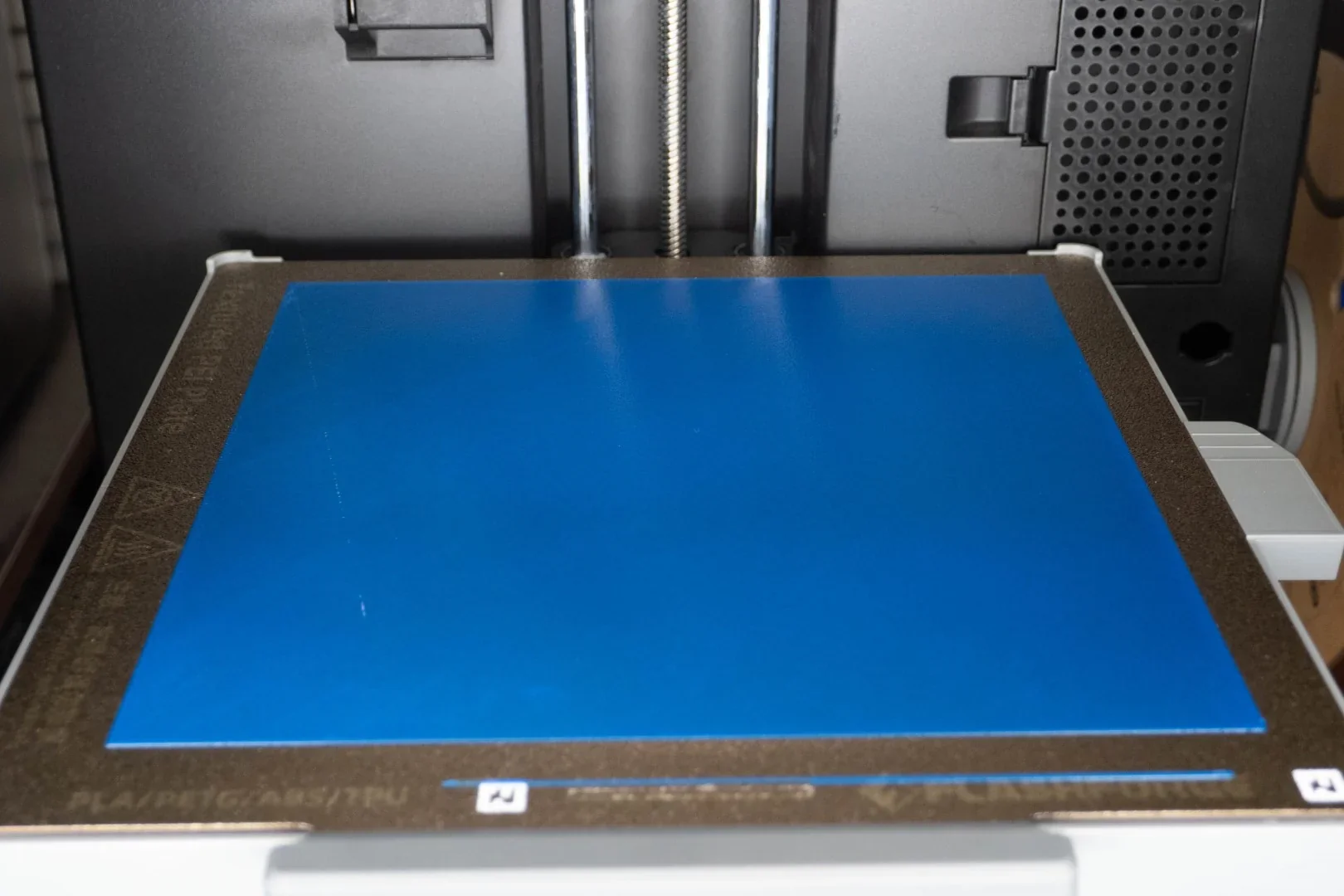
    The image showcases the build plate of a 3D printer, featuring a smooth, blue, removable surface designed for ease of model removal. Visible are dual vertical threaded rods, indicative of a stable Z-axis mechanism aimed at precise layer alignment. The surrounding frame highlights detailed markings for material compatibility, suggesting the use of PLA, PETG, ABS, and TPU filaments. The background includes a vented panel typical for cooling or exhaust functions, alongside a partial view of mechanical components indicating robust construction. The image likely focuses on the printer’s technical details rather than branding or overall structure.

    The AD5X’s dual-sided cooling system ensures thorough model cooling. A 3DBenchy printed in 30 minutes with 0.2mm layers using pink PLA came out clean and accurate.
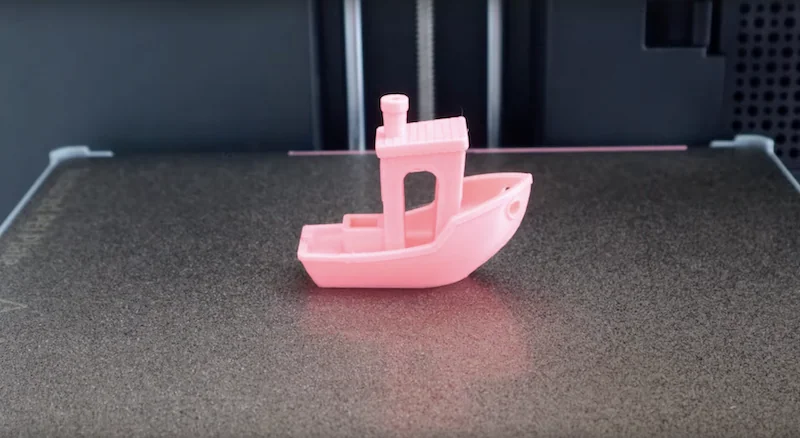
    The Flashforge AD5X 3D printer is prominently displayed, featuring a robust open-frame design with a sleek black and gray color scheme. The printer includes a large build platform housed within a sturdy structure. On the front, a central control unit with a touchscreen interface allows user interaction and displays relevant print information. The extruder is positioned above the build plate, indicating precision and high-performance printing capabilities. On the side, multiple filament spools in various colors, including blue, gray, orange, and black, are mounted, indicating the printer's capability for multi-material or color printing. The Flashforge branding is visible on the base, enhancing brand recognition. The setup suggests a professional and high-tech environment, suitable for detailed and intricate 3D printing tasks.

    A test with Elegoo 95A TPU produced an elastic part with well-fused layers. Minor stringing in holes was observed, which is typical for flexible filament.
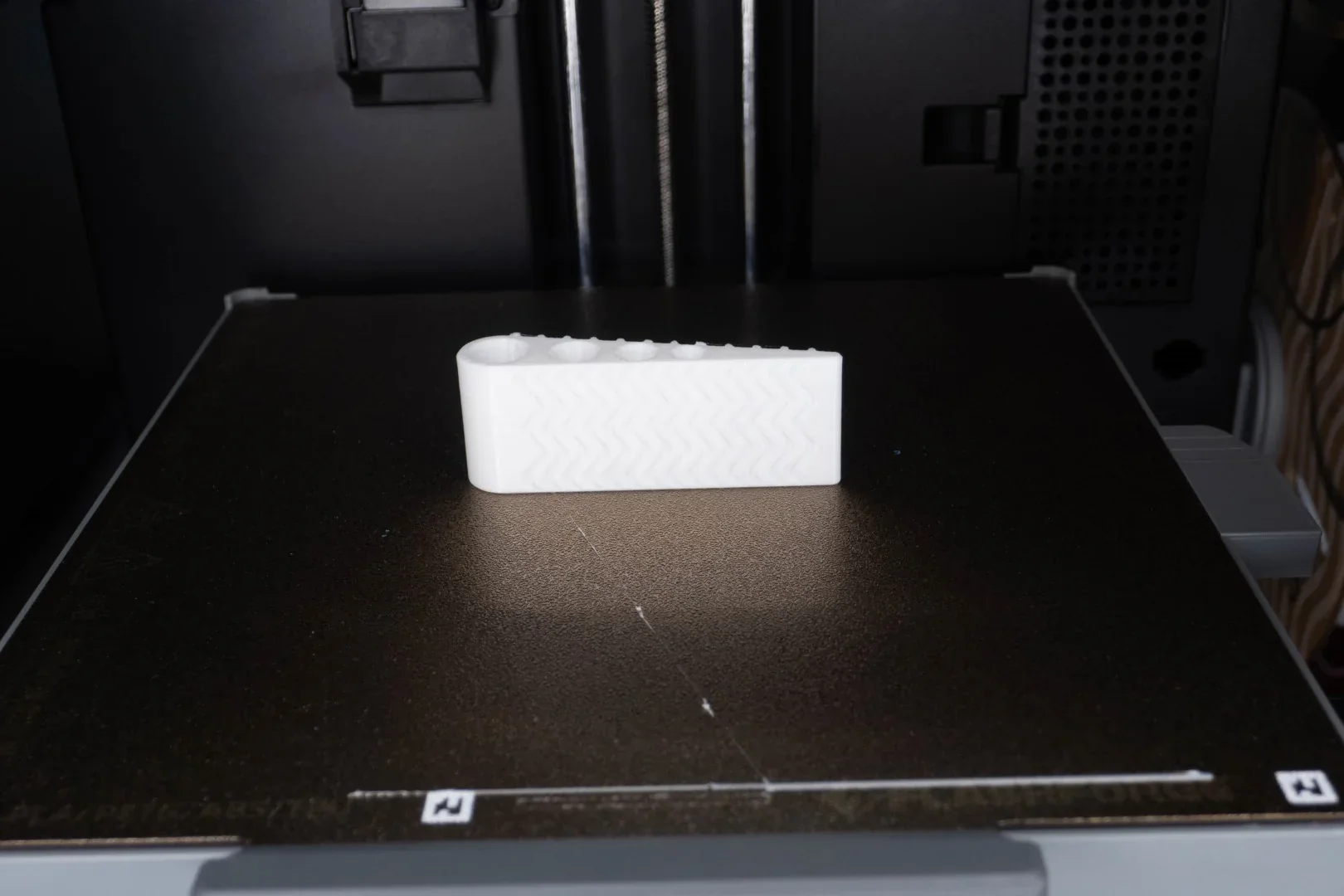
    The Flashforge AD5X 3D printer showcases a sleek, black design with a prominent cubic frame housing the printing mechanism. The printer features a clear front view of its detailed interior setup, including the dual vertical rods for precision movements. Visible components include the nozzle assembly at the center, integrated with linear rails for enhanced stability and accuracy during printing. Above the nozzle, there's a touchscreen control panel displaying user interface elements for easy operation. On the right side, two spools of filament, one blue and one bronze, are mounted vertically, ready for automatic feeding into the printer. Branding is clearly displayed at the bottom with the

    The flexible PEI steel build plate heats to 110°C for strong adhesion with various materials. In testing, two large gear models adhered well to the textured surface, despite covering over half the build area.
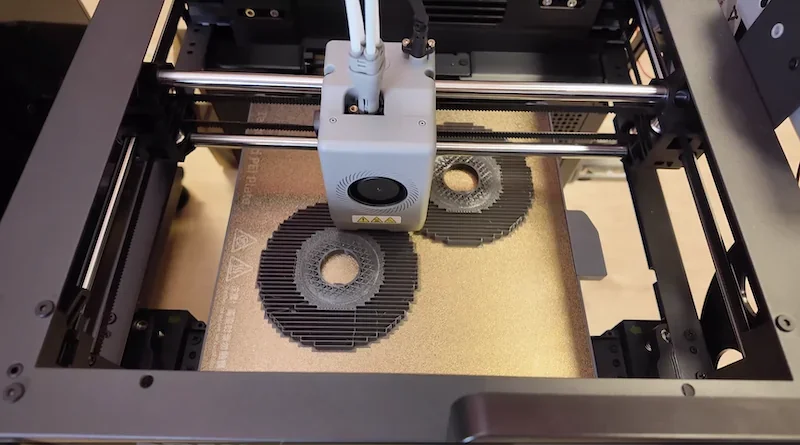
    The image shows the Flashforge Adventurer 5X 3D printer in operation. The printer’s build area features a heated print bed, with two circular objects currently being printed, highlighting its active dual-color extruder capabilities. The extruder head is centrally positioned, with white cables attached, suggesting precise filament control. The machine's robust frame and smooth rails ensure stability and accuracy during the printing process. Visible branding includes the Flashforge logo and caution symbols on the extruder, emphasizing safety and brand identity. The printer's modern design and enclosed structure indicate focus on usability and aesthetic integration into various environments.

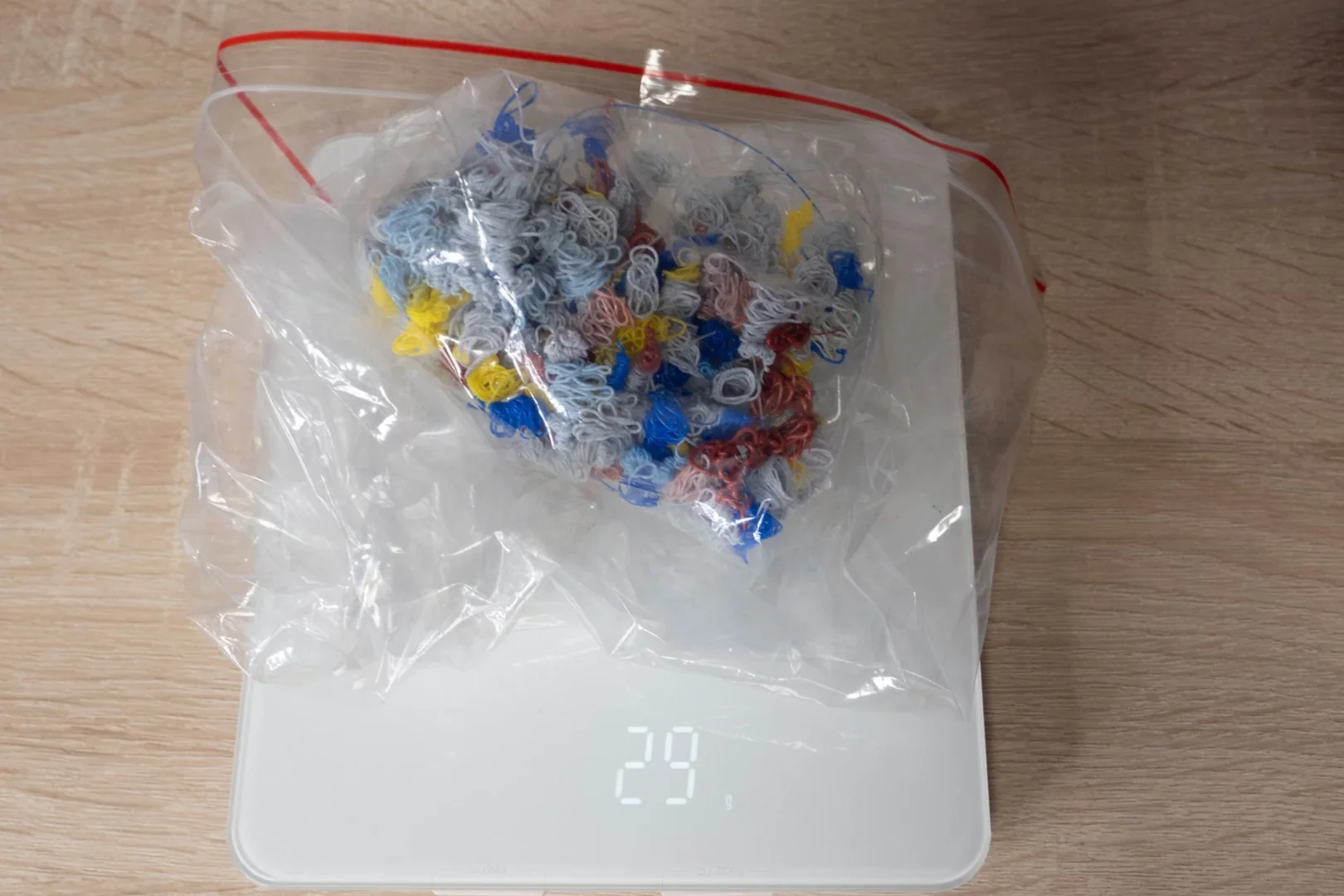
    The AD5X's nozzle cleaning system prevents color bleeding during material changes, ensuring sharp color transitions and edges without color mixing. In a 15-minute two-color test print, yellow and pink filaments showed clean separation, with purged material collected separately.
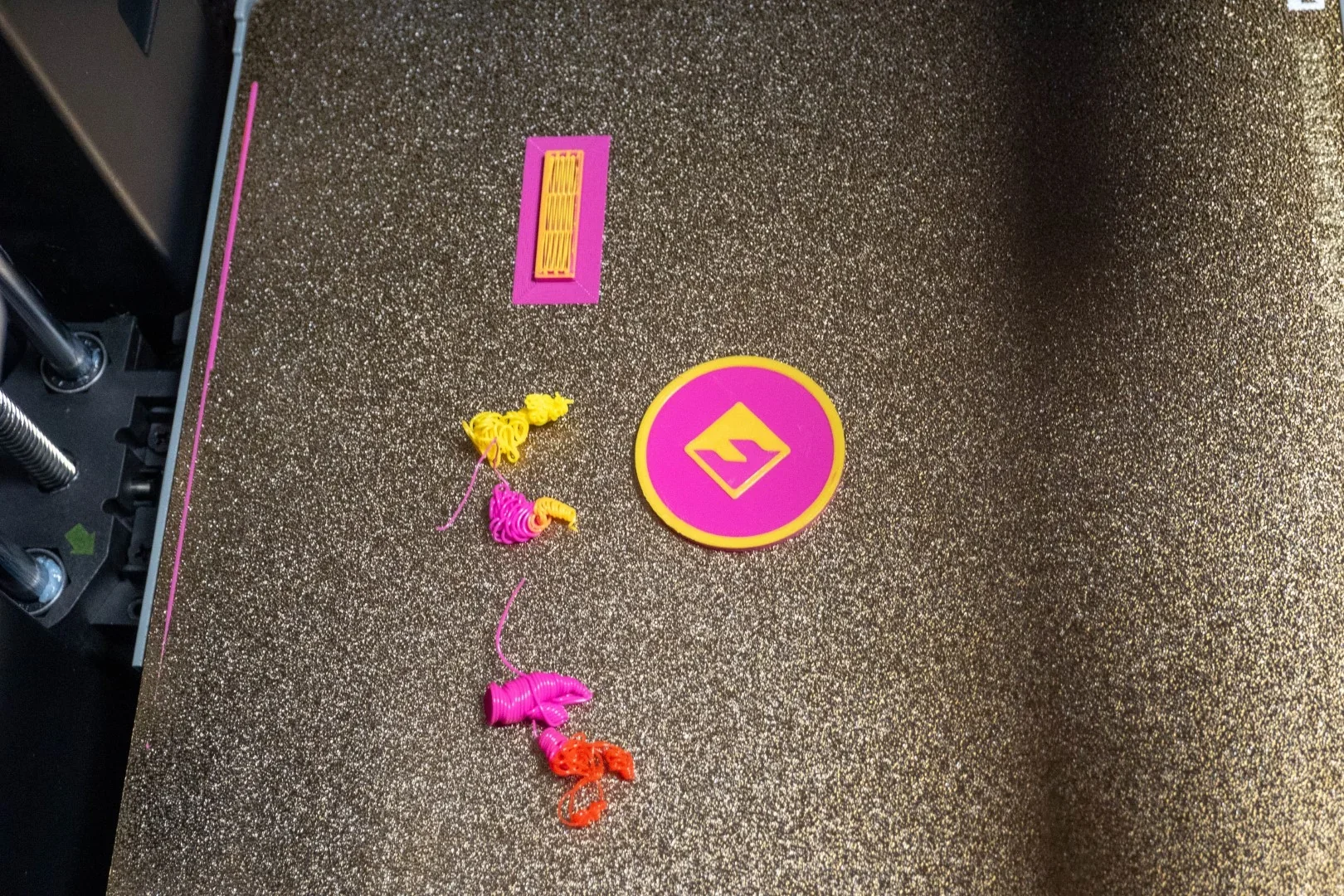
    On a textured, metallic print bed inside a 3D printer, various objects created by the Flashforge AD5X are displayed. The objects include a pink and yellow rectangular grid pattern and a circular piece featuring a symbol at the center, outlined in yellow. Additionally, there are colorful abstract shapes in yellow, pink, and orange, resembling small artistic sculptures. The print bed showcases a rough, grainy surface, indicating durability and adhesion properties crucial for successful printing. The surrounding structure of the printer is partially visible, featuring metal rods and structural components, suggesting a robust and precise printing environment. No branding is visible within this close-up setting.

    A two-color XYZ calibration cube showed sharp transitions between blue and yellow filaments, with clean perimeters and smooth surfaces.
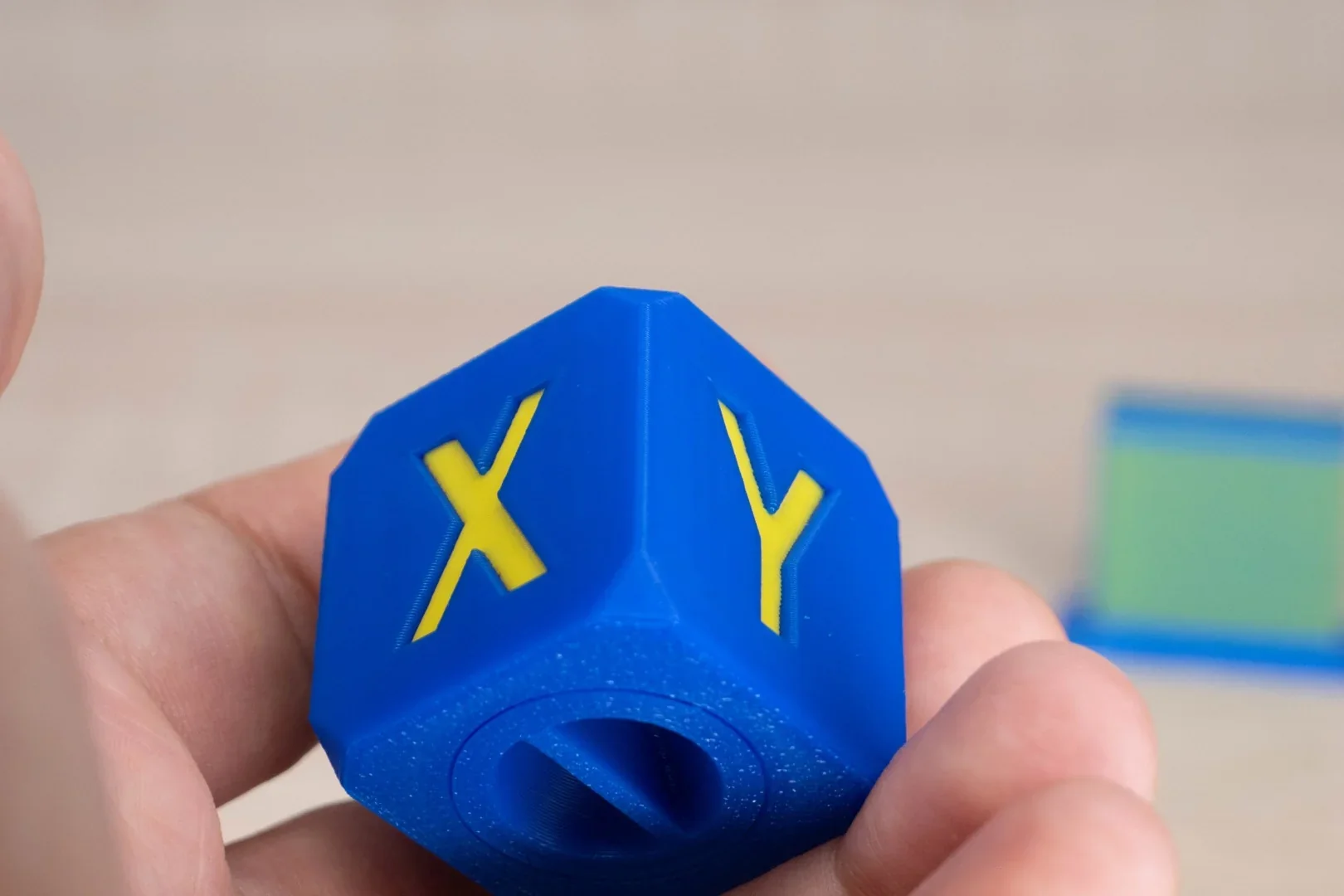
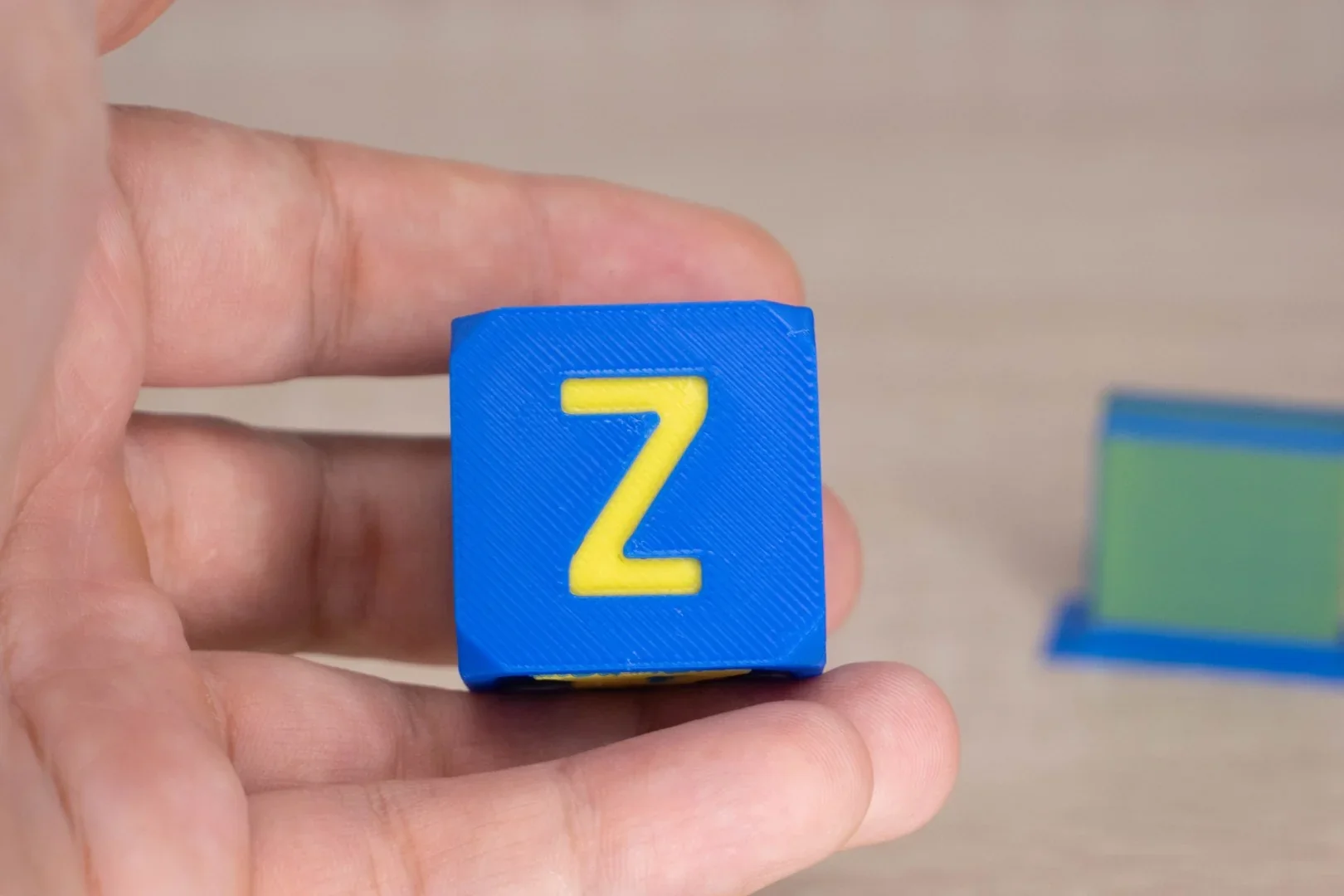
    A detailed image shows a 3D printed calibration cube created by a Flashforge printer. The cube is predominantly blue with yellow insets forming the letters

    A person holds a 3D-printed blue cube with a yellow letter

    A full-color test model sliced into four color segments was printed in 14 minutes, with four automatic filament changes.
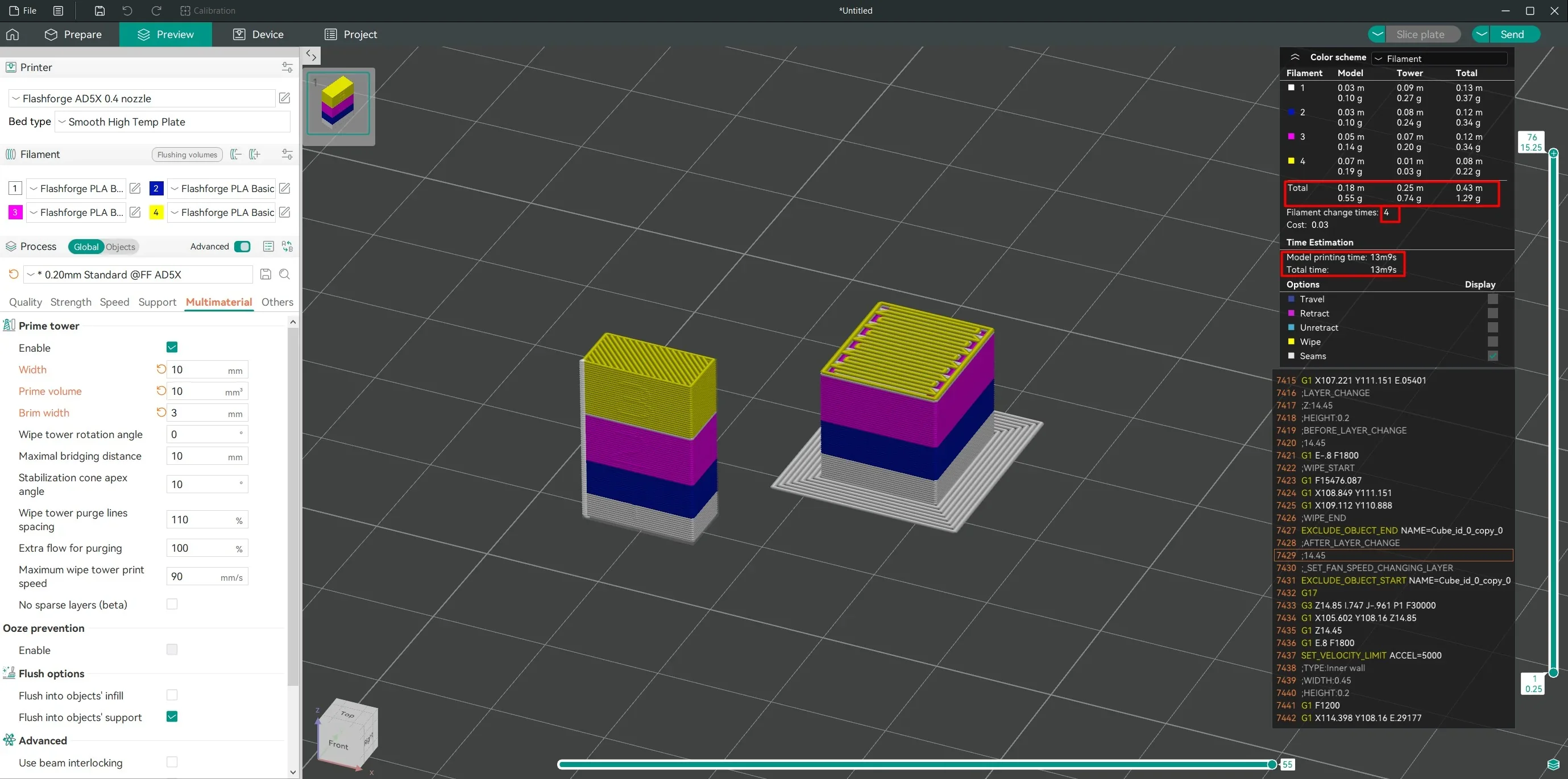
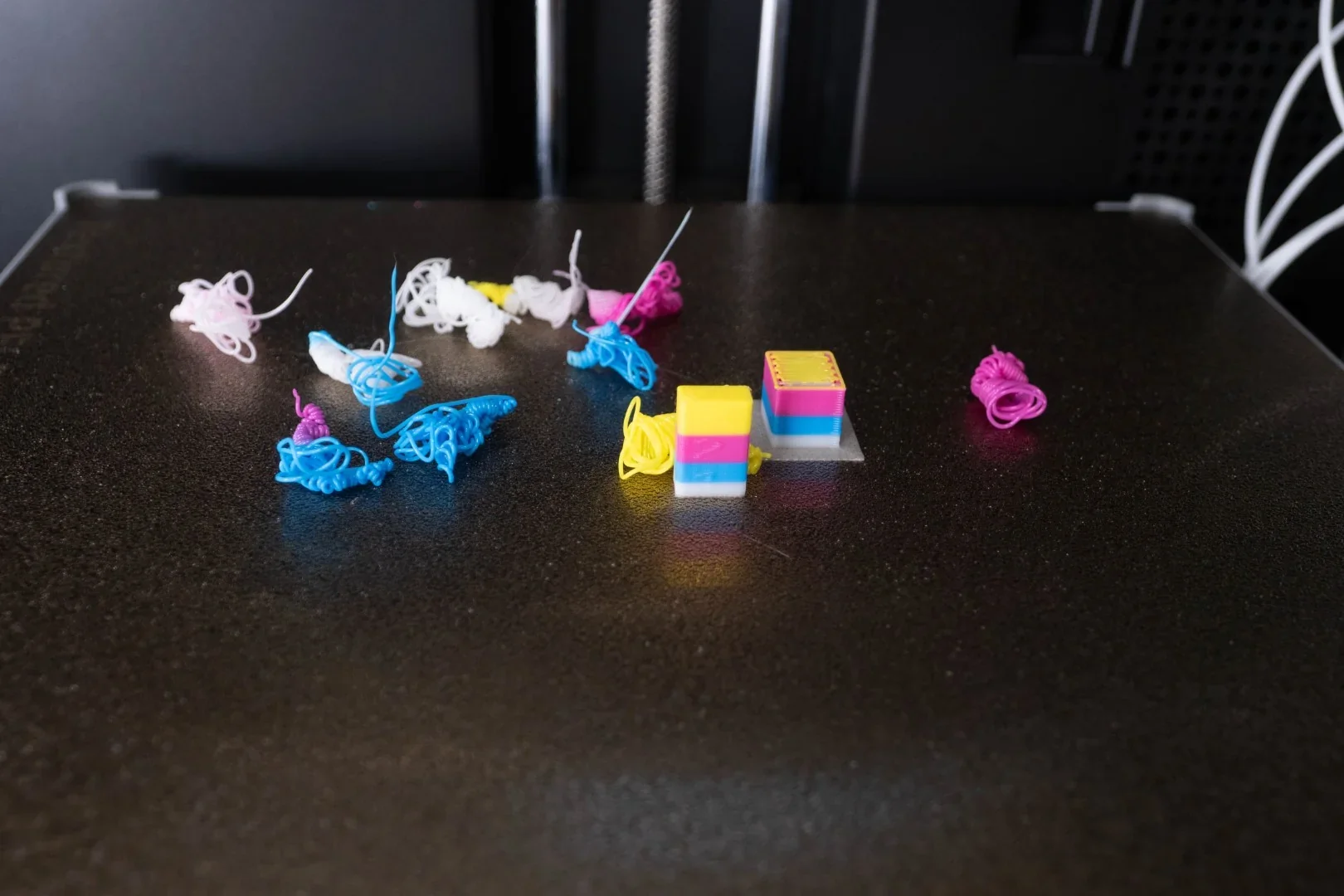
    The image displays a digital workspace interface for the Flashforge AD5X 3D printer, showcasing slicer software used for preparing 3D prints. The screen is split into a grid view where two model prints of stacked block towers are presented, each built with multiple colored layers: yellow, purple, and blue. To the left, settings are shown, including print quality and filament type, with options like "Flashforge PLA Basic" selected. A visual indicator of the active nozzle and heated bed specifications is apparent. On the right side, detailed specifications such as print time estimation, filament used, and layer height are listed. The 3D workspace is surrounded by menu options for viewing and configuration. Brands and model names like "Flashforge AD5X" are visible throughout the interface, highlighting the device used for the simulation.On a smooth, dark print bed, several samples and test prints are visible, presumably created by the Flashforge Adventurer 5X 3D printer. The output includes small, tangled piles of filament in various colors, such as white, blue, pink, and yellow, indicating remnants or failed prints. Additionally, there are two successful cube-shaped prints with vibrant layered colors including blue, pink, and yellow, showcasing the printer's capability to handle multiple colors. The background suggests an enclosed 3D printer environment, and some white cables or strings are partially visible, hinting at the printer's wiring or filament feed, though no specific branding of Flashforge is prominently displayed.

    A complex model was printed with matte filament, using color transitions only on part of the height to save time and material. The print quality was excellent.
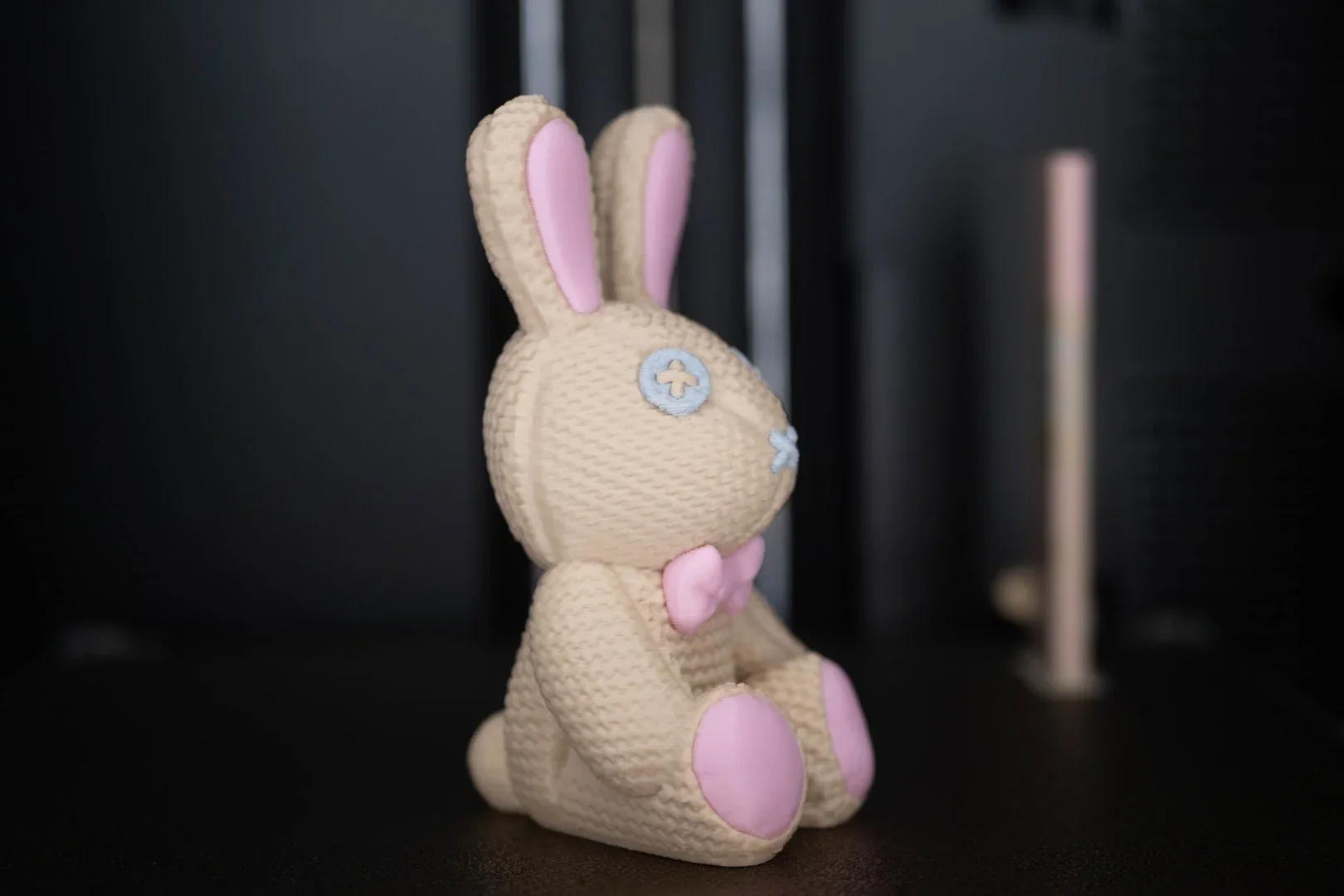
    A 3D-printed bunny figurine created by the Flashforge AD5X is showcased with intricate details. The bunny has a textured, beige knitted pattern, adding a realistic fabric-like appearance. Its ears, paw pads, and bow tie are accented in soft pink, contrasting with the beige body. The eyes and nose are designed with a stitched, button-like aesthetic using a pale blue color. The setting is a minimalist black backdrop, which emphasizes the craftsmanship and color details on the bunny. The Flashforge AD5X's capability to produce finely detailed and multi-colored objects is evident in this high-quality print.

    Which thermoplastic filaments can you use with the Flashforge AD5X?

    The Flashforge Adventurer 5M Pro supports over nine filament types, handling standard PLA variants with precision and also printing advanced materials like PETG, PETG Pro, HS PETG, and ASA for added durability and heat resistance.

    PLA Print Sample: This bear trap model printed in 45 minutes and functions once the ends are connected.
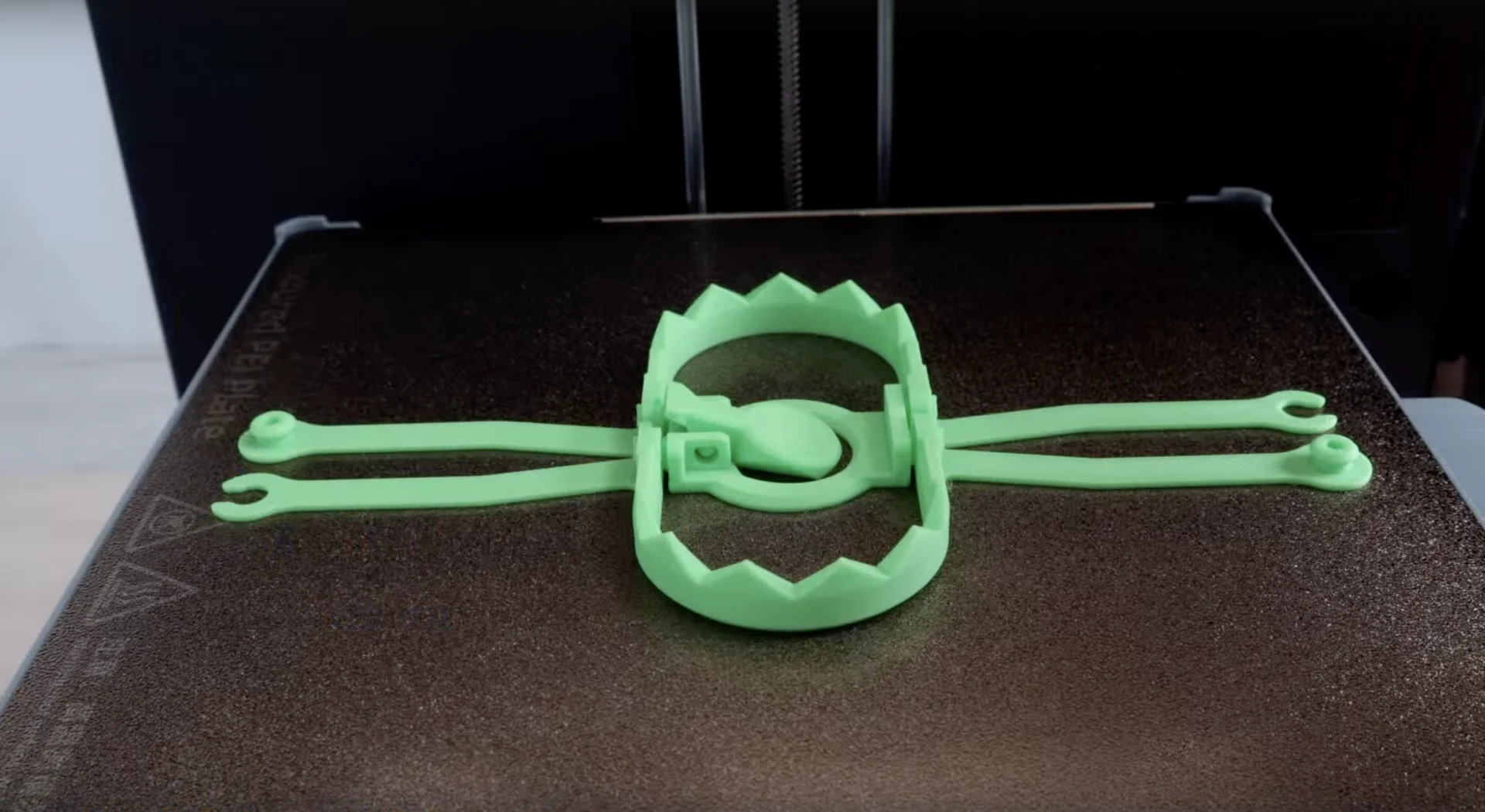
    A green plastic 3D-printed object resembling a bear trap is displayed on the build plate of a Flashforge Adventurer 5X 3D printer. The object has a circular base with jagged edges and extended lever arms on both sides, showcasing the printer's precision in creating intricate details. The build plate texture and the Flashforge branding are visible on the left side. The setting appears to be an indoor workspace with the printer's interior partially in view, emphasizing the machine's application in creating complex designs with consistent structural accuracy.

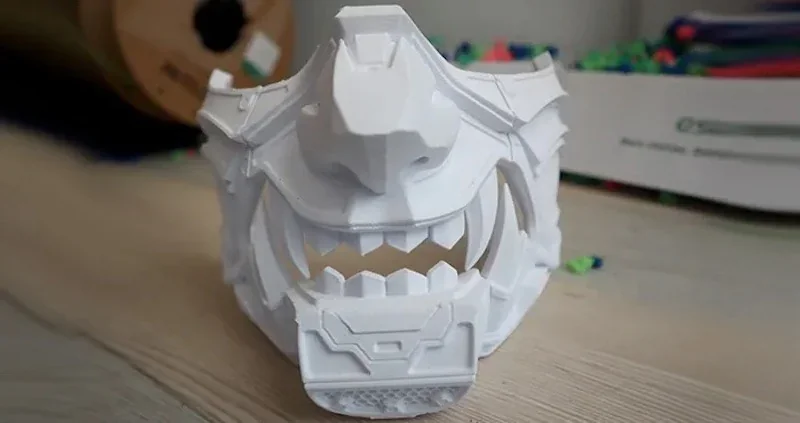
    PLA Print Sample: A multi-part Oni mask was printed with white eSUN fast PLA over 20 hours as an endurance test.
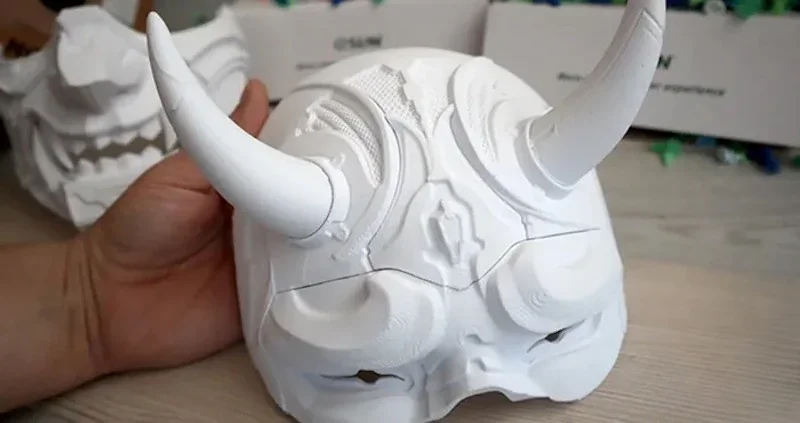
    A detailed white 3D-printed mask showcasing intricate patterns and horn-like protrusions, attributed to being created by the Flashforge AD5X 3D printer. The mask features smooth, curvilinear designs and detailed textures, reflecting a high level of precision and craftsmanship typical of advanced 3D printing technology. The setting includes a light wooden surface, and the background displays partially visible packaging boxes with subtle branding. A hand gently holds the mask, highlighting its size and structure. The environment conveys a sense of creative and technological exploration associated with 3D printing.

    A detailed white 3D-printed mask featuring angular geometric shapes and complex textures, resembling an ornate, futuristic headpiece with exaggerated facial features including prominent teeth and ridged contours. The mask is likely a product of the Flashforge AD5X 3D printer, showcasing its high-detail output capabilities. The item rests on a wooden surface in a workspace setting. In the background, a spool of filament is partially visible, along with colorful plastic debris and a white box, adding context to a busy, creative environment.

    PLA Print Sample: A white eSUN fast PLA Oni mask was printed in multiple parts over 20 hours as an endurance test.
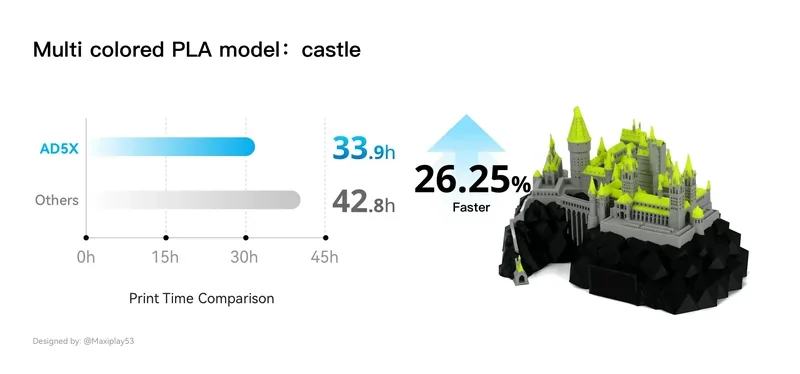
    The image showcases a print time comparison between the Flashforge AD5X 3D printer and other unspecified models. On the left, a horizontal bar graph displays two bars, with the AD5X represented in blue and others in gray. The AD5X shows a print time of 33.9 hours, while the others show 42.8 hours. A title reads

    Silk PLA Print Sample: A multi-color winged horse model was printed in 33.1 hours.
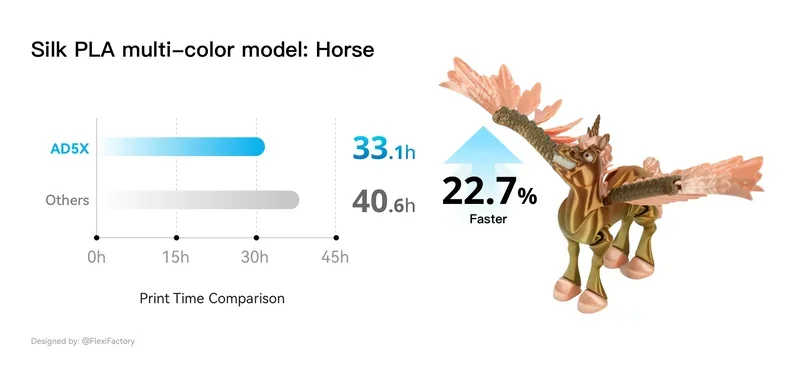
    The image features a print time comparison chart for a

    PLA Print Sample: A mechanical bee with black, silver, orange, and translucent blue parts was printed in 12.2 hours.
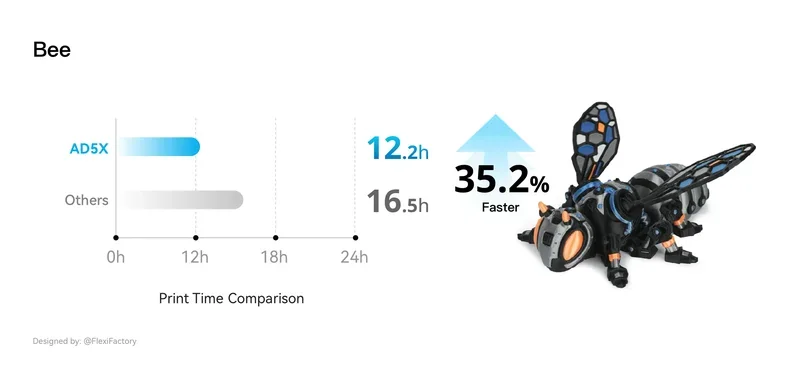
     

    The image features a detailed comparison chart and a 3D-printed model created by the Flashforge AD5X. On the left, a bar graph titled

    Multicolor PETG Print Sample: An orange and black triceratops model was printed in 10.6 hours.
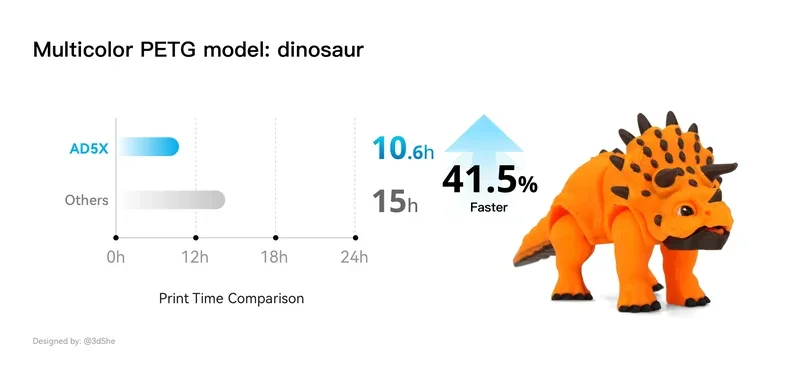
    The image features a comparison chart and model of a dinosaur to emphasize the efficiency of the Flashforge AD5X 3D printer. The main focus is on a multicolor PETG dinosaur model produced by the printer, showcasing vibrant orange with black accents. On the left, a bar graph illustrates print time comparison: the AD5X with a solid blue bar indicating a print time of 10.6 hours, while another generic option is shown with a grey bar representing a longer time of 15 hours. An upward arrow, labeled


    The extruder heats up to 300°C and the bed to 110°C, allowing use of engineering-grade filaments.
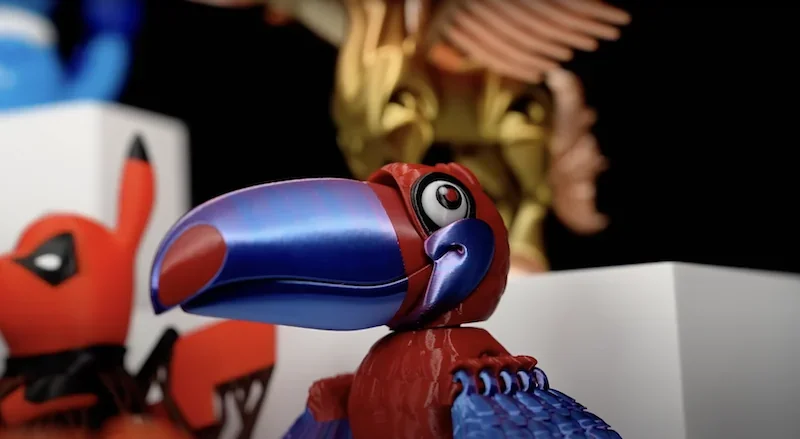
    A variety of detailed 3D printed models in vibrant colors showcase the capabilities of the Flashforge Adventurer 5X 3D printer. In the foreground, a large parrot model features a gradient of blue to purple on its beak, with red body details and intricately designed feathers, demonstrating the precision of multicolor printing. Behind it, other models include a highly detailed red and black figure and a gold, winged structure, highlighting the printer’s ability to handle intricate designs and multiple colors. The setting is a display environment with minimalistic white platforms, drawing focus to the vibrant models, indicative of the printer's exceptional output quality.

    The AD5X features an open filament system. Tests confirmed successful prints with filaments from Flashforge, Sunlu, Anycubic, Overture, and Inslogic. While minor adjustments may be needed for temperature differences, the flexible PEI build plate ensures strong adhesion for materials like PLA, PETG, and TPU.
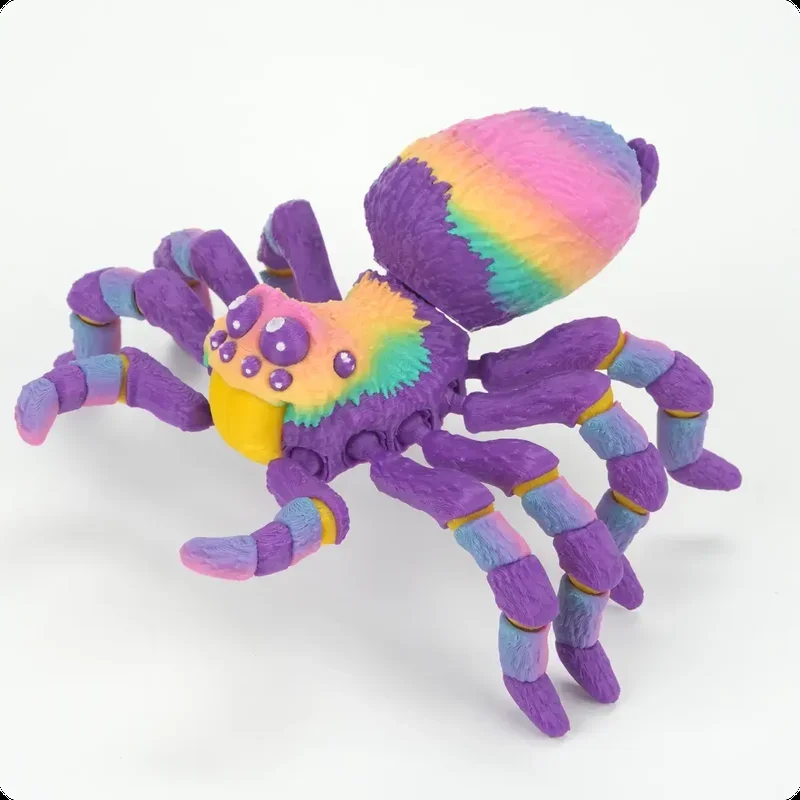
    A colorful 3D-printed spider model showcasing vibrant hues of purple, yellow, green, blue, and pink against a white background. The spider features detailed textures on its body and legs, demonstrating precision and accuracy in its layered construction. This intricate model highlights the capabilities of the Flashforge Adventurer 5X 3D printer, known for its high-quality multicolor printing and intricate detail resolution. The robust and vivid colors suggest the use of advanced filament materials, showcasing the printer's ability to produce professional-grade, visually appealing outputs suitable for decorative or illustrative purposes.

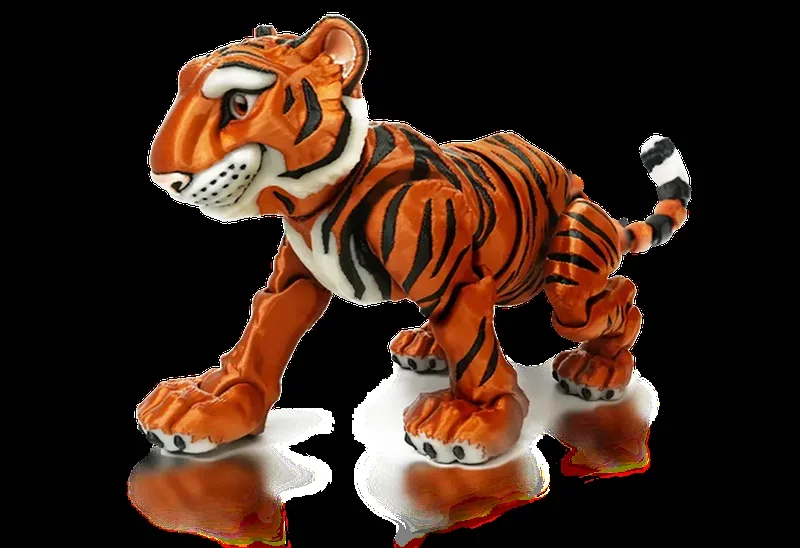
    A detailed and vibrantly colored 3D-printed model of a tiger, created by the Flashforge Adventurer 5X 3D printer. The model showcases intricate design work, with striking orange and black stripes typical of a tiger's fur pattern, white accents on the face and underbelly, and defined facial features including expressive eyes. The tiger is depicted in a dynamic, walking pose. The clarity and smooth finish of the model highlight the printer's capability for high-resolution and multi-color outputs. The scene focuses solely on the model, emphasizing its realistic and high-quality construction, indicative of the printer's advanced technology and precision.

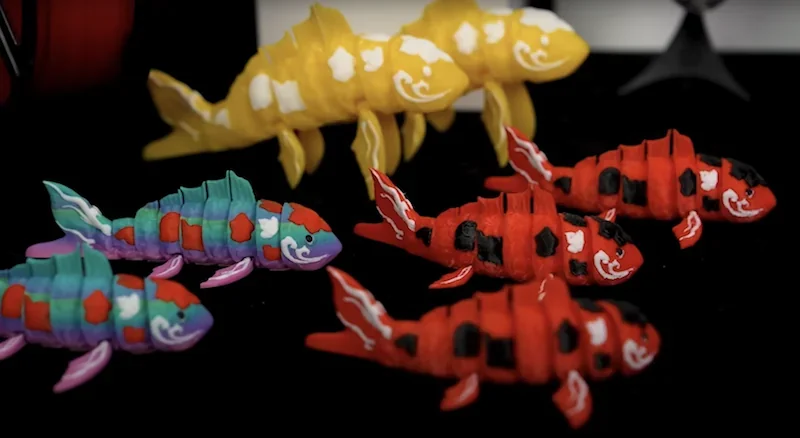
    Colorful 3D-printed koi fish models showcase intricate multi-color detailing created by a Flashforge AD5X 3D printer. The models display a variety of vibrant hues, including yellow, red, blue, and purple, with detailed patterns resembling the natural markings of koi fish. Each fish features articulated segments, allowing for movement, and displays a glossy finish, highlighting the precision of the 3D printing process. These vivid designs demonstrate the printer's capability to produce high-quality, complex models with detailed surface textures, suitable for decorative purposes or prototyping. The setting suggests an exhibition or display scenario, emphasizing the artistic and technical capabilities of the Flashforge AD5X.

    What are the TPU printing capabilities of the Flashforge AD5X?

    The AD5X uniquely supports full-color printing with flexible TPU 95A — unavailable in previous Flashforge models. For example, a multi-colored lattice sphere was printed in 18.6 hours.
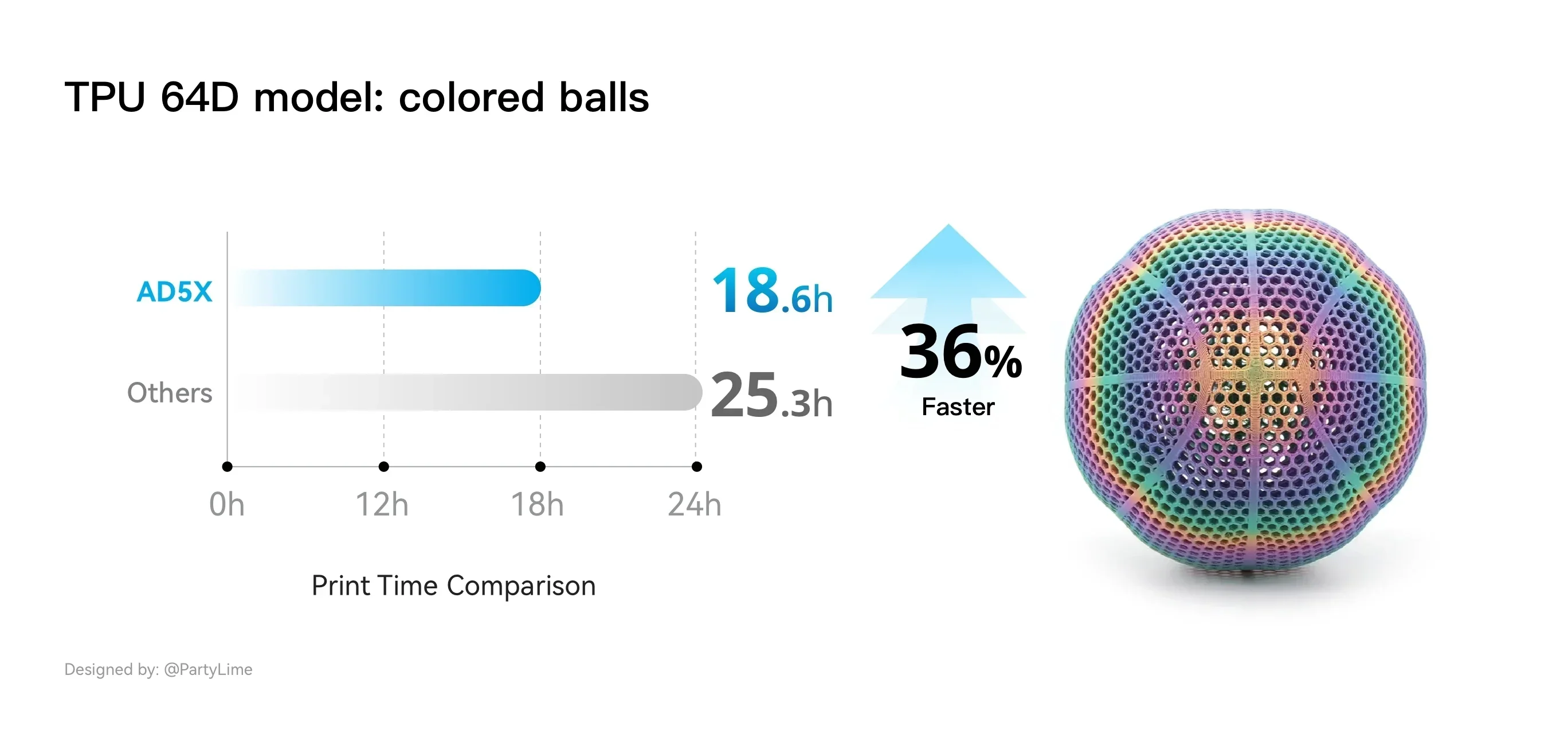
    TPU 64D model of colored balls presented alongside a performance comparison chart. On the left, a horizontal bar graph shows the Flashforge AD5X's print time of 18.6 hours, significantly faster than

    What is the build volume of the Flashforge AD5X?

    The Flashforge AD5X has a 220 × 220 × 220 mm build volume, offering a balanced cubic space suitable for various projects. This matches the build size of other Adventurer models like the AD5 and AD5M Pro, ensuring continuity for existing users.

    What is the difference between the Flashforge AD5X, 5M, 5M Pro, Bambu Lab A1 Combo, Bambu Lab P1S Combo, Anycubic Kobra S1 Combo, and Elegoo Centauri Carbon?

    3D Printer Model Build Volume (mm) Build Volume (liters) Price (USD)
    Flashforge AD5X 220 × 220 × 220 10.65 $400+
    Anycubic Kobra S1 Combo (w/ AMS) 250 × 250 × 250 15.63 $600+
    Bambu Lab A1 Combo (w/ AMS) 256 × 256 × 256 16.78 $499+
    Bambu Lab P1S Combo (w/ AMS) 256 × 256 × 256 16.78 $749+
    Elegoo Centauri Carbon (no AMS) 256 × 256 × 256 16.78 $300+
    Flashforge Adventurer 5M (no AMS) 220 × 220 × 220 10.65 $290+
    Flashforge Adventurer 5M Pro (no AMS) 220 × 220 × 220 10.65 $450+

    The Flashforge AD5X is a strong budget option for multi-color 3D printing at around $400, offering reliable four-color prints, fast speeds, and low filament waste. Its trade-offs include a smaller 220mm³ build volume and open-air design, limiting compatibility with temperature-sensitive materials.

    Multi-Color Competitors:

    • Anycubic Kobra S1 Combo (~$549+): Larger 250 mm³ build area, enclosed, supports ABS/Nylon, expandable to 8 colors, but slower print and filament swap speeds.
    • Bambu Lab A1 Combo (~$499+): Sharper print quality, 256 mm³ build area, slightly slower and more wasteful than AD5X on small prints, but higher overall quality.
    • Bambu Lab P1S Combo (~$749+): Fastest printer with quick swaps, enclosed 256mm³ build, premium performance and spare part support at a higher cost.

    Single-Color Competitors:

    • Elegoo Centauri Carbon (~$300+): Larger 256mm³ build but lacks multi-color, ideal for size-focused users.
    • Flashforge 5M & 5M Pro (~$290–$450): Same platform as AD5X without multi-color. AD5X’s price premium reflects its added color-printing capability.

    The AD5X is ideal for users wanting affordable multi-color printing without needing a large build area or enclosure. While single-color printers offer more space for less, the AD5X balances speed, quality, and multi-color features at a competitive price.
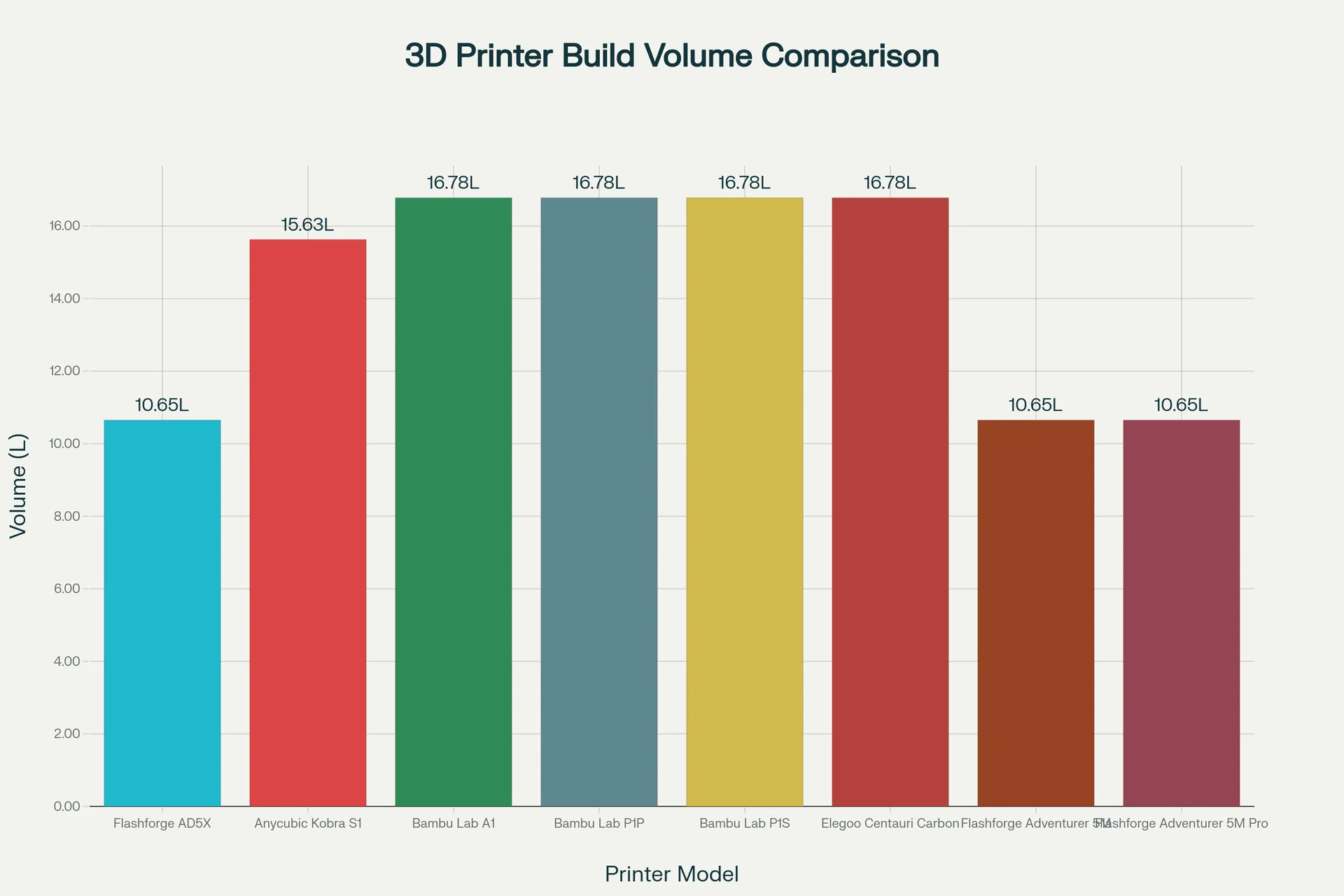
    Bar chart titled

    What printer controls are available on the Flashforge AD5X?

    The Flashforge AD5X uses a 4.3-inch color touchscreen with 14 primary controls organized across key menus:

    Home Menu:

    • Cancel Print: Stop current job
    • Pause/Resume: Control printing
    • Progress Bar: Shows time and completion
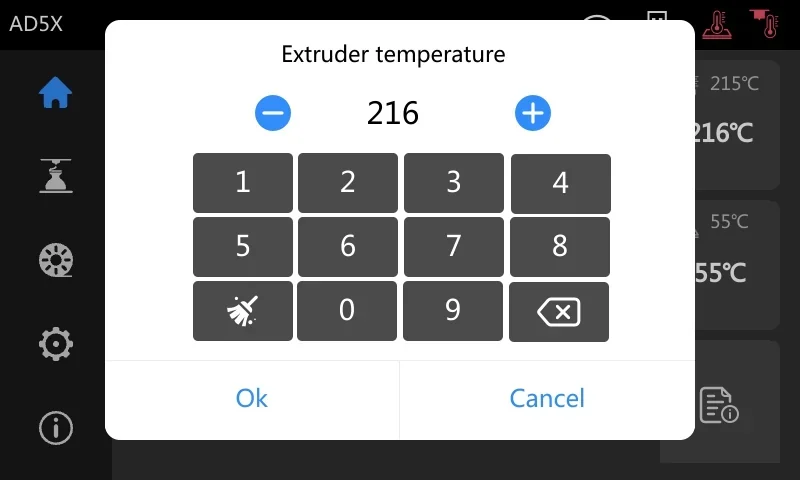
    • Temp Controls: Set extruder and bed temps
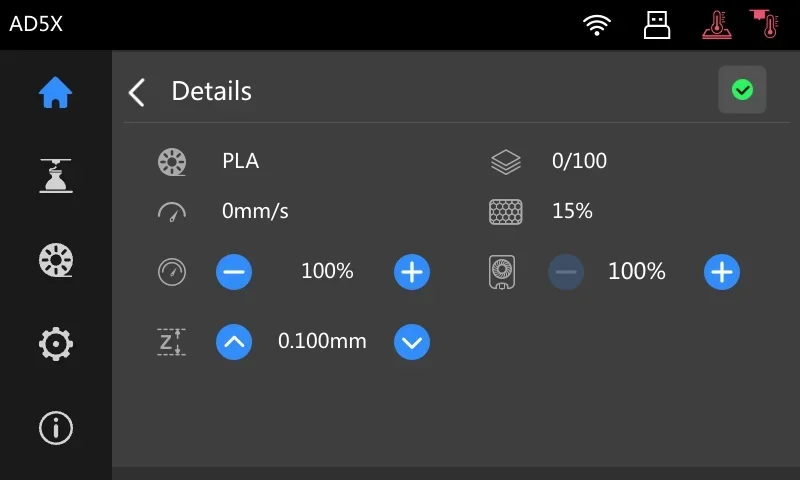
    • Details Menu: Access real-time adjustments
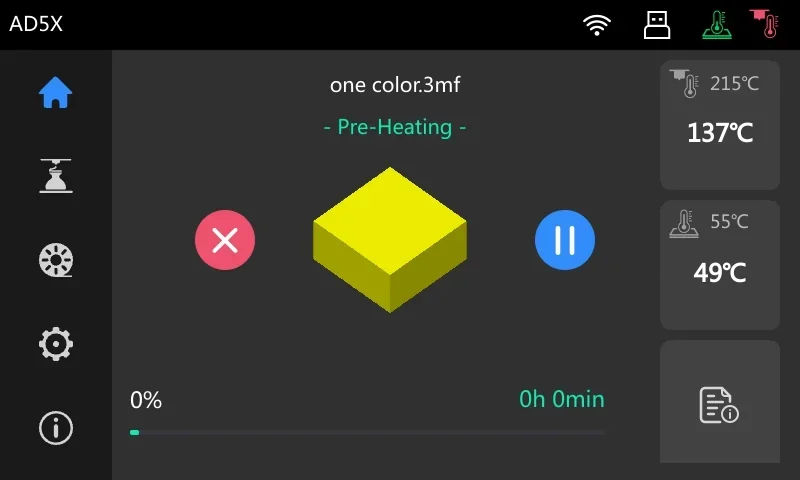
    The display shows the interface of the Flashforge AD5X 3D printer, focusing on a pre-heating process for a print file titled "one color.3mf." Central to the interface is a 3D model representation of a yellow cube. To the left, a vertical menu features icons for navigation: home, print settings, filament settings, and system configuration. The top bar indicates connectivity status and machine identification (AD5X). Temperature readouts are on the right: the nozzle is set to 215°C but currently at 137°C, and the heated bed targets 55°C but reads 49°C. Below, progress is at 0%, with an estimated time of 0h 0min. Buttons for cancel (red X) and pause (blue circle) are present. The interface uses a dark theme with contrasting icons for clear readability.A digital interface showing the extruder temperature settings for the Flashforge AD5X 3D printer, featuring a keypad for input. The central display reads "216" degrees, indicating the current temperature setting. The interface allows adjustment with plus and minus icons to increase or decrease the temperature. Function buttons include "Ok" and "Cancel" at the bottom for confirmation and cancellation of settings. The left side displays menu icons, with a prominent home button at the top, suggesting navigation options. The environment appears to be a touchscreen interface, with additional temperature settings visible in the background for other components, such as the heated bed. The branding "AD5X" is visible in the upper left corner, confirming the model being configured.

    Details Menu:

    • Print Speed: Adjust as %
    • Fan Speed: Adjust as %
    • Z-Offset: Fine-tune nozzle height

    The image displays the user interface screen of the Flashforge AD5X 3D printer. The screen shows the

    Print Management ("Material" Menu):

    • Print from Memory/USB: Load and start jobs
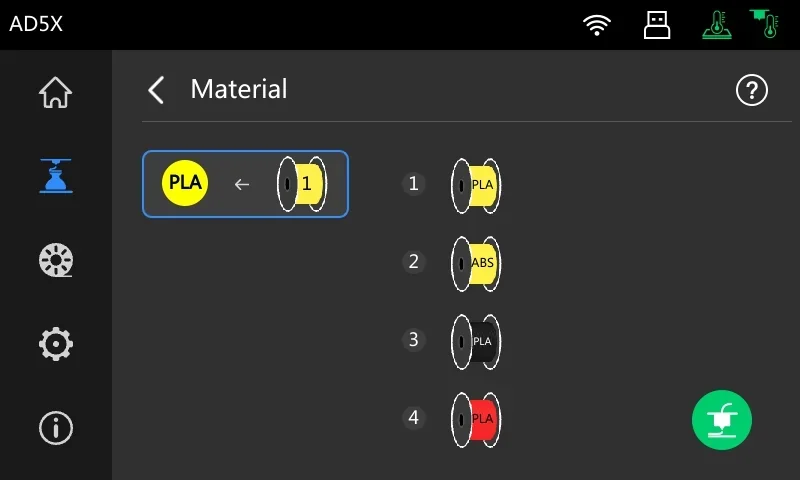
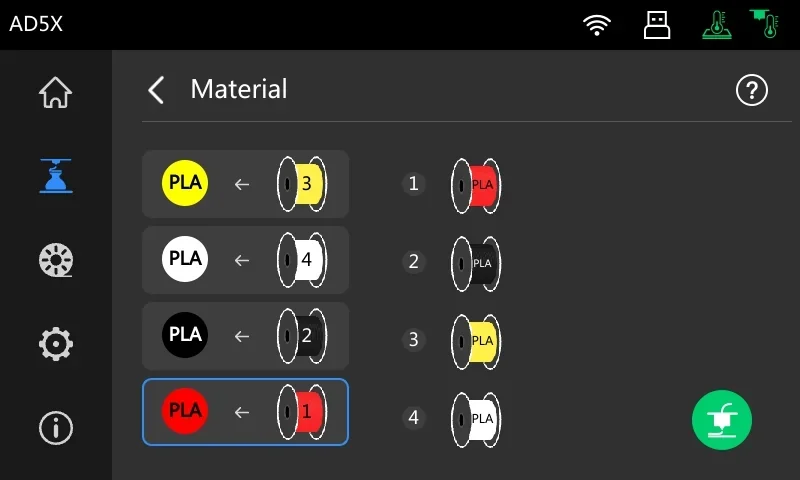
    • Material Mapping: Assign model colors to IFS spools (for up to for spools of filament)
    • Filament Info: Shows type and color for each spool
    • Start Print: Begin print after mapping
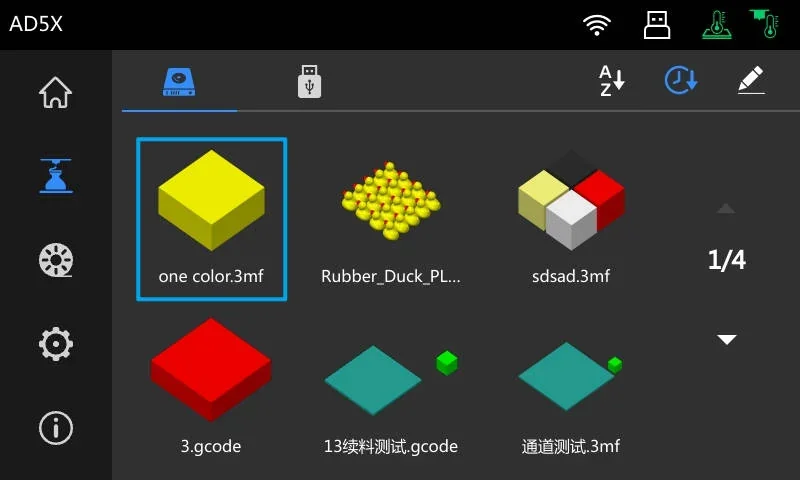
    The display screen for the Flashforge AD5X shows a user interface with several 3D printing models and file names in a grid format. The top of the screen includes icons for home, settings, and connectivity options, alongside the Flashforge AD5X branding. Visible on the screen are various 3D model previews, such as a yellow cube labeled "one color.3mf," a cluster of yellow duck models titled "Rubber_Duck_PL," and a multi-colored cube named "sdsad.3mf." Additional models include a red cube labeled "3.gcode" and two platforms named "13绿料测试.gcode" and "通道测试.3mf." The screen organizes these files across four pages, indicated by a "1/4" pagination label, with navigation arrows for browsing. The setting is a sleek, professional interface designed for managing 3D printing tasks using the Flashforge AD5X.The screen display for the Flashforge AD5X 3D printer features a Flashforge AD5X user interface screen displays a material selection menu for 3D printing. The interface shows different PLA filament options identified by color-coded spools: yellow labeled "3," white labeled "4," black labeled "2," and red labeled "1." The menu allows users to configure the material settings for printing, with arrows indicating the selection process for each filament spool. The left sidebar includes navigation icons, such as a home button and settings. The top bar features connectivity icons, including Wi-Fi and USB symbols. The interface uses a dark theme for better contrast, enhancing visibility and accessibility of controls.

    Filament Management:

    • Slot Selection: Pick spool 1–4
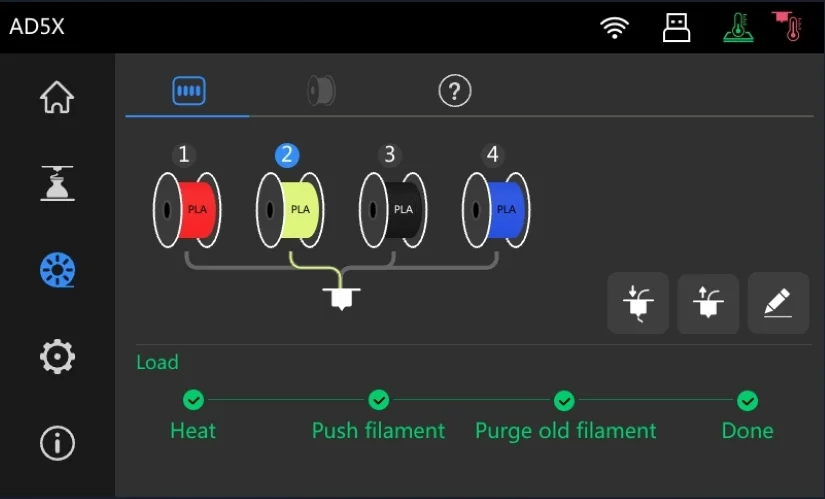
    • Load/Unload Filament: Automated, with progress steps
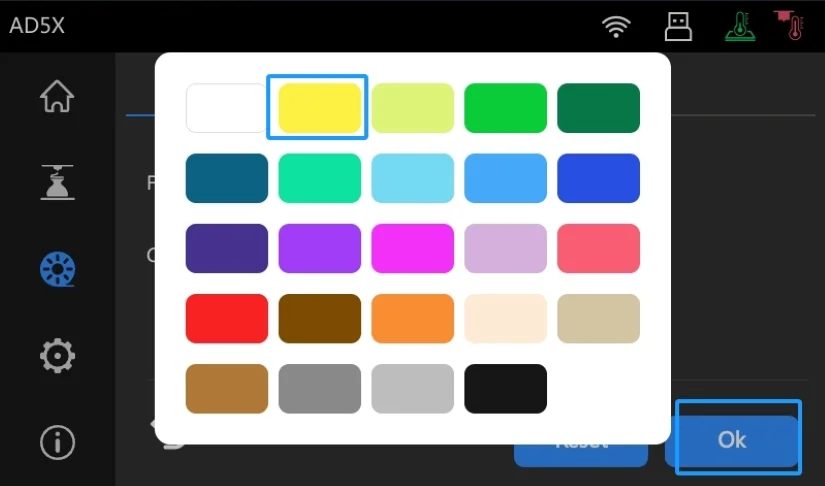
    • Edit Properties: Set material (PLA, ABS, PETG, TPU, etc.) and color from a 24-color palette
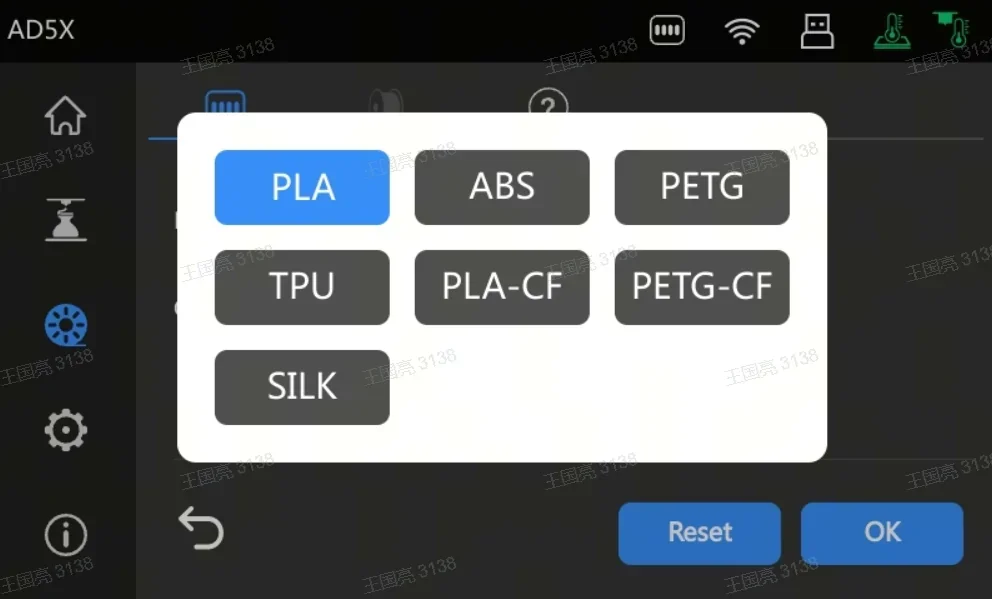


    Flashforge AD5X interface displaying a material selection menu on a digital screen. The menu lists various 3D printing filaments including PLA, ABS, PETG, TPU, PLA-CF, PETG-CF, and SILK, with PLA highlighted in blue. The bottom of the display features blue

    The display screen on the Flashforge AD5X 3D printer shows a color selection interface. The screen features a grid of 24 color options, outlined in white, with a bright yellow highlighted by a blue border indicating the current selection. The interface includes icons along the top, depicting home, Wi-Fi connectivity, USB port, and heating elements. On the left side, there are various symbols for 3D printing settings such as a gear for settings, a nozzle, and possibly filament or fan-related icons. A blue "Ok" button is visible at the bottom right, allowing users to confirm their selection. The background features a dark theme with subtle gradients, aligning with a modern tech interface.

    The display screen shows the user interface for controlling the Flashforge AD5X 3D printer. The top section features icons for navigation, including a home icon, connectivity indicators, and settings. Below is a diagram displaying four filament spools labeled 1 to 4, with the first two spools indicating "PLA" in red and green, respectively. A line connects the selected spool, number 2, to a representation of an extruder nozzle. The interface provides a loading process status at the bottom, with checks for "Heat," "Push filament," "Purge old filament," and "Done," indicating the steps required for filament loading. The design is sleek with intuitive icons and a dark theme for contrast, showcasing the printer’s multi-filament capability and ease of use.

    Settings Menu:

    Calibration:

    • Start full auto calibration
    • Checklist: Leveling, vibration, temperature

    Network Settings:

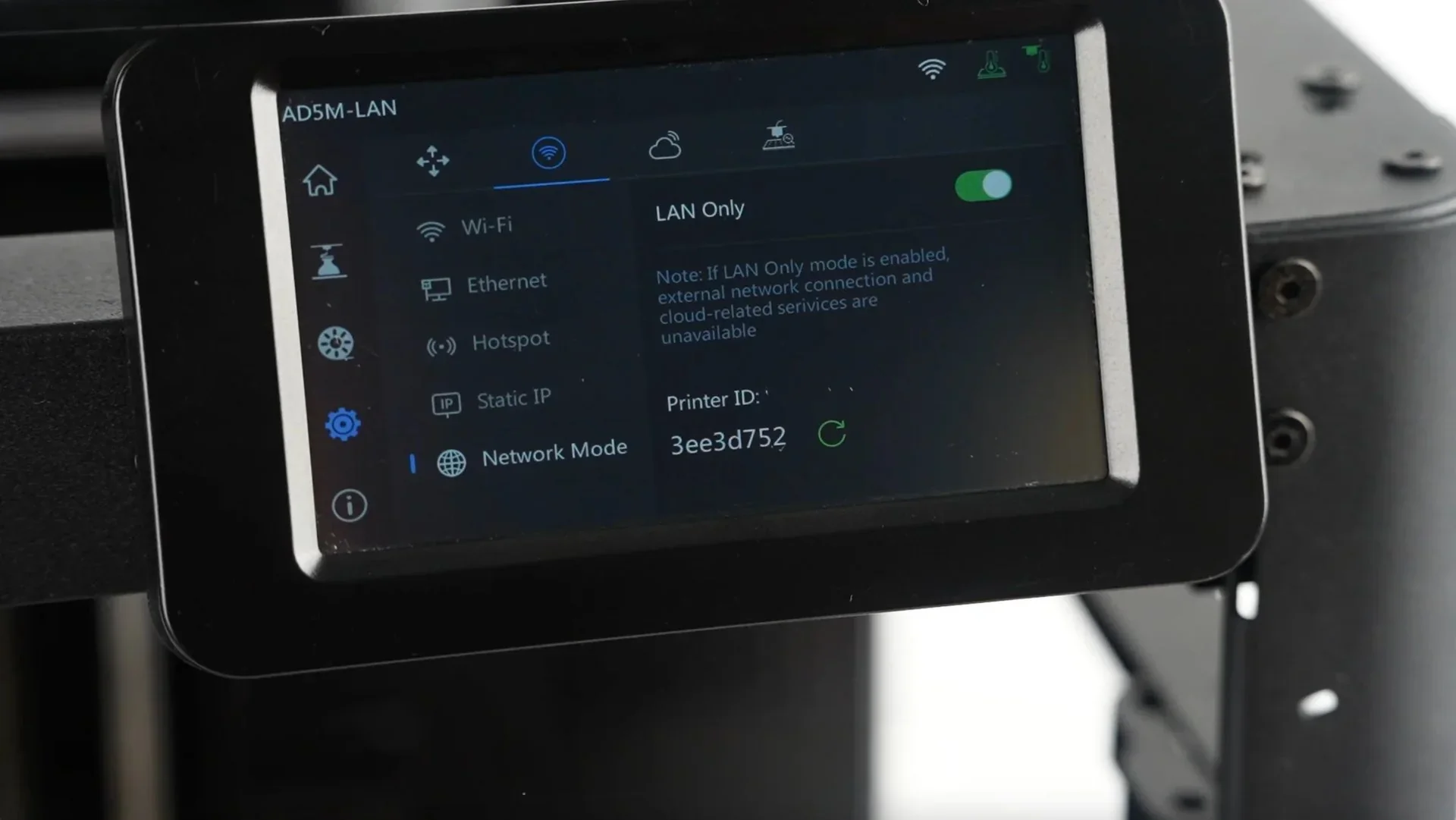
    • Wi-Fi / Ethernet / Hotspot
    • Static IP setup
    • LAN Only mode
    • Printer ID

    Timelapse Menu:

    • View recordings (camera required)

    The image showcases the control interface of a 3D printer featuring a digital display labeled

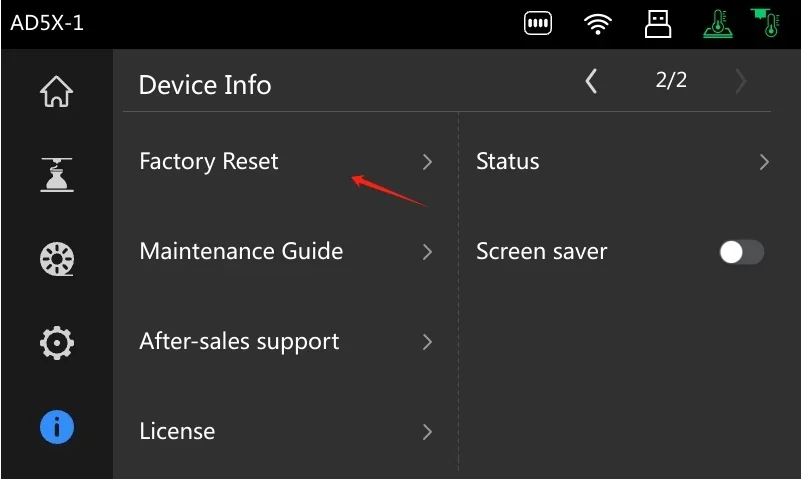
    Device Info:

    • Printer name, location, nozzle size
    • Language, firmware, IFS updates
    • Account access, log export, reset
    • Maintenance guide, support info, license, status, screensaver
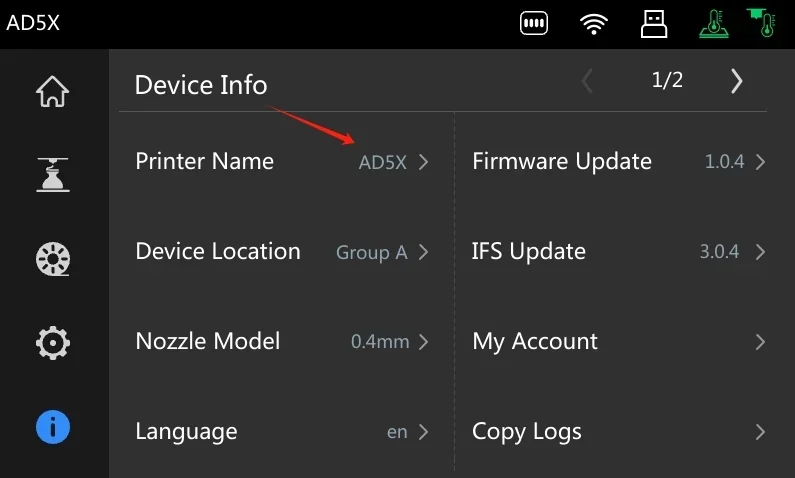
    The image displays a user interface screen for a 3D printer labeled "AD5X," resembling the Flashforge AD5X model. The interface lists detailed device information including the printer name "AD5X," device location categorized under "Group A," and a nozzle model specification at "0.4mm," indicating the nozzle diameter. Firmware update version "1.0.4" and IFS update version "3.0.4" options are visible, suggesting software management capabilities. Other options include language selection set to "en," and user account management via "My Account." Additional features for managing operational data like "Copy Logs" are also shown. Icons for navigation, home, settings, and connectivity, alongside a sleek, dark-themed design, suggest a modern, user-friendly interface tailored for efficient 3D printing operations.

    The display screen of the Flashforge AD5X shows a digital interface labeled

    What connectivity options are available on the Flashforge AD5X?

    The Flashforge AD5X offers 3 connectivity options:

    • Wi-Fi for wireless printing
    • USB port for direct PC connection
    • USB flash drive slot for standalone printing (FAT32 format supported)
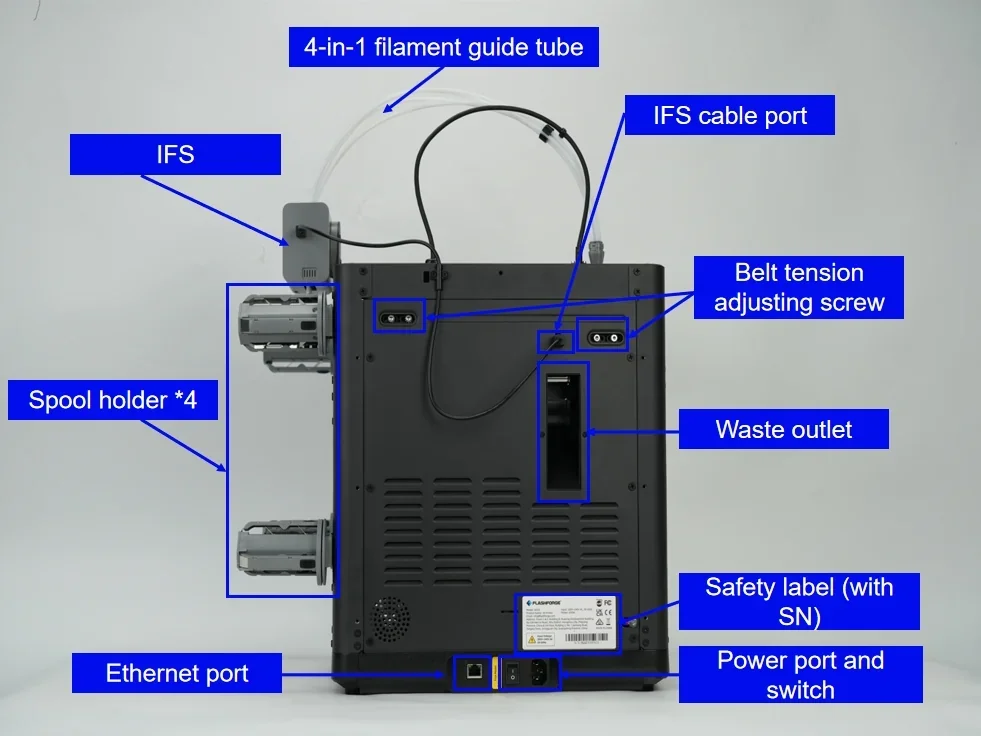
    The image shows the back view of the Flashforge AD5X 3D printer, highlighting various components and features. At the top, there is a 4-in-1 filament guide tube that facilitates filament loading. Below it is the IFS (Intelligent Filament System) module, connected via an IFS cable port. The printer includes four spool holders on the left side, accommodating multiple filament spools. A belt tension adjusting screw is present for maintaining optimal tension. The waste outlet is centrally located, providing a space for excess filament waste. At the bottom, the Ethernet port allows network connectivity. Adjacent to it, the power port and switch are visible for powering the device. A safety label with a serial number (SN) is affixed, ensuring traceability and safety compliance. The setting is a plain white background, and the Flashforge branding is subtly featured on the label.

    The AD5X integrates with Orca-Flashforge and Flash Maker software. During setup, users connect to Wi-Fi and link their Flash Maker account by scanning a QR code on the screen. This enables remote print control, job monitoring, and multi-printer management from desktop or mobile devices — ideal for home, office, or classroom use.


    What software is offered with the Flashforge AD5X?

    The Flashforge AD5X uses Orca-Flashforge, a customized version of OrcaSlicer optimized for Flashforge printers. It features an intuitive interface, smart slicing tools, object exclusion for failed prints, and streamlined multi-color print setup.

    The AD5X supports standard file formats like G-code and 3MF, automatically mapping model colors to the four IFS channels. Users can also print directly from FAT32 USB drives, providing flexibility in offline environments.

    Full user manual: https://wiki.flashforge.com/en/Orca-Flashforge-and-Flashmaker/orca-flashforge-quick-start-guide


    What is the design and build quality of the Flashforge AD5X?

    What is the design and form factor of the Flashforge AD5X?

    The Flashforge AD5X has a compact, cube-shaped open-frame design for easy access. The base measures 363 × 376 × 413 mm (14.29 × 14.8 × 16.26 inches) and the fully assembled printer measures 363 × 402 × 448 mm (14.29 × 15.83 × 17.64 inches), weighing 11.4 kg (25.13 lbs) net and 14.2 kg (31.31 lbs) gross.

    While the open-frame improves usability and reduces cost, it lacks an enclosed chamber, limiting performance with high-shrinkage materials. The four-color IFS module integrates cleanly, saving space.
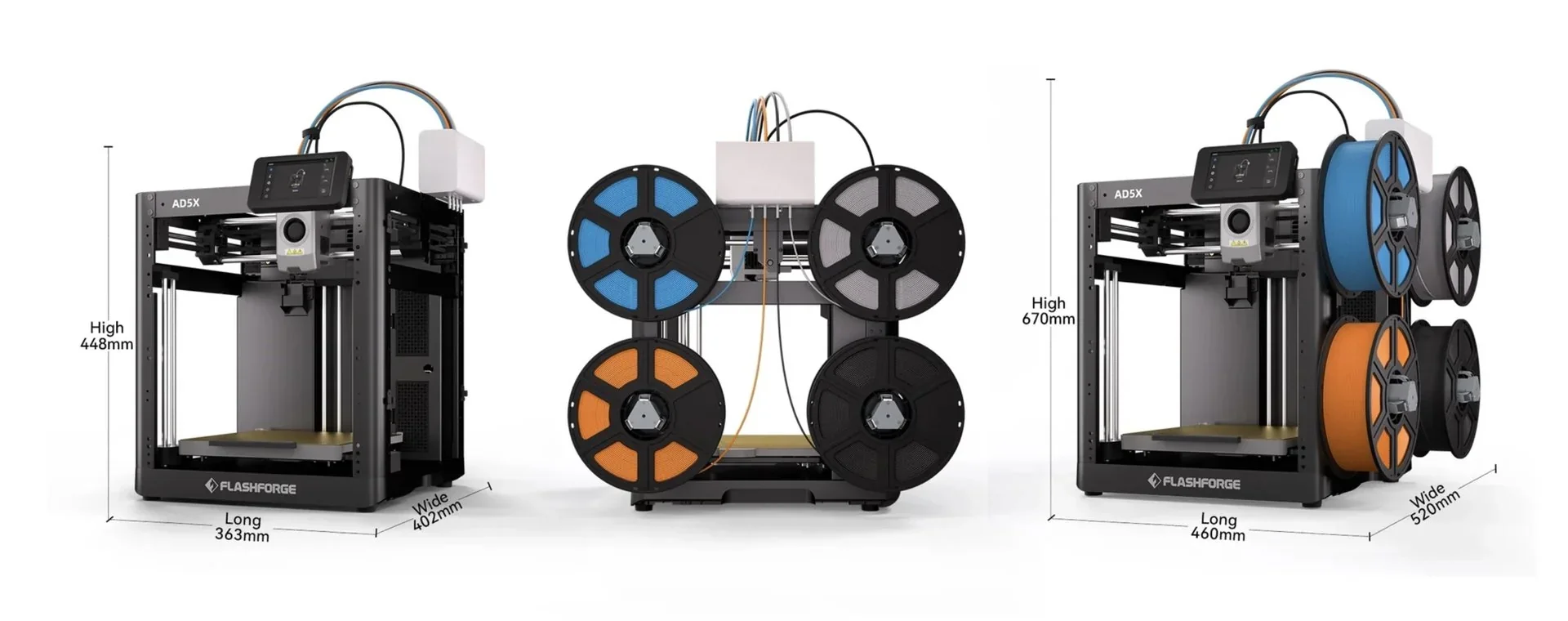
    The image showcases three Flashforge AD5X 3D printers from different angles, highlighting their structure and capabilities. Each printer is equipped with a sturdy, open-frame design featuring a black metal chassis. Visible components include a top-mounted touchscreen display for easy navigation and control, along with a nozzle mounted on a horizontal bar for precision printing. The AD5X models prominently display multiple filament holders mounted on the sides, containing colorful spools in blue, orange, and black, indicating the ability to handle multi-filament printing projects. Dimensions are labeled next to each printer: one model stands at 448 mm high with base dimensions of 363 mm by 402 mm, while another measures 670 mm high with a base of 460 mm by 550 mm. The brand name "Flashforge" is clearly displayed at the base of each printer. This detailed composition suggests the AD5X as a versatile 3D printing solution suitable for complex prototyping and manufacturing tasks.

    What is the motion system of the Flashforge AD5X?

    The Flashforge AD5X uses a CoreXY motion system with two motors controlling the X and Y axes — moving in the same direction for X-axis motion and opposite for Y. Linear rods and bearings on all axes ensure consistent movement.
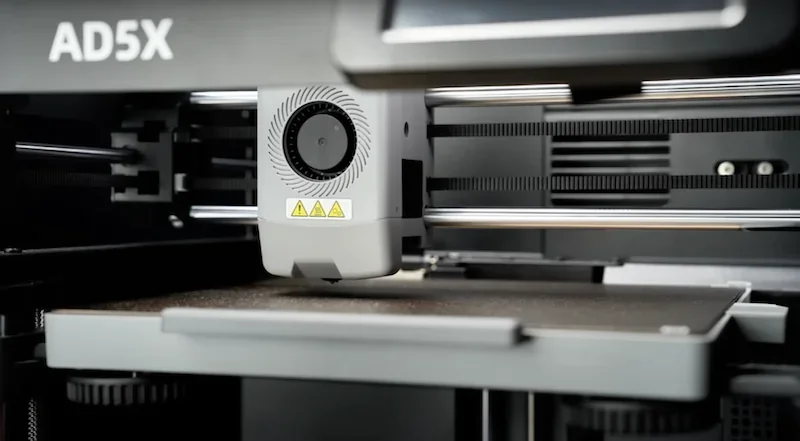
    The Flashforge AD5X 3D printer is shown in a close-up view, highlighting its advanced printing head and mechanical components. The machine's branding

    The Z-axis uses dual rods and a lead screw driven by a motor.
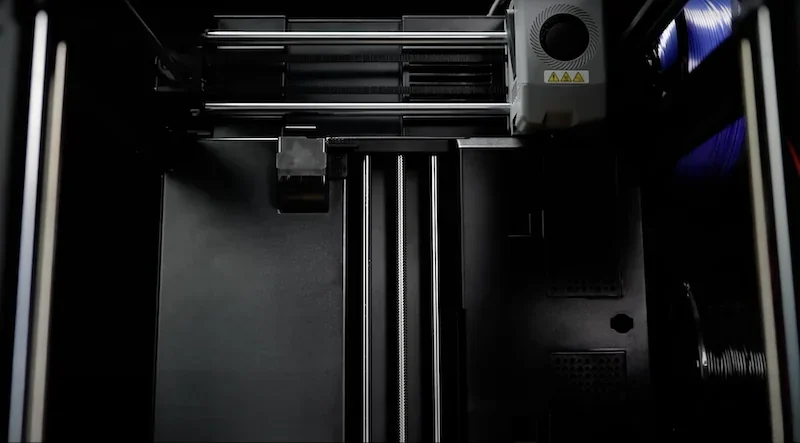
    Top-down view of the interior workings of a 3D printer, potentially the Flashforge AD5X model, showing its technical components. The image highlights the printer's build platform and dual linear rails that guide the print head for precision movement. Visible is the print head, equipped with warning labels, indicating its operational safety measures. Filament spools are placed on the right side, suggesting material supply areas. The environment is enclosed, with dark panels and metal structures, emphasizing the robust and technical design typical of professional-grade 3D printers. No branding or logos are visible in the image.

    High-quality stepper motors power the classic Core XY structure, with two 28-type motors supporting the Intelligent Filament System (IFS).
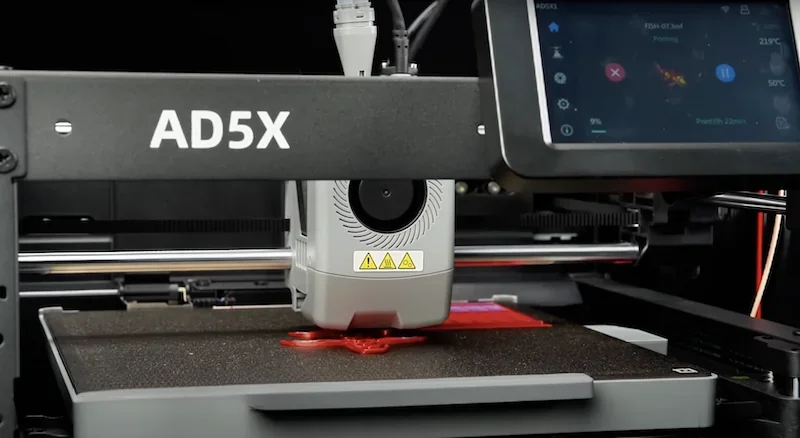
    The image showcases the Flashforge AD5X 3D printer. The main body of the printer is visible, featuring a sleek, industrial design with the product name

    What are the build platform specifications of the Flashforge AD5X?

    The Flashforge AD5X 3D printer has a 220 × 220 × 220 mm heated build platform (10.65L volume) with a removable PEI-coated flexible steel sheet on a heated aluminum bed. It reaches 110°C, supporting materials like PLA, PETG, and TPU.
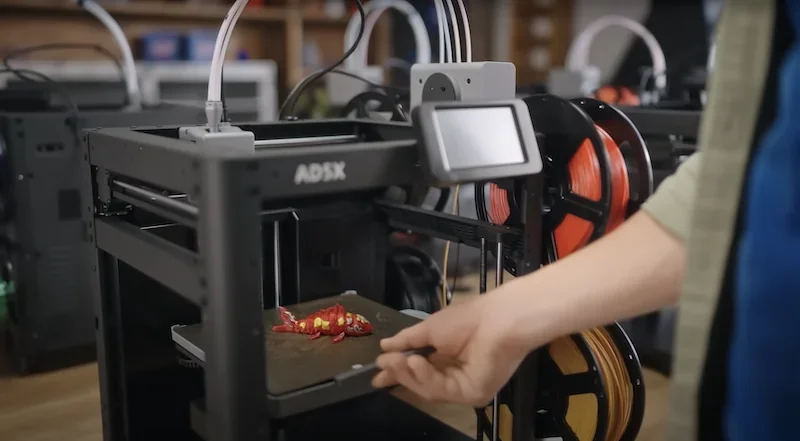
    The image showcases the Flashforge AD5X 3D printer prominently in a workshop setting. A black, sturdy frame supports the printer's open design, allowing clear visibility of the printing area. The printer is in the process of creating a detailed, colorful dragon-like figurine, with visible red and yellow segments, using its advanced printing capabilities. Located on the side of the printer is a touch screen interface for user interaction. Behind the touch screen, multiple spools of filament in various colors, including orange and yellow, are mounted on the side, indicating the printer's multi-material capability. The surrounding workshop environment features shelves and other printers, suggesting a professional or educational setting. The branding

    The flexible sheet enables easy, tool-free print removal.
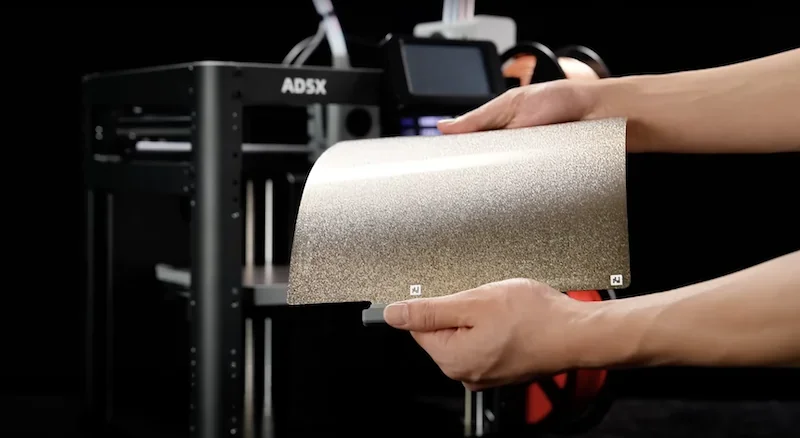
    The image showcases a Flashforge AD5X 3D printer in a dimly lit setting with a focus on a textured, flexible build plate held by two hands in the foreground. The printer is visible in the background, featuring a robust frame with a metallic finish and prominent branding displaying

    A built-in pressure sensor provides automatic Z-axis calibration and bed leveling for consistent first-layer adhesion.
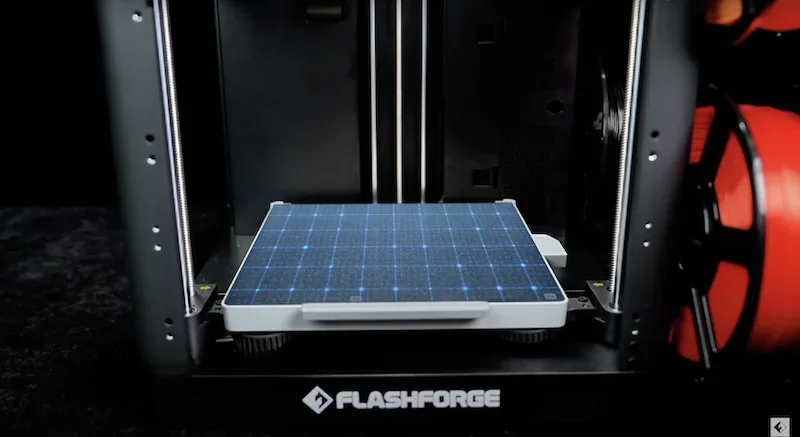
    The image shows the Flashforge AD5X 3D printer with the main focus on its build platform, which features a blue grid pattern for precise alignment and measurements. The printer's open frame design reveals dual vertical guide rods on either side for stability and accurate movement of the print head. The Flashforge branding is prominently displayed on the front base of the printer. Spools of red filament are visible to the side, emphasizing the printer’s capability to handle versatile printing materials. The setting is likely a studio or tech workshop, highlighted by a dark background that contrasts with the illuminated printer components.

    What is the hotend and extruder system of the Flashforge AD5X?

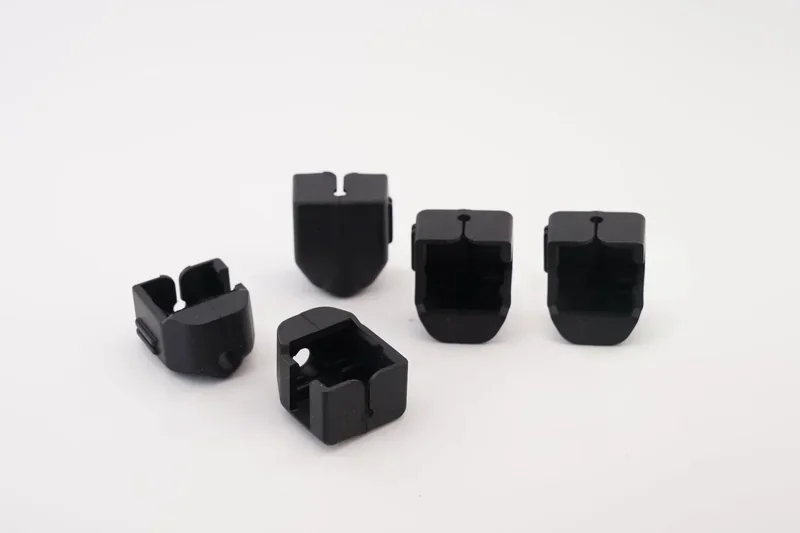
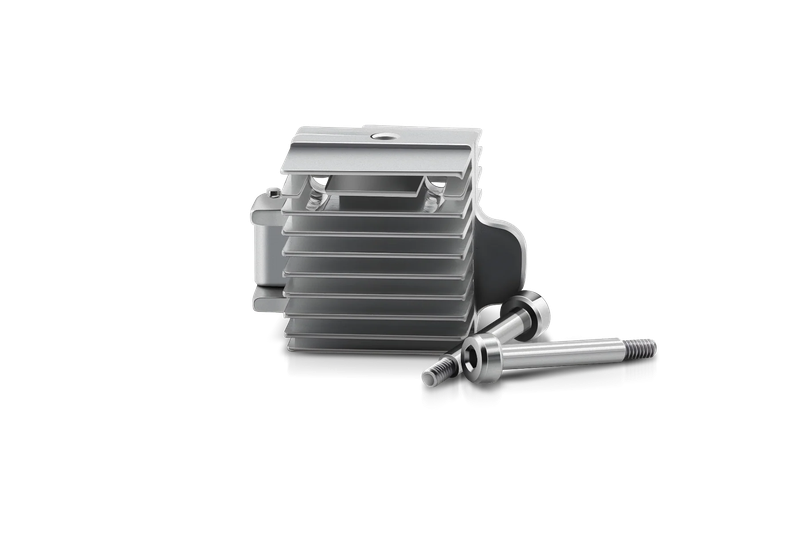
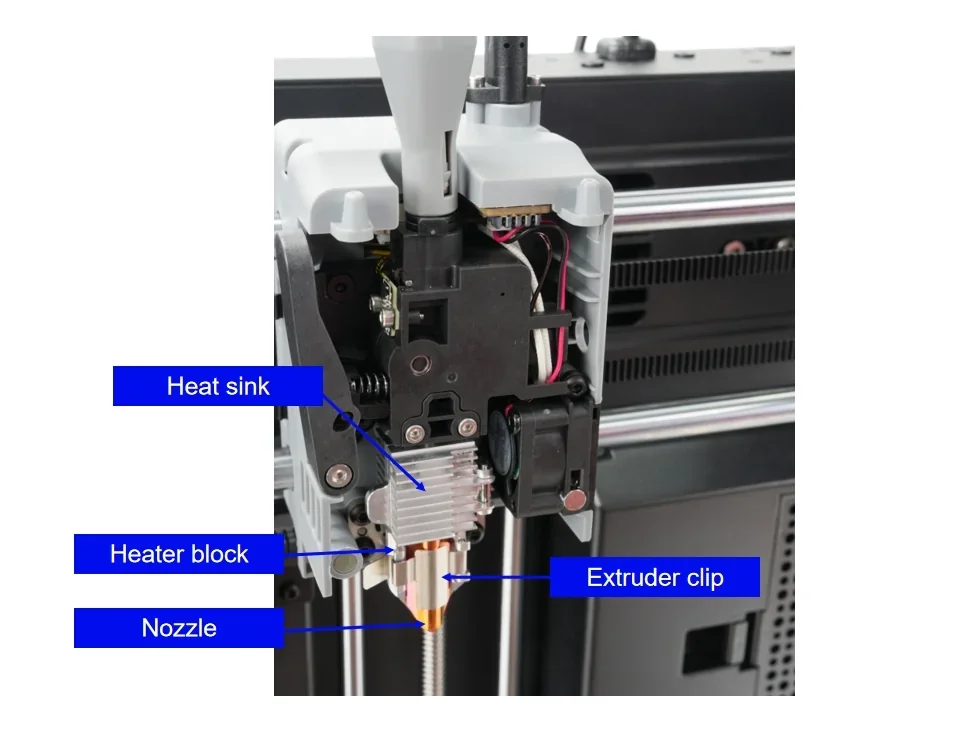
    The Flashforge AD5X uses a single direct-drive extruder that integrates the hotend, cooling fan, cutter module, filament sensor, heat sink, and nozzle, with a clip for tool-free nozzle changes.
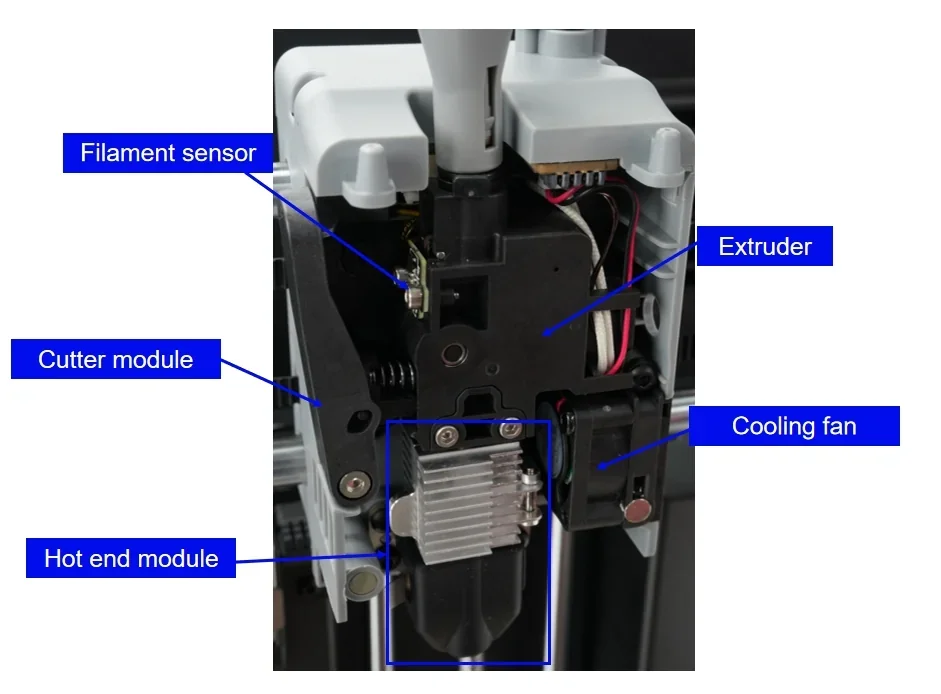
    In a close-up view of the 3D printing components of the Flashforge AD5X, various key parts are labeled for clarity. Positioned prominently at the center, the extruder is highlighted, responsible for feeding filament into the printer. Above the extruder, the filament sensor is visible, designed to detect the presence or absence of filament to prevent printing interruptions. To the side, a cutter module is shown, likely used for trimming and handling the filament efficiently. The hot end module is situated below, its purpose being to melt the filament for layering during the printing process. Adjacent to the extruder, a cooling fan is clearly marked, crucial for cooling the printed material and preventing warping. The overall layout appears technical and precise, ensuring smooth operation and quality print results. The image serves as a detailed guide, helping users understand the key components and functionality of the Flashforge AD5X 3D printer.

    Close-up view of the Flashforge AD5X 3D printer's extruder mechanism, highlighting its detailed technical components. The extruder comprises a heat sink, labeled in blue text, positioned above a metallic heater block. Below the heater block is the nozzle, designed for precise filament extrusion. An extruder clip is also visible, securing the components. The assemblage appears robust, with visible wiring and connectors, emphasizing the printer's sophisticated construction. The setting is an industrial or workshop environment, and the focus is on the detailed engineering of the extruder, showcasing the Flashforge AD5X’s advanced printing capabilities.

    The hotend reaches 300°C, supporting materials from PLA to engineering-grade filaments.
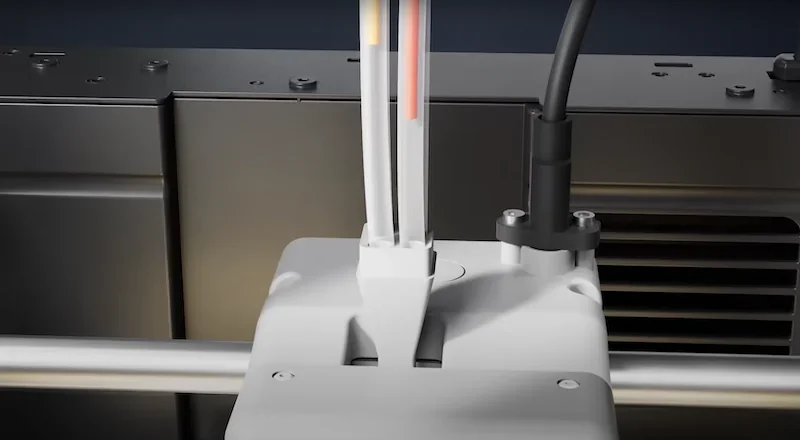
    The image shows a close-up view of the Flashforge AD5X 3D printer, focusing on the extruder mechanism. The extruder is encased in a sleek, white housing with visible wiring that feeds filament through a set of guiding tubes. The setup is mounted on a metallic rod suggesting precise movement capabilities, possibly along the X-axis, indicative of the printer's ability to perform detailed print operations. The surrounding area features a black metal casing with ventilation slots, suggesting a well-structured cooling system. The environment appears to be an industrial or workshop setting, emphasizing the printer's professional-grade capabilities. No specific branding is visible on the displayed components.

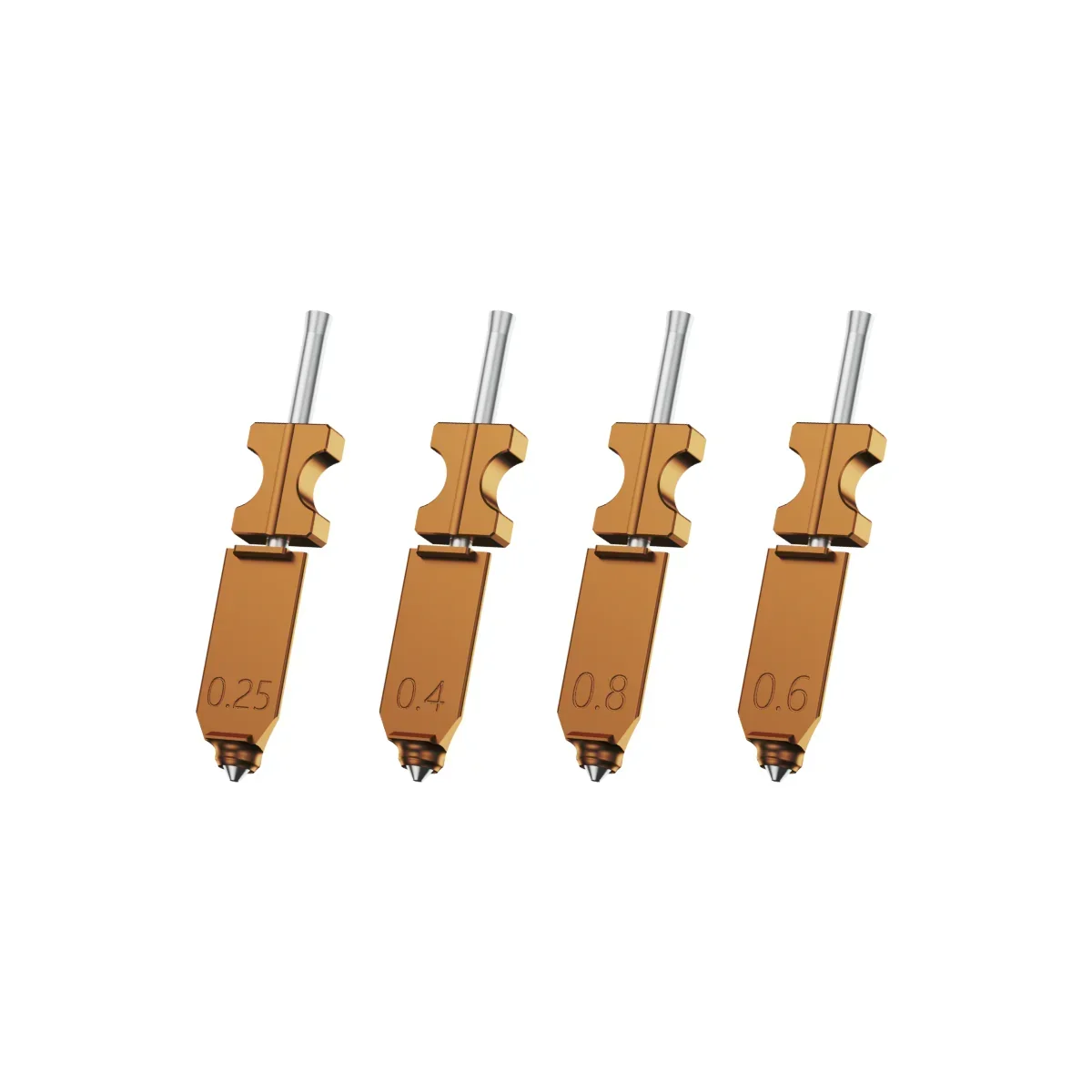
    The default 0.4 mm nozzle can be swapped for 0.25, 0.6, or 0.8 mm variants without tools, cutting maintenance costs by 30%.
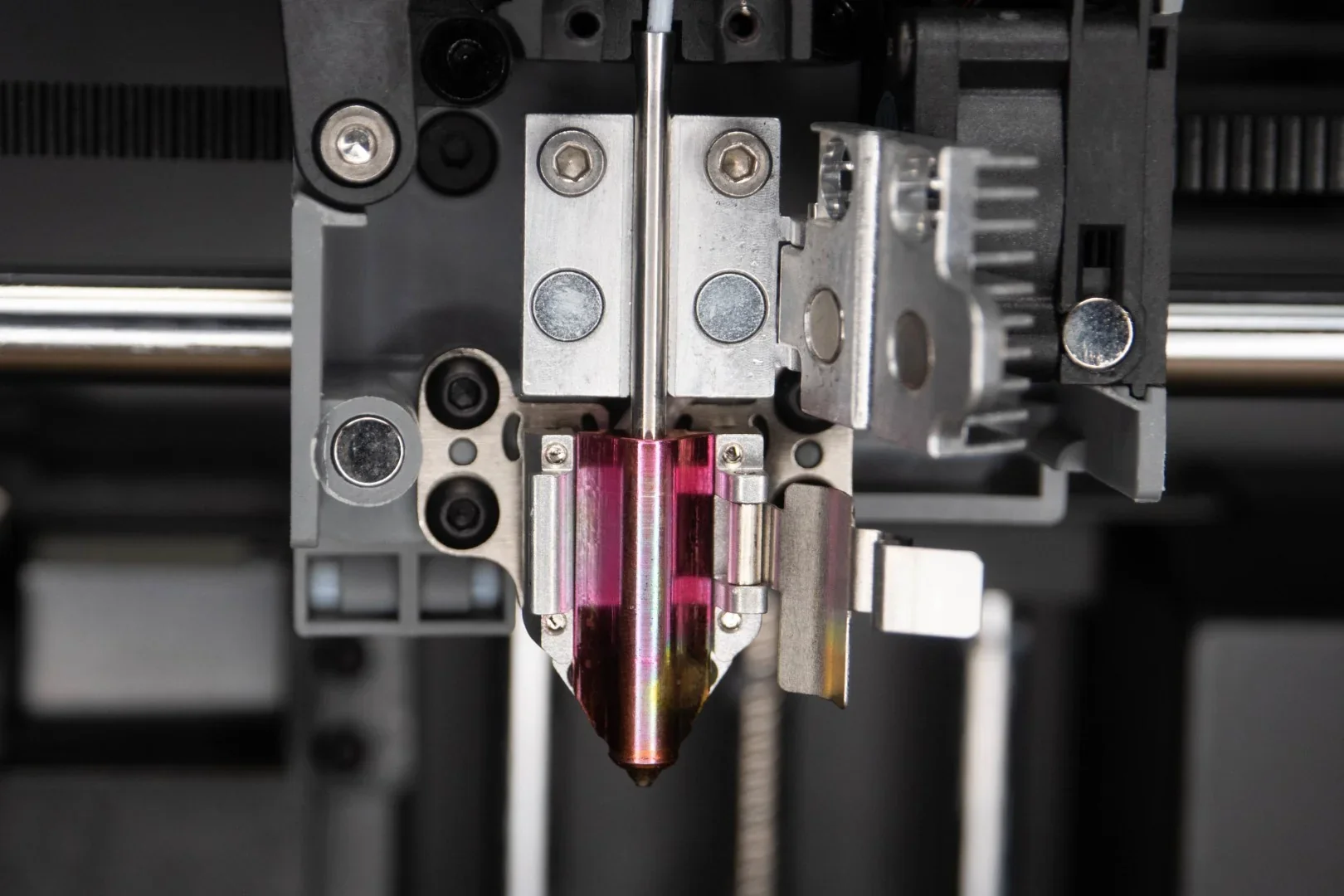
    Close-up view of the extruder assembly of a 3D printer, potentially from the Flashforge line. The image prominently features the metallic nozzle and heater block surrounded by a vibrant magenta-tinted heat break, indicating advanced thermal regulation technology. The assembly includes several precise components like cooling fins for heat dissipation, secured with multiple screws and bolts for stability. Visible linear motion components hint at accurate, smooth movement capabilities, possibly associated with the Flashforge AD5X model. The detailed and clean arrangement of metallic elements within an industrial gray frame suggests a professional-grade printer designed for high-quality outputs. The setting implies a technical environment, emphasizing durability and precision in 3D printing applications.

    Four interchangeable 3D printer nozzles designed for the FlashForge AD5X are arranged in a line. Each nozzle is composed of a metallic upper section, with a flat, dark gold finish, and features a thin, silver shaft extending upwards. The nozzles are marked with different diameter measurements: 0.25, 0.4, 0.8, and 0.6, indicating the nozzle opening size for varying levels of detail and speed in printing. The nozzles exhibit precise manufacturing with a sleek, polished look, illustrating their suitability for creating detailed 3D prints with the FlashForge AD5X. The background is plain white, emphasizing the technical components' features and craftsmanship.

    Dual-sided cooling ducts improve part cooling, while an automatic nozzle cleaning system purges material during color changes to prevent bleeding.
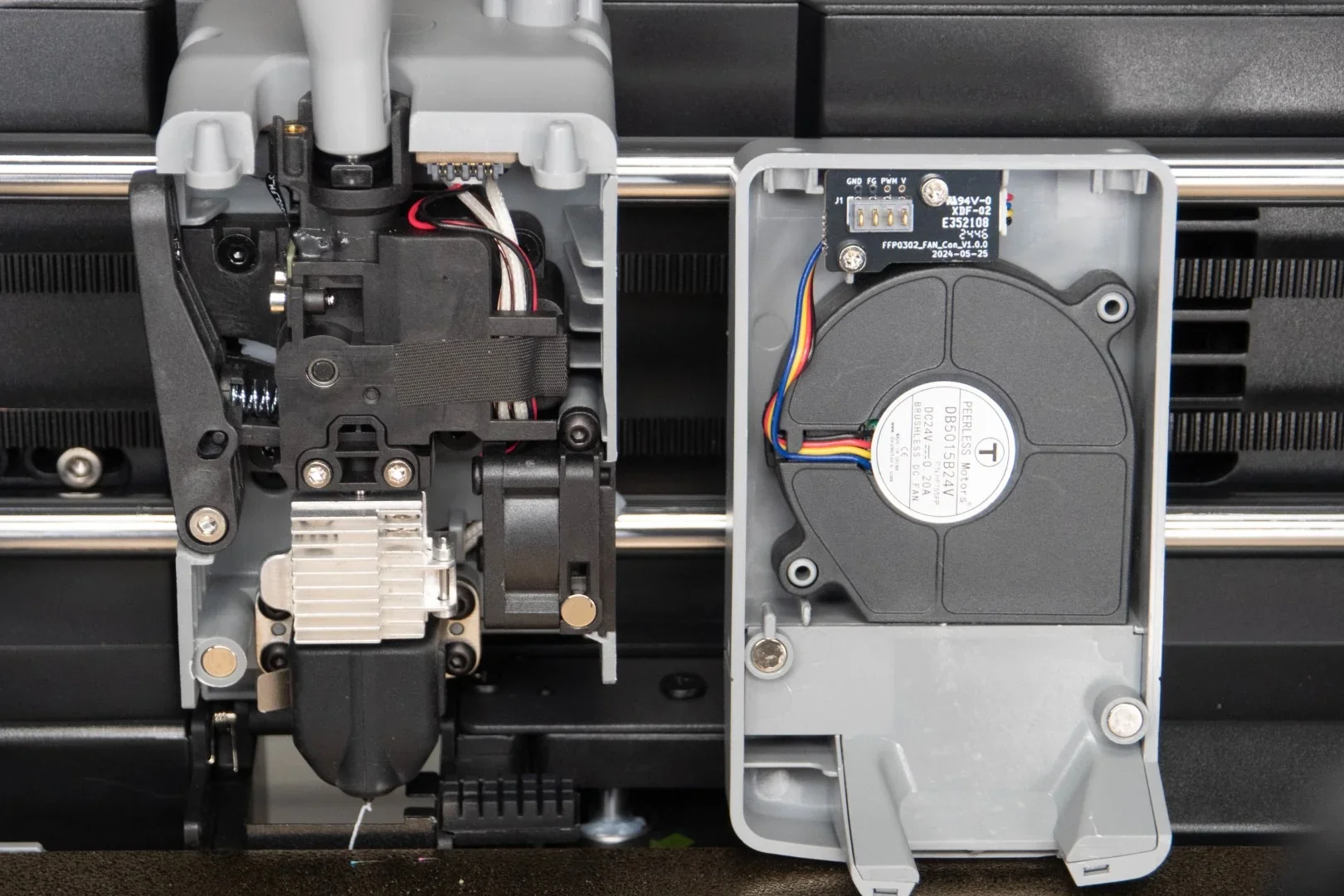
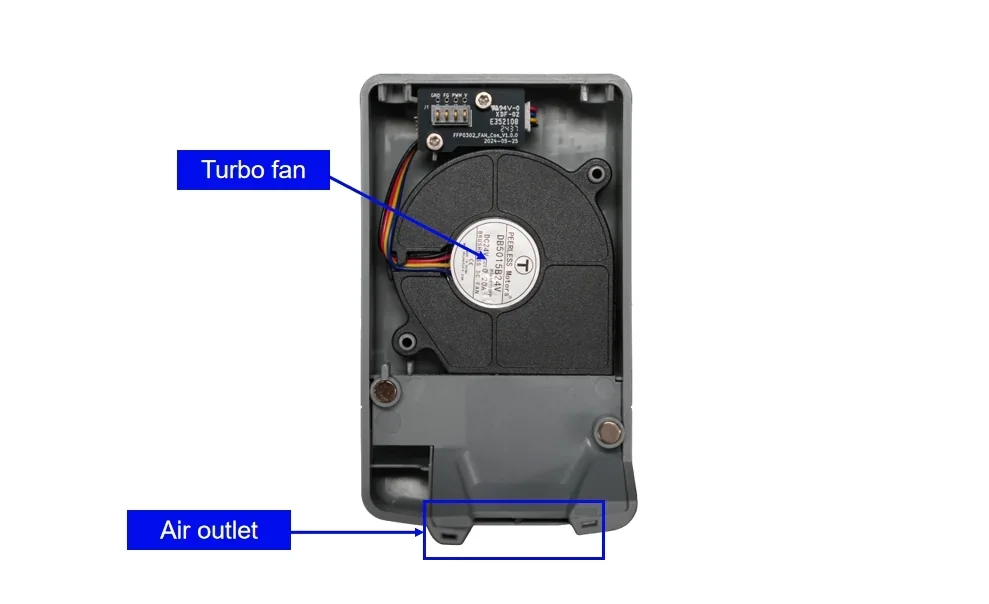
    The image shows a close-up view of the internal components of the Flashforge AD5X 3D printer. On the left side, the extruder assembly includes a metal heat sink and multiple bolts, showcasing its mechanical design. Electrical wiring is visible, indicating connections for power and control between components. On the right, the cover is open to reveal a cooling fan system with multicolored wires connected to a circuit board. The setting appears to be a technical workbench, with a focus on the mechanical and electronic aspects of the printer. The environment suggests maintenance or assembly, with clear visibility of the printer's integrated parts.

    A close-up view of a component identified as a

    A retractable cleaning mechanism and waste collector support seamless multi-color printing.
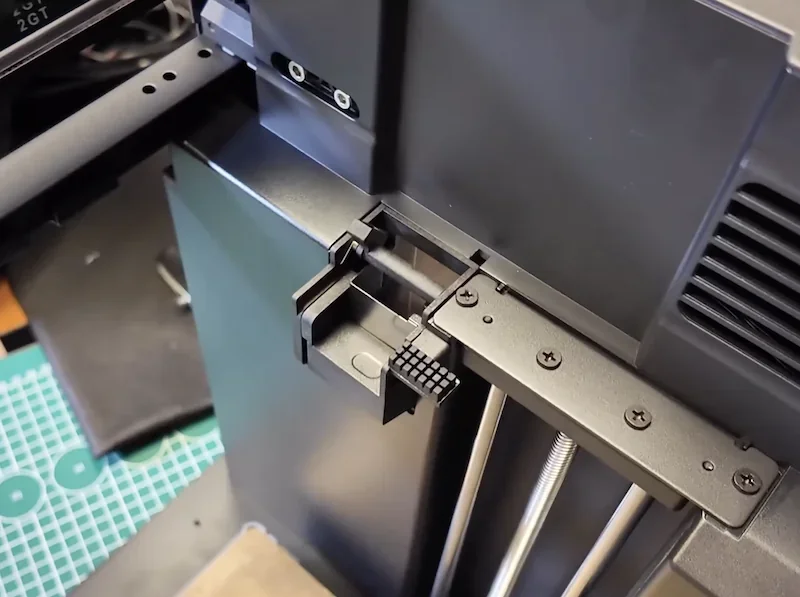
    Close-up view of a 3D printer, displaying a part that is possibly a component or accessory related to the Flashforge AD5X. The image focuses on a section of the printer's frame, highlighting a black plastic bracket with a textured surface detail. This bracket is mounted on a metal rod supported by a set of vertical metal bars, secured with several screws. Adjacent to the bracket, a smooth matte-black surface with vent-like cutouts can be seen on the printer's body, indicating potential ventilation for cooling. The setting includes a portion of a workspace with a cutting mat in the background, suggesting a technical or industrial environment where 3D printing assembly or maintenance is performed.

    A transparent plastic bag filled with small, multicolored filament scraps, possibly remnants from 3D printing activities, rests on an electronic kitchen scale. The scale displays the number "29," indicating the weight of the contents in grams. The setting shows a wooden surface, emphasizing a home or workshop environment. The plastic bag is sealed with a red ziplock closure, while the filament pieces inside include shades of blue, red, yellow, and gray, suggesting a variety of materials used in 3D printing processes. No visible branding or specific reference to the Flashforge ad5x printer is visible in the scene.

    How does the Flashforge AD5X handle filament storage and feeding?

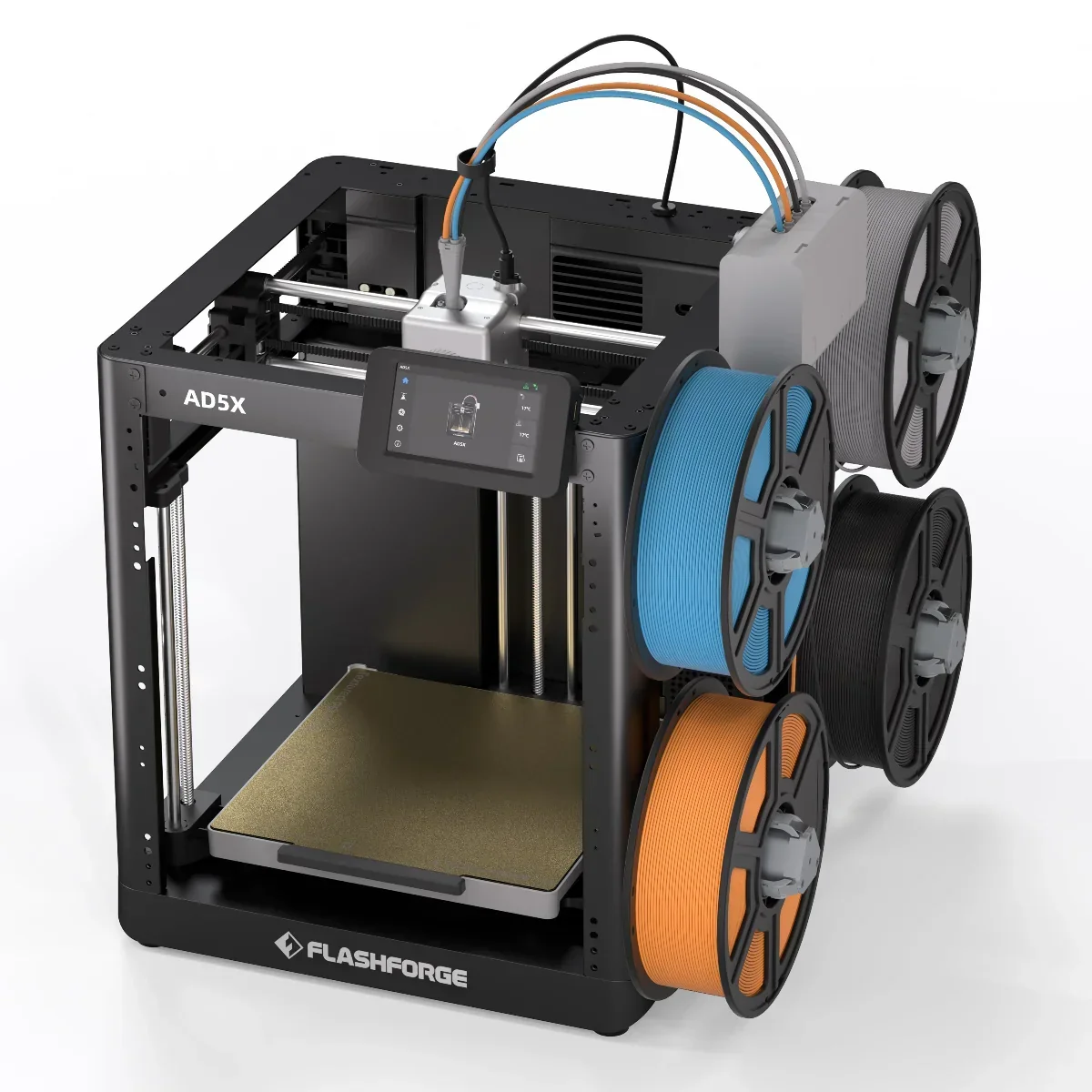
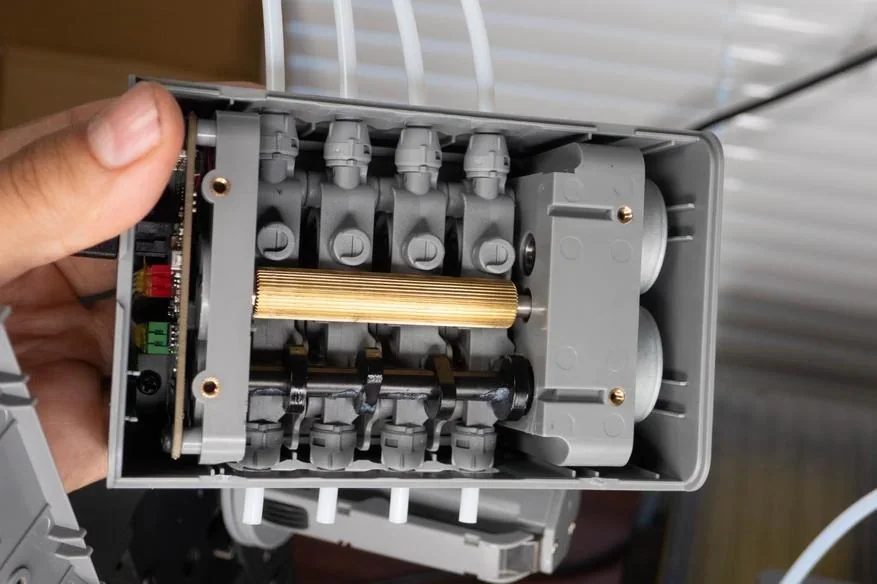
    The Flashforge AD5X's Intelligent Filament System (IFS) is a compact multi-color printing module that controls four independent channels for automated multi-color printing. Numbered, side-mounted spool holders arranged side by side save space and offer easy access, with spring-loaded mechanisms to prevent tangling.
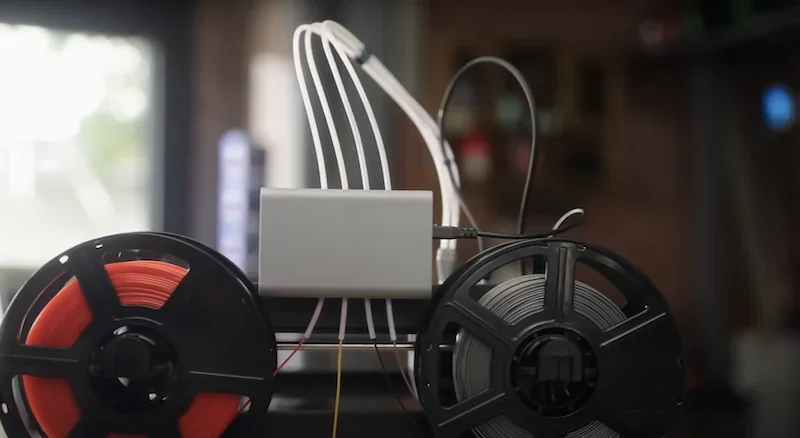
    A dual-spool filament holder setup is shown, likely for use with a 3D printer such as the Flashforge AD5X. On the left, a black spool holds bright red filament, while on the right, another black spool contains gray filament. Between the spools, a rectangular metal extrusion housing connects to several white filament guide tubes, curving upwards, suggesting a multi-filament printing capability possibly for color or material variation. Multiple connecting cables and tubes signify a complex setup for advanced 3D printing tasks. The background is a blurred workshop or studio environment with various tools and equipment, contributing to a technical and creative setting. The image does not explicitly show the Flashforge AD5X printer itself but indicates an accessory or component that could be associated with it.

    A close-up view of a detailed 3D-printed mechanical part, possibly created by the Flashforge Adventurer 5X. The part resembles a small, detailed engine or motor component, featuring multiple cylinders aligned in a row. The structure is primarily gray with intricate detailing, including a gold-colored rod at the center. Behind the cylinders, there are visible circuit board components with green and red elements. The piece is being held by a hand, indicating its relatively compact size. The background includes slight glimpses of additional mechanical components and a vertical stack of white, tube-like elements. The setting appears to be a well-lit workspace, possibly indicating an environment focused on mechanical engineering or 3D printing technology.

    The IFS auto-detects filament, enables automatic filament feeding and retraction, handles loading and color transitions while reducing the time the material is switched, and monitors flow to detect clogs or runout. For single-color prints, it can switch between spools of the same material for uninterrupted printing.


    What is the mainboard of the Flashforge AD5X?

    The Flashforge AD5X runs on a dual-core Cortex-A53 mainboard with 8 GB storage and supports 2.4G/5G Wi-Fi for wireless printing and remote monitoring. Silent stepper drivers reduce noise while maintaining precision. The control system manages temperature, motion, filament monitoring, and auto-calibration, with support for over-the-air updates and Flashforge’s cloud platform.
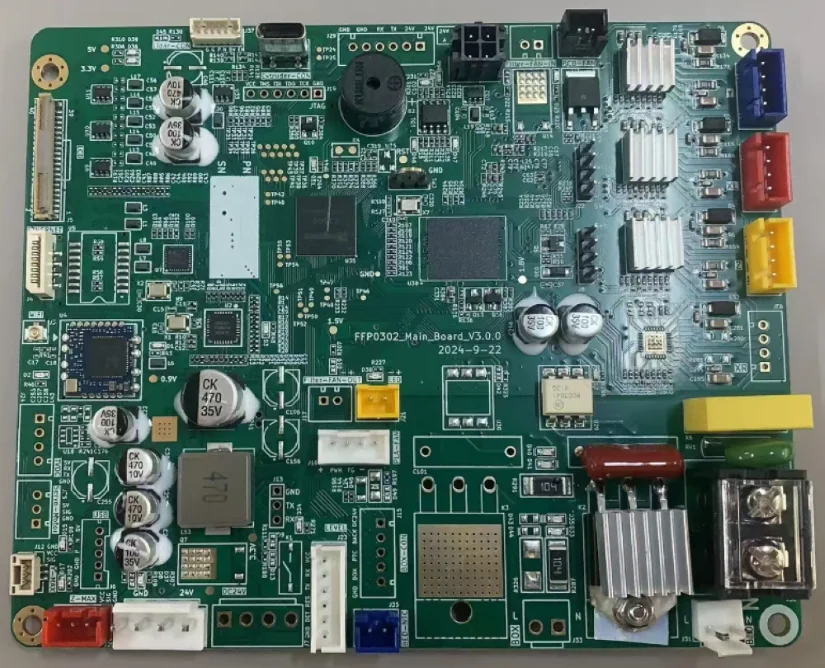
    A detailed view of a 3D printer main board, possibly for the Flashforge AD5X. The circuit board is densely packed with components, featuring multiple capacitors marked with values like "CK 470 35V" and "CK 10V." Integrated circuits of various sizes are centrally positioned, surrounded by connectors and headers for interfacing with other machine parts. There are heat sinks visible on the board, suggesting areas that manage thermal regulation. The PCB is labeled "FPP032_Main_Board_v3.0.0" with a date code of "2024-9-22." The layout includes various power connectors and interface ports, including color-coded terminal blocks and molex connectors, likely used for stepper motor connections and other peripheral components essential for 3D printer operation. The board color is a standard green, with white silkscreen markings detailing the board’s circuitry paths and components placement.

    What are the power supply specifications of the Flashforge AD5X?

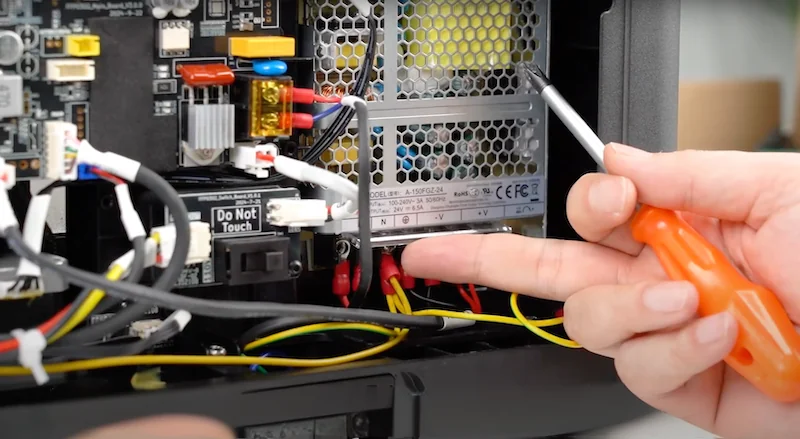
    The Flashforge AD5X operates on AC 100–240V at 50/60 Hz with a 650W power supply, compatible with global voltage standards. Its power capacity supports simultaneous heating of the extruder (up to 300°C), heated bed (110°C), and electronics during high-speed printing.
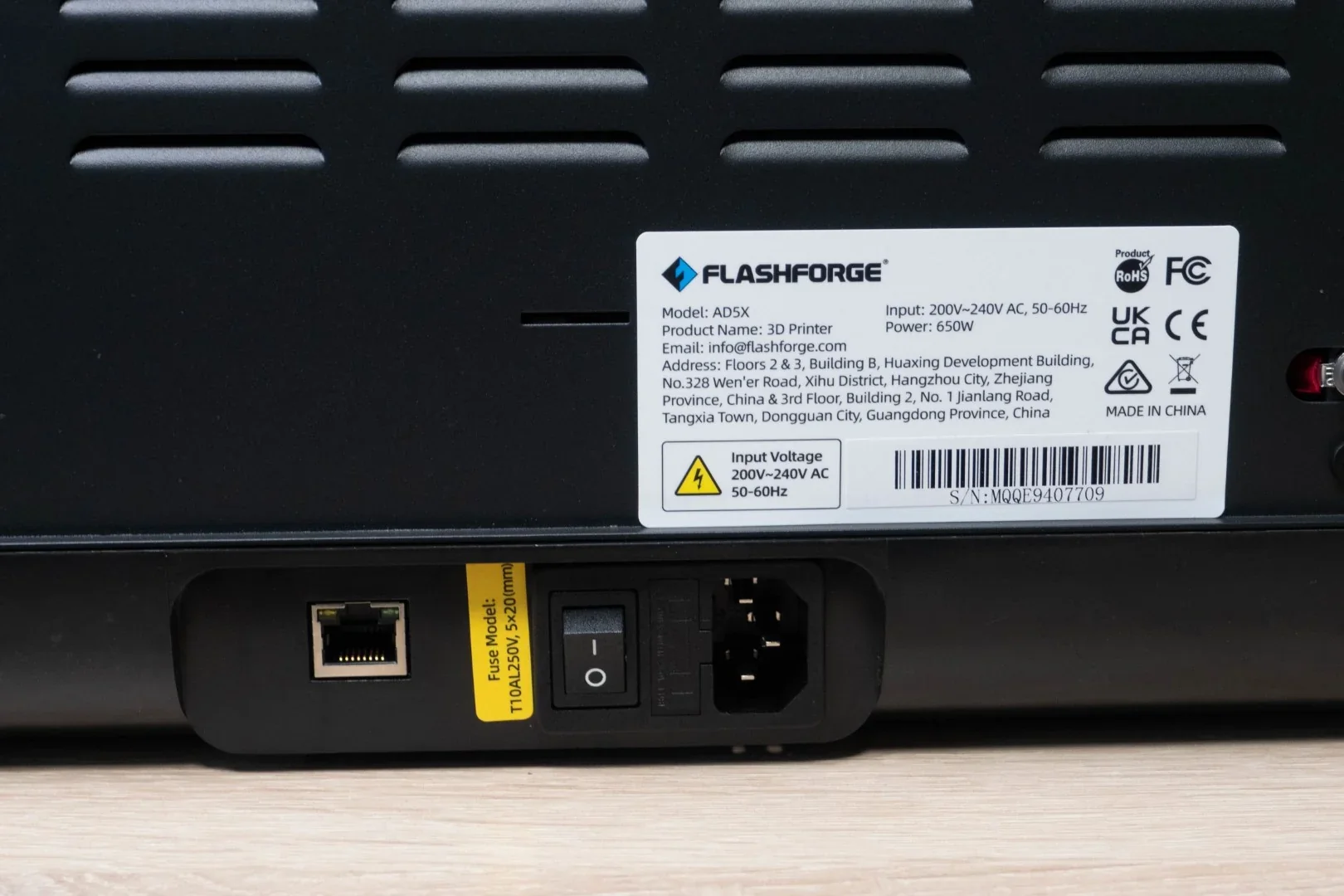
    The image shows the back panel of the Flashforge AD5X 3D printer, featuring a black casing with horizontal ventilation slits. A prominent label displays the Flashforge logo, model name

    The image depicts a close-up view of the internal components of a Flashforge 3D printer model, specifically focusing on the power supply and wiring system. Visible within the open compartment are multiple colored wires, including yellow, red, and black, which are securely connected to various ports. A hand holding an orange-handled screwdriver is prominently positioned near these connections, suggesting maintenance or assembly in progress. A silver, metal mesh vent allows visibility into the interior while ensuring ventilation. Nearby, a circuit board equipped with colorful components, including resistors and a labeled "Do Not Touch" switch, emphasizes the complex electronic systems integral to 3D printer operation. No external branding of the Flashforge AD5X is visible, but the setup suggests a high level of technical detail associated with modern 3D printing hardware.

    What comes included in the box with Flashforge AD5X?

    What's Included in the Box:

    • 1× 3D Printer
    • 4× Filament 10g
    • 1× Power Cord
    • 1× After-sales Service Card
    • 1× IFS Connection Cable
    • 1× Quick Start Guide
    • 1× Display Screen
    • 1× Grease
    • 4× Spool Holder
    • 1× 4-in-1 Guide Tube
    • 1× Mounting Plate
    • 1× 4-Color Module (IFS)
    • 4× Screw M3×6
    • 1× Cable Clip
    • 1× Glue
    • 1× Allen Wrench
    • 1× Diagonal Pliers
    • 1× Unclogging Pin Tool
    • 1× Phillips Screwdriver

    The Flashforge AD5X comes partially assembled, requiring installation of the touchscreen, filament holder, and 4-color IFS module. Setup takes 15–20 minutes. The PEI-coated steel build plate offers strong adhesion and easy print removal. The pre-configured IFS enables automatic filament detection, loading, and multi-color printing.

    Please Note: Package contents are determined by the manufacturer and may change without notice. To confirm the current items included with this product, please contact a Flashforge sales representative before placing your order.
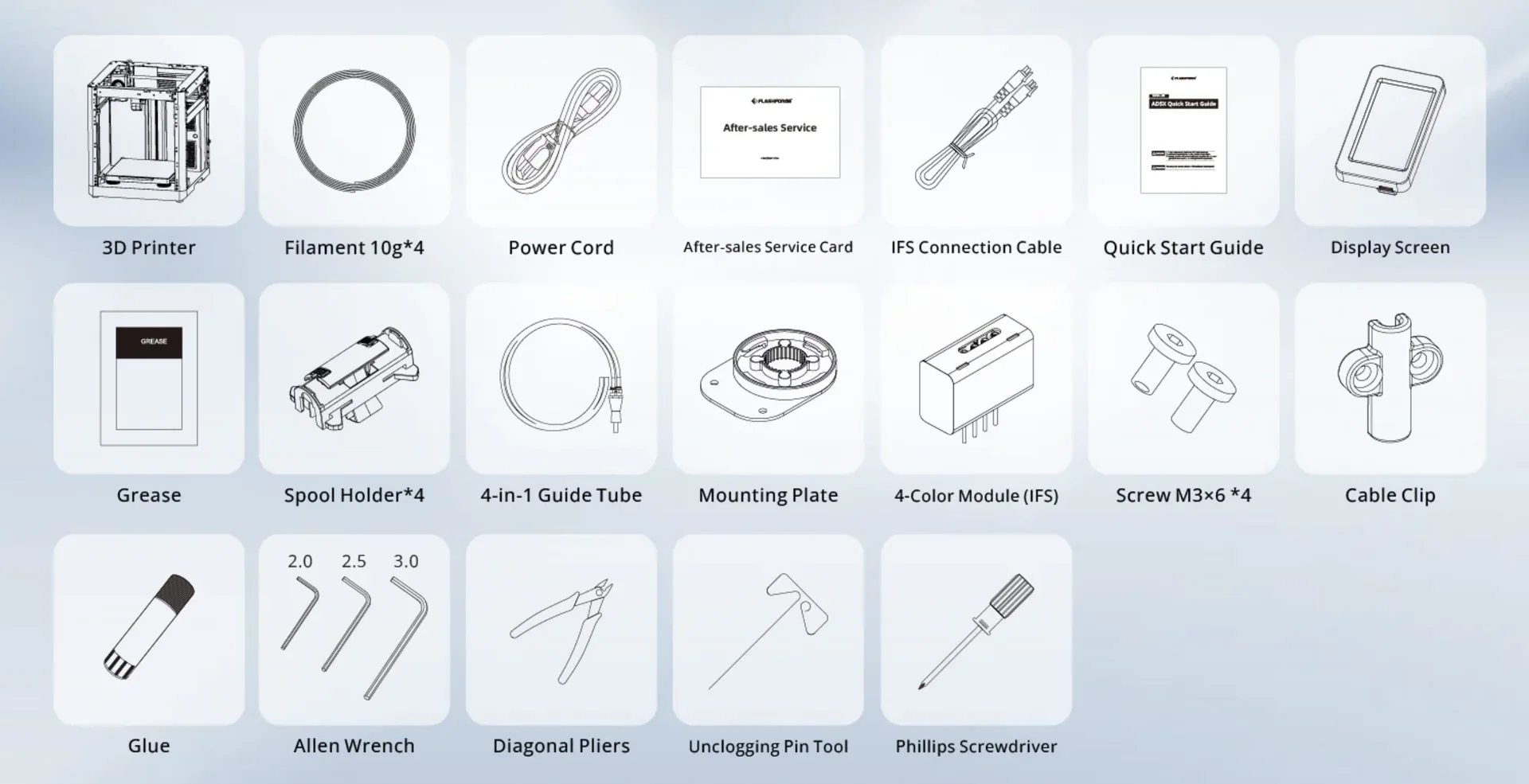
    A diagram displays the comprehensive components and accessories included with the Flashforge Adventurer 5X 3D printer. The grid layout showcases each item with a simplistic line drawing and label. The components include the 3D Printer unit itself, four 10g packs of filament, a power cord, an after-sales service card, an IFS connection cable, a quick start guide, and a display screen. Additional items featured are a container of grease, four spool holders, a 4-in-1 guide tube, a mounting plate, a 4-color module identified as IFS, four M3x6 screws, and a cable clip. Also included are tools and accessories like glue, a set of three Allen wrenches in sizes 2.0, 2.5, and 3.0, diagonal pliers, an unclogging pin tool, and a Phillips screwdriver. This extensive assortment supports assembly, maintenance, and operation of the Flashforge Adventurer 5X, and the contextual design enhances brand recognition and product usability. The branding details are subtly incorporated in the diagrams.


    What upgrades and accessories are available for the Flashforge AD5X?

    The Flashforge AD5X supports various accessories and upgrades for improved performance, maintenance, and longevity:

    Accessory Function Target User Price (USD)
    Enclosure Kit Controls temperature and improves safety Users needing a stable print environment $49+
    Nozzle Assembly Replacement for worn or upgraded nozzles Users performing nozzle maintenance/upgrades $25+
    PEI Textured Build Plate Enhances adhesion and surface finish Users seeking better print quality $19+
    Touch Screen Assembly Replacement interface Users replacing or upgrading the screen $50+
    Camera Kit Enables remote monitoring Users wanting remote oversight $40+
    IFS System Parts Replacement parts for filament system Users maintaining the IFS $10+

    Enclosure kit for Flashforge AD5X

    The Enclosure Kit converts the open-frame AD5X into a fully enclosed system, improving safety, temperature control, and print quality. It reduces noise from 65dB to 55dB, contains fumes, and shields users and household members from hot or moving parts. The enclosure maintains stable internal temperatures, aiding prints with temperature-sensitive materials.


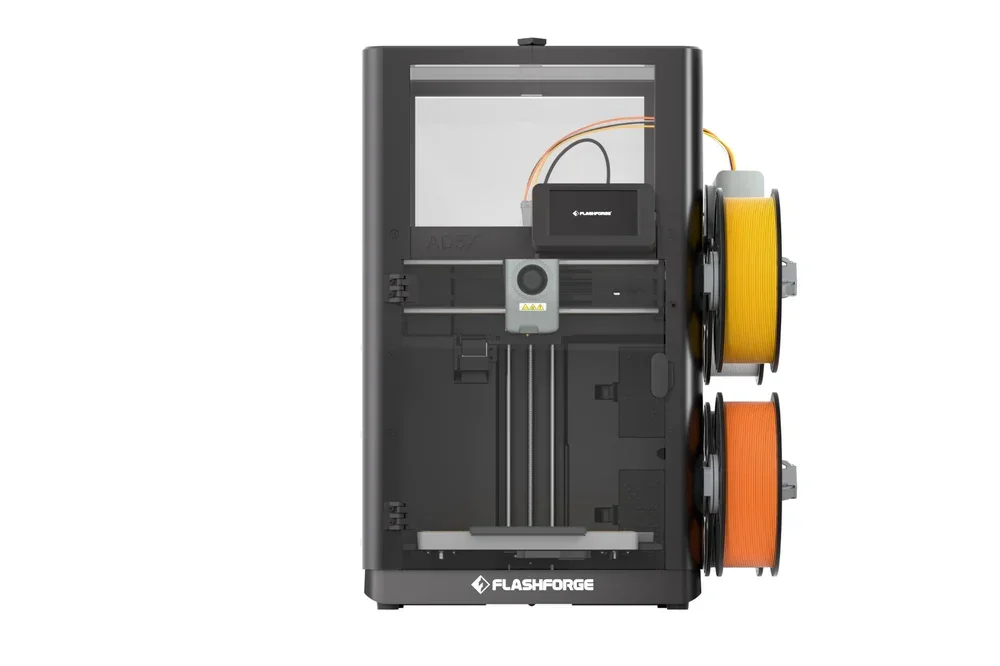
    The image features the Flashforge AD5X 3D printer. The printer has a sleek, modern design with a black exterior. The front view showcases a transparent enclosure, allowing a clear view of the printing area. On the left side, dual filament spools, one yellow and one orange, are mounted vertically, indicating a dual-extruder system. The branding "Flashforge" is prominently displayed at the bottom front of the unit. The printer includes a touchscreen interface for easy control, positioned centrally. The internal components reveal precision movement rails and a detailed extruder setup for high-quality printing. The overall design suggests robust construction suitable for both professional and personal use.

    Nozzle Assembly for Flashforge AD5X

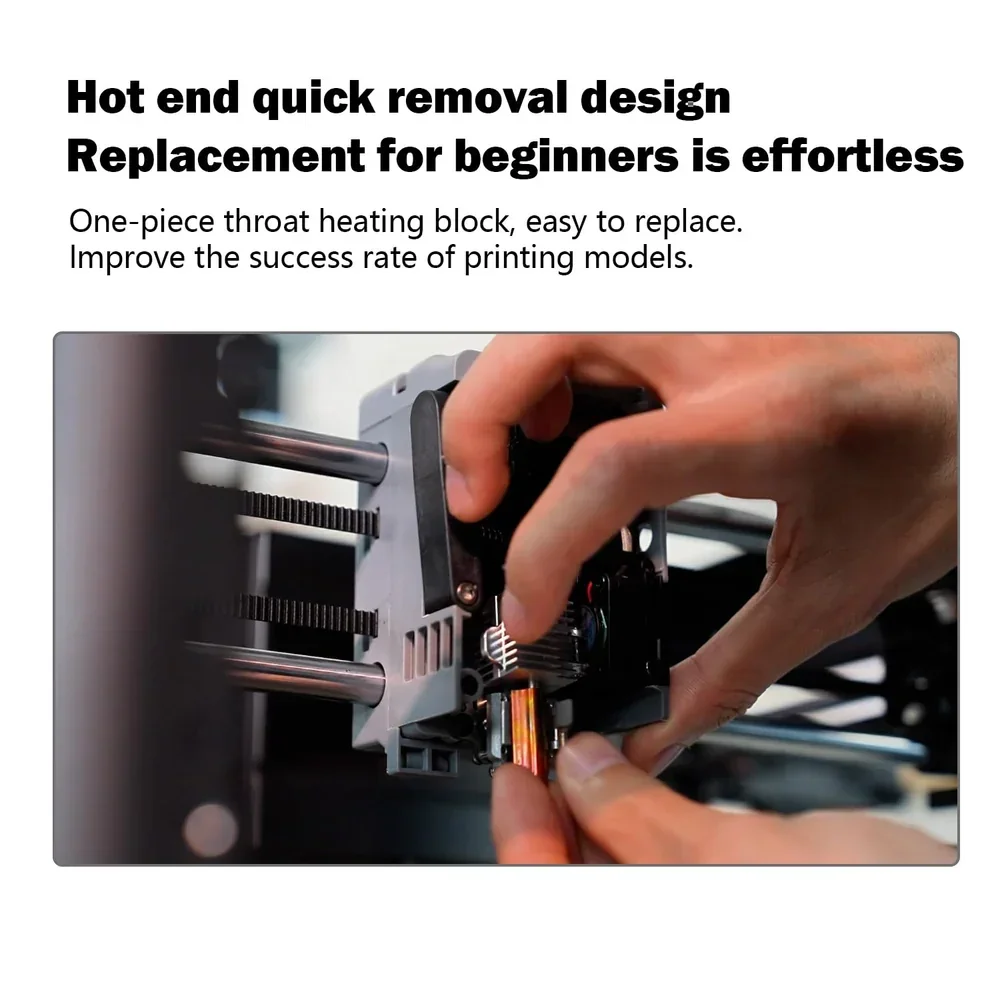
    The Flashforge AD5X Nozzle Assembly features a one-piece copper nozzle design with an interference fit to prevent leaks and material shedding. It offers fast heating, stable 280°C temperature control, and easy tool-free replacement for beginners. The assembly measures 54mm with a 28mm heating block. A nozzle pack includes 0.25mm, 0.4mm, 0.6mm, and 0.8mm sizes.

     
    The image features a close-up view of a person demonstrating the "Hot end quick removal design" on what appears to be a Flashforge 3D printer, potentially the ad5x model. The technical focus is on a one-piece throat heating block, which is highlighted as easy to replace, indicating a user-friendly feature especially beneficial for beginners to enhance the success rate of printing models. The background shows part of the printer’s structure, including metal rods and belts, which are components typically involved in the movement of the printer head. The hands are positioned to illustrate the simplicity of the component swap process. The visual is accompanied by text at the top that emphasizes the ease of part replacement and aims at conveying accessibility and simplicity in maintenance for new users.

    PEI Textured Build Plate for Flashforge AD5X

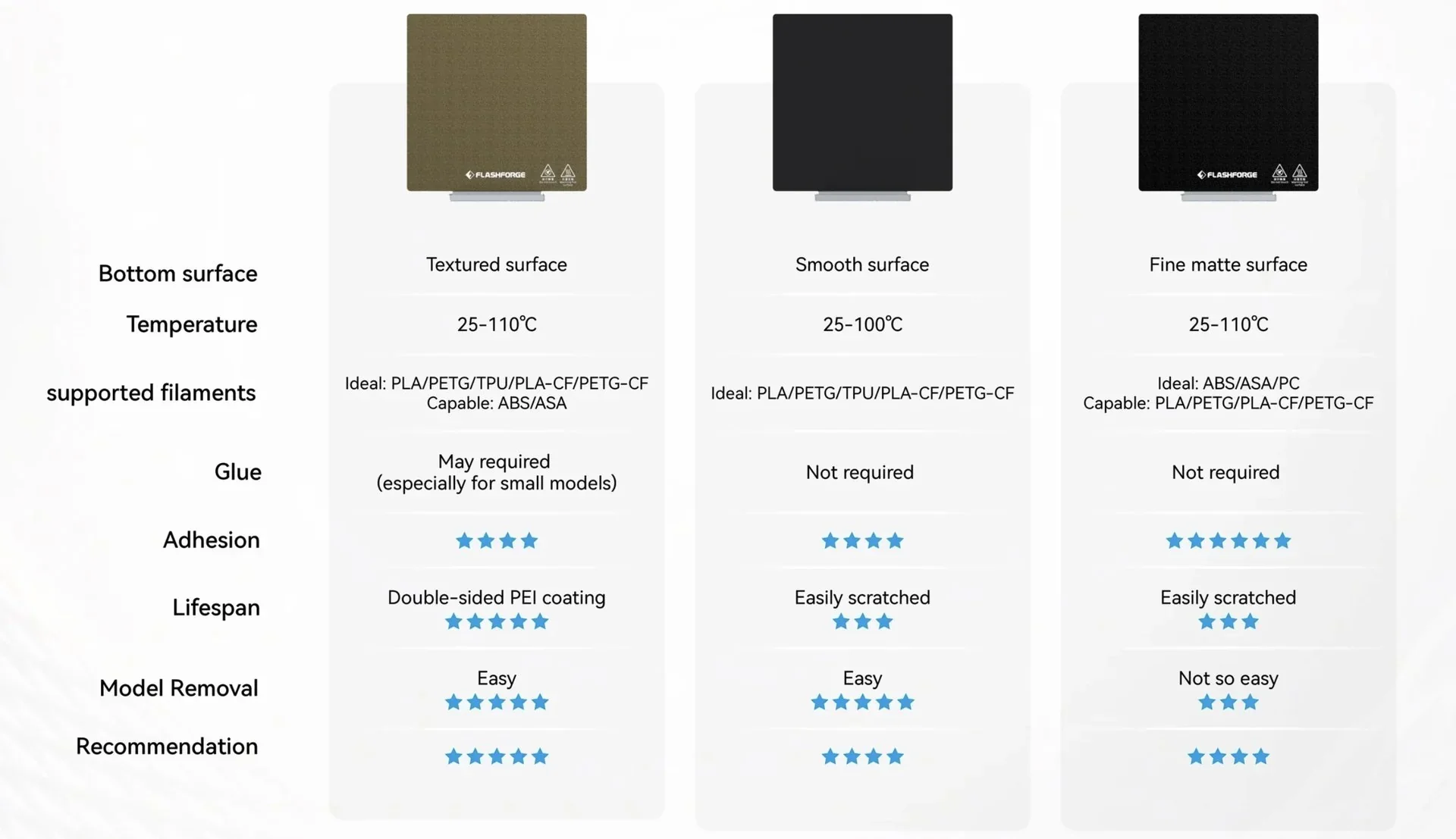
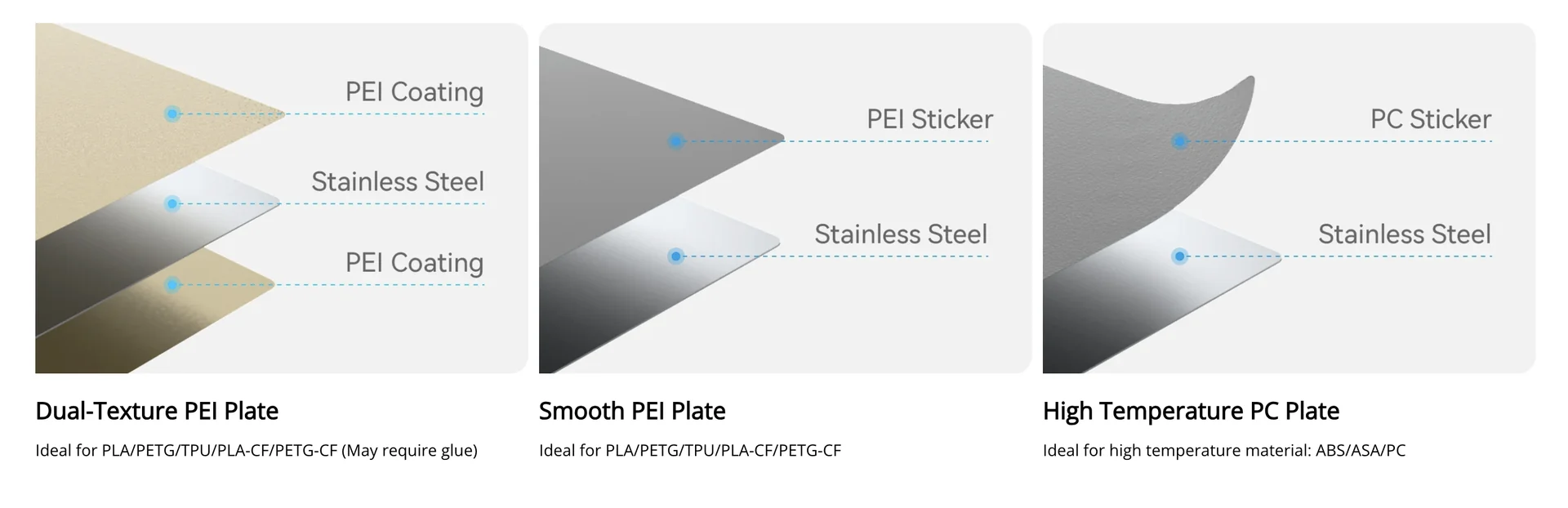
    The PEI Textured Build Plate for the Flashforge AD5X features dual-sided PEI coating on stainless steel, supporting 25°C to 110°C operation for filaments like PLA, PETG, TPU, PLA-CF, and PETG-CF. Its textured surface improves adhesion and allows easy model removal once cooled, eliminating the need for glue in most cases. Small prints may need adhesive. Regular cleaning maintains performance, and the durable coating resists wear better than standard surfaces.


    Flashforge presents a detailed comparison chart highlighting three different build plate surfaces for their 3D printers, including the AD5X. The comparison showcases three options: a textured surface, a smooth surface, and a fine matte surface. Each column provides technical specifications concerning the bottom surface, ideal temperature range, supported filaments, glue requirements, adhesion, lifespan, model removal ease, and overall recommendations.

The textured surface, suited for temperatures between 25–110°C, works best with PLA, PETG, TPU, and other specified filaments but may require glue for small models. It features a double-sided PEI coating, offering high adhesion and easy model removal, with a strong recommendation rating.

The smooth surface, operating at 25–100°C, is ideal for similar filament types without needing glue. It provides moderate adhesion and is easily scratched, with easy model removal and a high recommendation rating.

The fine matte surface, shareable with ABS and ASA filaments, supports temperatures of 25–110°C, recommending against glue use. Despite ease of scratching, it presents moderate adhesion, challenging model removal, and a solid recommendation rating.

Each surface option is visually represented, with the Flashforge branding prominently displayed on the textured and matte variants. This comprehensive guide aids users in selecting the optimal surface based on their 3D printing needs.
    Diagram illustrates three types of build plates for 3D printers, emphasizing their layered constructions and material compatibility. From left to right, the "Dual-Texture PEI Plate" shows two separate PEI coatings flanking a layer of stainless steel, making it suitable for materials like PLA, PETG, TPU, and others, though glue may be required. The "Smooth PEI Plate" features a PEI sticker atop a stainless steel layer, ideal for the same material types without the need for adhesive. On the right, the "High Temperature PC Plate" includes a PC sticker on stainless steel, designed for high-temperature materials such as ABS and ASA. Each section is neatly labeled with dash lines pointing to the respective layers, providing a clear comparison of their technical compositions and best-use scenarios.

    Touch Screen Assembly for Flashforge AD5X

    The 4.3-inch resistive Touch Screen Assembly for the Flashforge AD5X restores full control over printing, workflow, and system operations. It features pre-connected wiring for easy, tool-free installation, aligning with the AD5X’s user-friendly design.


    Camera Kit for Flashforge AD5X

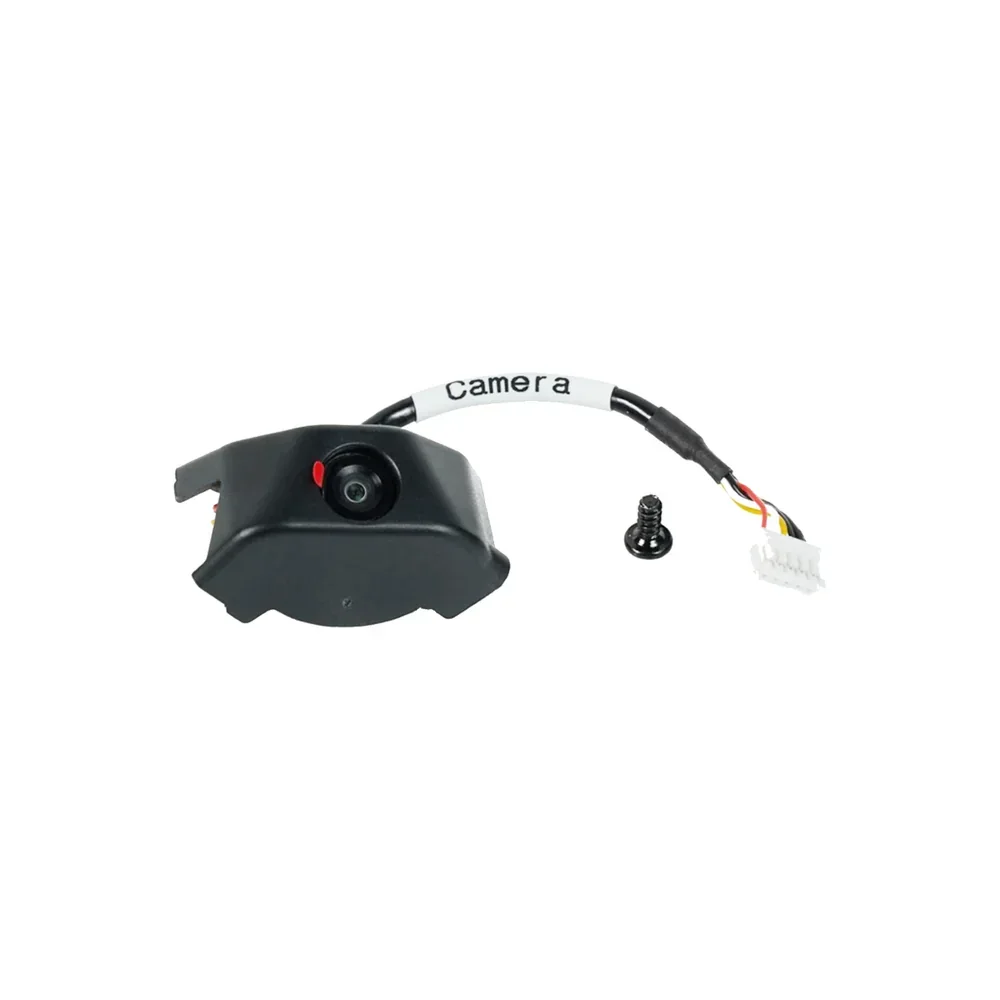
    The Camera Kit for the Flashforge AD5X connects via USB and enables real-time, high-resolution print monitoring. Users can remotely check print status, inspect layer quality, and capture time-lapse videos. It helps detect issues early, reducing failures and material waste for improved print management. 

     
    A black camera module with a lens housed in a curved, compact casing designed for integration with devices such as 3D printers. The camera is equipped with a connected wire bundle, comprising red, yellow, and black wires, leading to a white connector on the end. The wire is labeled with a white tag that reads

    IFS System Parts for Flashforge AD5X

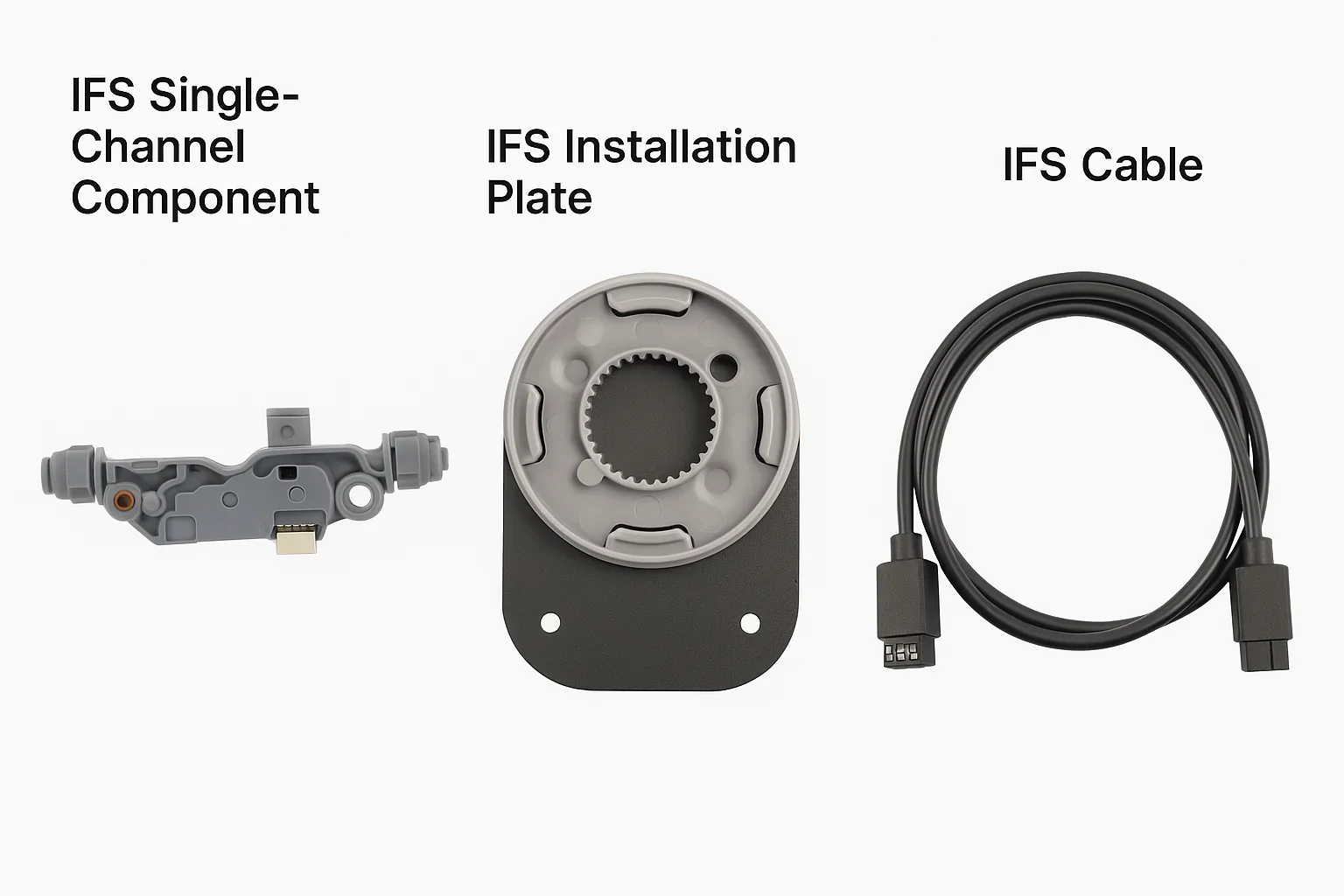
    The IFS System Parts for the Flashforge AD5X include four key components that enable multi-color printing. The instation plate mounts the IFS module to the frame with two M3×6 screws for stability. The IFS cable connects the module to the control system for automatic filament switching. The IFS host manages loading, unloading, and switching across four channels. Individual single-channel parts allow modular maintenance without full disassembly. Mounted on top of the printer, the IFS uses short PTFE tubes to reduce filament feed resistance.

    The image features three distinct IFS components labeled from left to right. On the left is the "IFS Single-Channel Component," a small, gray device with a compact design, showing several connecting ports and structural features indicating its function in electronic systems. In the center, the "IFS Installation Plate" is depicted, displaying a circular design with gear-like grooves and a black base with two mounting holes, suggesting its use in securing components. On the right, the "IFS Cable" is coiled neatly, highlighting its connectivity with two robust connectors at each end. The components are isolated against a white background with clear labeling above each item.


    What maintenance does the Flashforge Adventurer AD5X require?

    The Flashforge AD5X requires over 35 maintenance procedures, grouped into basic, intermediate, advanced, and IFS-specific tasks. Full video guides are available at: https://wiki.flashforge.com/en/ad5x/maintenance

    Basic Maintenance – Daily upkeep to maintain print quality:

    • Replace or unclog nozzle
    • Load/change filament
    • Level bed and calibrate
    • Copy logs and update firmware
    • Install IFS and spool holder

    Intermediate Maintenance – Component-level replacements:

    • Disassemble/reassemble extruder
    • Replace hotend (thermistor + heater), filament feed parts, cutter, waste chute
    • Replace fans, extruder board, heat sink, screen, heater plate, platform bus
    • Replace sensors (Z, Y, XY), strain gauge, motherboard, Wi-Fi antenna
    • Replace IFS adapter board and adjust timing belts

    Advanced Maintenance – Structural and power system replacements:

    • Replace power supply
    • Replace motor assemblies (X, Y, Z)
    • Replace guide rails and bearings (XY, Z)
    • Replace Z-axis lead screw connector

    IFS Maintenance – Multi-filament system tasks:

    • Install or remove IFS module
    • Replace 4-in-1 channel and filament guide tube


    What support and warranty come with the Flashforge AD5X?

    The Flashforge AD5X includes a 12-month limited warranty for the printer and 3 months for extruder components, starting from the purchase date. It covers defects and malfunctions under normal use, with free parts, replacements, or refunds if repair isn't possible.

    Warranty Exclusions:

    • Not covered: build plates, SD cards, USBs, filament, tools, accessories
    • Voided by: unauthorized repairs, misuse, non-Flashforge parts/filaments, or over 400 hours of use on consumer models

    Full warranty terms: https://www.flashforge.com/pages/warranty-and-return-policy, https://www.flashforge.com/pages/after-sales-policy.

    Support & Warranty Claims:

    • Email tech support: customer@flashforge.com (response in ~3 business days)
    • Warranty claims: aftersales@flashforge.com (requires full equipment info)
    • Lifetime free technical guidance via remote support from Flashforge engineers
    • Knowledge base and troubleshooting: https://wiki.flashforge.com/en/ad5x

    Firmware Updates:

    • Supports over-the-air updates via Wi-Fi — no manual installation needed.


    How much does the Flashforge AD5X cost?

    The Flashforge AD5X is available at $399.00, offering strong value as a 4-color multi-material 3D printer. It features CoreXY architecture, 600mm/s speed, 20,000mm/s² acceleration, and the Intelligent Filament System (IFS) for true multi-color printing, including with flexible TPU. Buyers can choose between the base unit or a bundle with four random filament colors for 8–10% more. Both options include a 12-month warranty, free tech support, and access to Orca-Flashforge and Flash Maker software.
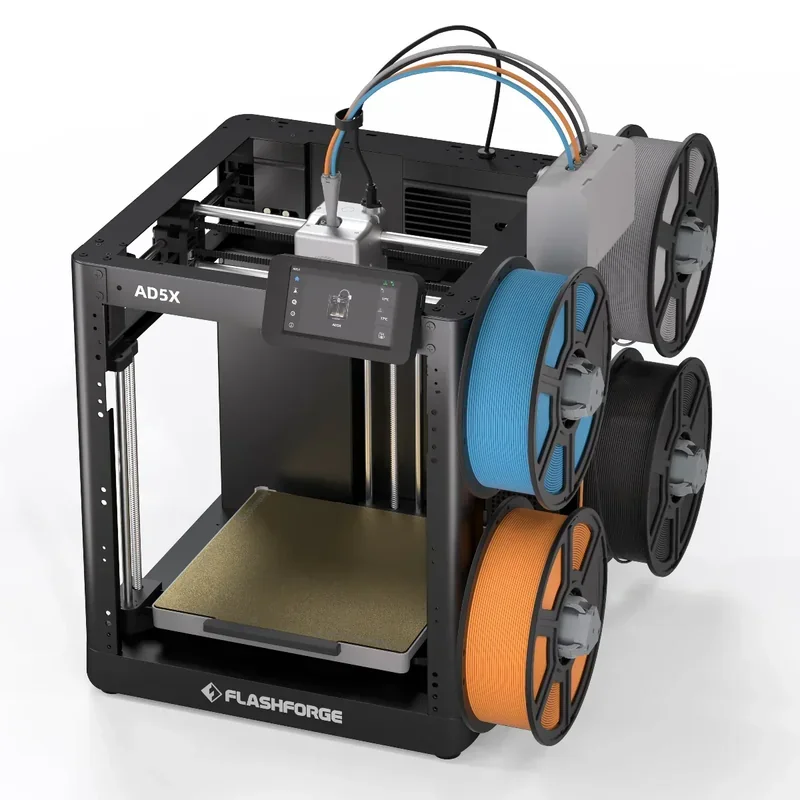
    The Flashforge AD5X 3D printer appears in a modern, open-frame design with a robust, black metal structure. Prominently featured on the front, the model name

    Our mission
    Founded in 2013, we have integrated digital manufacturing in over 10,000 businesses. Today we are a team of 80+ 3D printing enthusiasts, geeks and entrepreneurs on a mission to make these technologies accessible to all.
    Trusted integrator
    In 2018, 3D Print Awards named us the best digital manufacturing integrator. We offer technology and operational consulting to capture growth and achieve excellence in strategy, manufacturing and distribution.
    Expert customer service
    Deep expertise in 3D printing, 3D scanning, 3D modelling, plastic casting, laser cutting and CNC milling. It comes from delivering 5,000+ projects at our digital manufacturing bureau. We know what we talk about.
    Fast response time
    93% of surveyed customers are satisfied with our customer service. Have a question, concern or feedback for us? Our support team is a quick chat or email away — 5 days a week, Monday to Friday from 8 am to 4 pm PST.
    Your browser is out-of-date!

    Update your browser to view this website correctly. Update my browser now

    ×

    Please, wait ...